

Forgotten Super User Password in Joomla 2.5.x - 3.x

What?
A quick article on how to set a password using the database tools for super users.

Why?
It happens to us all, especially me. I like to use different passwords for every site but this came up as a client had lost their super user password.

How?
This method is reliant on having access to the database of your Joomla website.

Method #1: Quickest way I know
This is based on if you have another user account (registered or administrator, any) with a password known to you (create a new joomla user if necessary).

The gist:
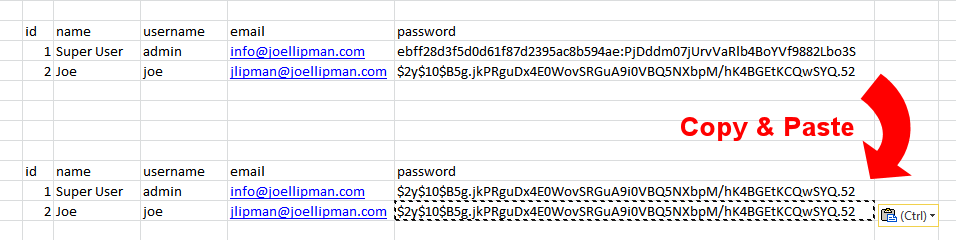
The gist, Copy and Paste the password value of the known user to the forgotten user
  1. Login to your Joomla database
  2. Go to the #__users database table (where #_ is the prefix to your joomla tables)
  3. Find the column password and the row of your known user and Copy the text there
  4. Find the row of your forgotten user and Paste the text there.
  5. Test by logging in as the forgotten user
  6. Done
Category: Joomla :: Article: 513

Credit where Credit is Due:


Feel free to copy, redistribute and share this information. All that we ask is that you attribute credit and possibly even a link back to this website as it really helps in our search engine rankings.

Disclaimer: Please note that the information provided on this website is intended for informational purposes only and does not represent a warranty. The opinions expressed are those of the author only. We recommend testing any solutions in a development environment before implementing them in production. The articles are based on our good faith efforts and were current at the time of writing, reflecting our practical experience in a commercial setting.

Thank you for visiting and, as always, we hope this website was of some use to you!

Kind Regards,

Joel Lipman
www.joellipman.com




