An article on something that has taken me several days to get working: Get Zoho Books or Zoho Inventory that when an invoice is marked as paid, update 2 custom fields with the Payment Method, and the Payment Date.
Why?
This was requested by a customer and the problem happened in that the workflow would simply not trigger when the invoice was paid. The customer had added 3 custom fields: Payment Method, Payment Date, and Last Four Digits. They needed these because sometimes their customers needed to know what card they had paid with (if paid by card). The customer wanted payment method and payment date to appear on the invoice.
How?
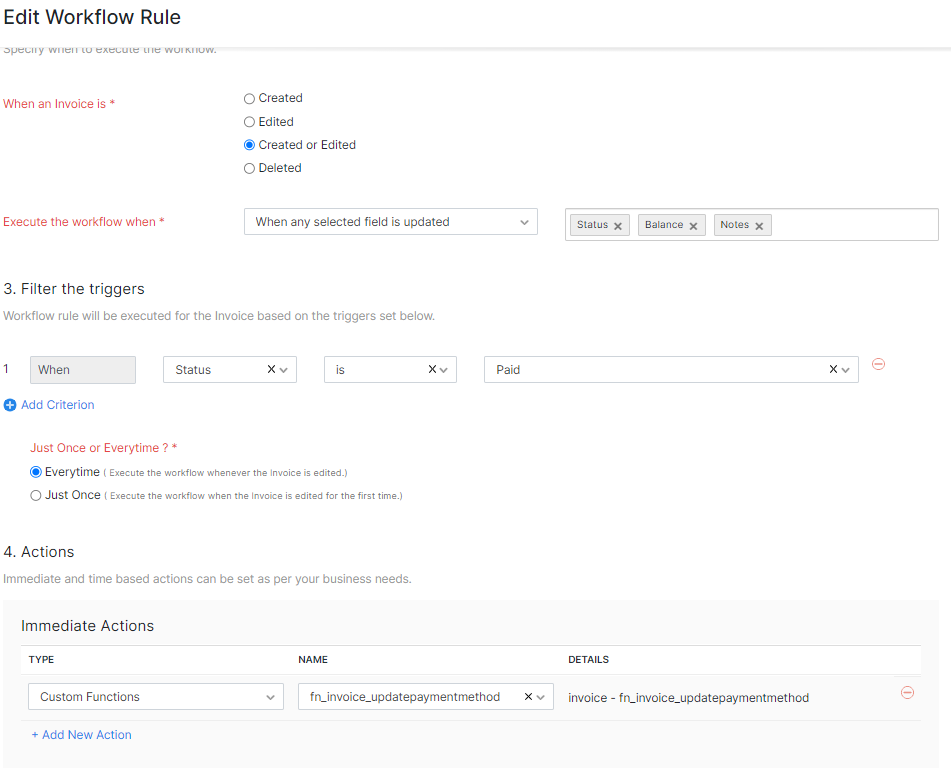
This sounds rather straightforward, write a function that given an invoice, checks the customer payments and updates the custom fields. Executing the function this worked as expected. Now put it on a workflow where the settings were:
- When an invoice is "Created or Edited"
- Execute the workflow when "When any field is updated"
- Filter the triggers when Status is "Paid"
- Just once or every time is "Everytime"
- Actions is a custom function called "fn_invoice_updatepaymentmethod"
Here's the code for our function; note it is within ZohoBooks and not ZohoInventory (moved) and the connection "zbooks" has a fullaccess scope:
copyraw
//
// initialize
v_PaymentMode = "";
v_PaymentDate = null;
v_Last4Digits = "";
r_UpdateInvoice = Map();
//
// evaluate
v_InvoiceID = invoice.get("invoice_id");
v_CustomerID = invoice.get("customer_id");
v_BooksOrgID = organization.get("organization_id");
v_InvoiceRef = invoice.get("invoice_number");
v_BalanceDue = ifnull(invoice.get("balance"),0.0);
//
// search payments
m_SearchCriteria = Map();
m_SearchCriteria.put("customer_id",v_CustomerID);
m_SearchCriteria.put("sort_order","A");
m_SearchCriteria.put("sort_by","payment_number");
//
// fetch all payments against this customer in order of payment reference (oldest to most recent)
r_SearchResults = zoho.books.getRecords("customerpayments",v_BooksOrgID,m_SearchCriteria,"zbooks");
if(!isnull(r_SearchResults.get("customerpayments")))
{
	l_SearchResults = r_SearchResults.get("customerpayments");
	for each  r_Result in l_SearchResults
	{
		if(!isnull(r_Result.get("payment_id")))
		{
			//
			// invalid searches will return 200 results non-matching, so let's double-check
			if(r_Result.get("invoice_numbers").containsIgnoreCase(v_InvoiceRef))
			{
				// retrieve payment mode, amount and date
				v_PaymentMode = ifnull(r_Result.get("payment_mode_formatted"),"");
				v_PaymentDate = r_Result.get("date");
				v_Last4Digits = ifnull(r_Result.get("last_four_digits"),"");
			}
		}
	}
	//
	// if fully paid and payment date is not null
	if(v_BalanceDue.toDecimal() == 0.0 && v_PaymentDate != null)
	{
		m_UpdateInvoice = Map();
		//
		// copy existing custom fields (not required but just in case)
		l_CustomFields = invoice.get("custom_fields");
		l_NewCustomFields = List();
		for each  m_CustomField in l_CustomFields
		{
			// exclude existing custom field payment mode and date
			l_DontCopyFields = {"cf_payment_method","cf_payment_date","cf_last_4_digits"};
			if(!l_DontCopyFields.contains(m_CustomField.get("api_name")))
			{
				l_NewCustomFields.add(m_CustomField);
			}
		}
		// add custom field payment mode
		m_MiniCustomField = Map();
		m_MiniCustomField.put("api_name","cf_payment_method");
		m_MiniCustomField.put("value",v_PaymentMode);
		l_NewCustomFields.add(m_MiniCustomField);
		//
		// add custom field payment date
		m_MiniCustomField = Map();
		m_MiniCustomField.put("api_name","cf_payment_date");
		m_MiniCustomField.put("value",v_PaymentDate);
		l_NewCustomFields.add(m_MiniCustomField);
		//
		// add custom field last 4 digits
		if(v_Last4Digits != "")
		{
			m_MiniCustomField = Map();
			m_MiniCustomField.put("api_name","cf_last_4_digits");
			m_MiniCustomField.put("value",v_Last4Digits);
			l_NewCustomFields.add(m_MiniCustomField);
		}
		//
		m_UpdateInvoice.put("custom_fields",l_NewCustomFields);
		r_UpdateInvoice = zoho.books.updateRecord("invoices",v_BooksOrgID,v_InvoiceID,m_UpdateInvoice,"zbooks");
		info r_UpdateInvoice;
	}
}
//
// send ourselves an email as evidence that the workflow was triggered and ran this function
sendmail
[
	from :zoho.adminuserid
	to :"info@joellipman.com"
	subject :"Client Test: ZB: Payment Received for Invoice " + v_InvoiceRef
	message :"Workflow was executed and function ran:Balance: " + v_BalanceDue + "Customer Payments: " + r_SearchResults + "Invoice Update" + r_UpdateInvoice
]
- //
- // initialize
- v_PaymentMode = "";
- v_PaymentDate = null;
- v_Last4Digits = "";
- r_UpdateInvoice = Map();
- //
- // evaluate
- v_InvoiceID = invoice.get("invoice_id");
- v_CustomerID = invoice.get("customer_id");
- v_BooksOrgID = organization.get("organization_id");
- v_InvoiceRef = invoice.get("invoice_number");
- v_BalanceDue = ifnull(invoice.get("balance"),0.0);
- //
- // search payments
- m_SearchCriteria = Map();
- m_SearchCriteria.put("customer_id",v_CustomerID);
- m_SearchCriteria.put("sort_order","A");
- m_SearchCriteria.put("sort_by","payment_number");
- //
- // fetch all payments against this customer in order of payment reference (oldest to most recent)
- r_SearchResults = zoho.books.getRecords("customerpayments",v_BooksOrgID,m_SearchCriteria,"zbooks");
- if(!isnull(r_SearchResults.get("customerpayments")))
- {
- l_SearchResults = r_SearchResults.get("customerpayments");
- for each r_Result in l_SearchResults
- {
- if(!isnull(r_Result.get("payment_id")))
- {
- //
- // invalid searches will return 200 results non-matching, so let's double-check
- if(r_Result.get("invoice_numbers").containsIgnoreCase(v_InvoiceRef))
- {
- // retrieve payment mode, amount and date
- v_PaymentMode = ifnull(r_Result.get("payment_mode_formatted"),"");
- v_PaymentDate = r_Result.get("date");
- v_Last4Digits = ifnull(r_Result.get("last_four_digits"),"");
- }
- }
- }
- //
- // if fully paid and payment date is not null
- if(v_BalanceDue.toDecimal() == 0.0 && v_PaymentDate != null)
- {
- m_UpdateInvoice = Map();
- //
- // copy existing custom fields (not required but just in case)
- l_CustomFields = invoice.get("custom_fields");
- l_NewCustomFields = List();
- for each m_CustomField in l_CustomFields
- {
- // exclude existing custom field payment mode and date
- l_DontCopyFields = {"cf_payment_method","cf_payment_date","cf_last_4_digits"};
- if(!l_DontCopyFields.contains(m_CustomField.get("api_name")))
- {
- l_NewCustomFields.add(m_CustomField);
- }
- }
- // add custom field payment mode
- m_MiniCustomField = Map();
- m_MiniCustomField.put("api_name","cf_payment_method");
- m_MiniCustomField.put("value",v_PaymentMode);
- l_NewCustomFields.add(m_MiniCustomField);
- //
- // add custom field payment date
- m_MiniCustomField = Map();
- m_MiniCustomField.put("api_name","cf_payment_date");
- m_MiniCustomField.put("value",v_PaymentDate);
- l_NewCustomFields.add(m_MiniCustomField);
- //
- // add custom field last 4 digits
- if(v_Last4Digits != "")
- {
- m_MiniCustomField = Map();
- m_MiniCustomField.put("api_name","cf_last_4_digits");
- m_MiniCustomField.put("value",v_Last4Digits);
- l_NewCustomFields.add(m_MiniCustomField);
- }
- //
- m_UpdateInvoice.put("custom_fields",l_NewCustomFields);
- r_UpdateInvoice = zoho.books.updateRecord("invoices",v_BooksOrgID,v_InvoiceID,m_UpdateInvoice,"zbooks");
- info r_UpdateInvoice;
- }
- }
- //
- // send ourselves an email as evidence that the workflow was triggered and ran this function
- sendmail
- [
- from :zoho.adminuserid
- to :"info@joellipman.com"
- subject :"Client Test: ZB: Payment Received for Invoice " + v_InvoiceRef
- message :"Workflow was executed and function ran:Balance: " + v_BalanceDue + "Customer Payments: " + r_SearchResults + "Invoice Update" + r_UpdateInvoice
- ]
The trick is all in the workflow settings. This worked for us but may not work for you or may be already working for you without this issue. By changing the workflow to execute not "When any field is upddated" but "When any selected field is updated" and then selecting the fields "Status", "Balance", and "Notes". (not sure which one fixed it but I now add all three):
Error(s):
- Workflow did not trigger and did not receive even the email included in my custom function.
Debug Method(s):
- Go to Settings > Automations > Custom Functions > Select the function > Execute the function against a paid invoice - check the fields updated.
- Go to Sales > Invoices > Select an invoice > Click on "Comments & History"
- Go into Settings > Automations > Workflow Logs > Custom Functions: check if/when they occurred and in relation to what invoice.
Source(s):
Category: Zoho Books :: Article: 351