

Zoho Creator: Button on Report for Merging Multiple Selected Records
- Category: Zoho Creator
- Hits: 50297
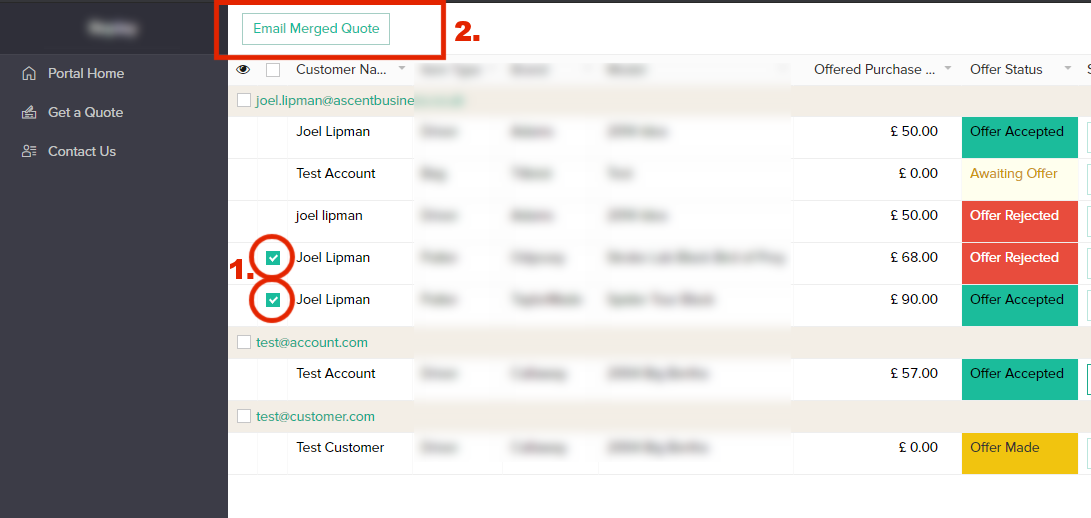
The aim of this article is to document how you can display a Creator report to the user, that they can select (tickbox) multiple records in that report, and then have a button that loops through all the selected (ticked) records. The example below documents a report of Quotes where we want to merge all the product line items of each quote into one single quote.
Why?
I've written this article because I keep forgetting on how to do this. I have a specific order of steps on how I do this, you may find other ways but this is one that works for me.
How?
So here's an overview and then we'll go into more detail:
- Create a function that accepts a form of records
- Create a workflow that understands the function parameters
Zoho Creator: Set Up Custom Domain for Customer Portal
- Category: Zoho Creator
- Hits: 61217
This is a quick article I use to list step by step on how to set up a custom domain for a Zoho Creator customer portal. In this example, we are going to use a subdomain of a company which has the domain joellipman.com.
Why?
This took me a bit of going backwards and forwards to Zoho rather than getting my client to do this. The aim is to take up as little time as possible of the third-parties involved, plus the documentation online was in parts and requires going to several pages across the Internet. Here I have 1 page and 1 article documenting the process.
How?
I'm breaking this down into 3 stages:
- Zoho Creator: Specify Custom Domain
- Domain Registrar: Setup subdomain and add CNAME
- Zoho Support: Get Zoho to setup SSL
Zoho Creator: info/alert/modal/popup notification for any user
- Category: Zoho Creator
- Hits: 66784
So I thought I'd write a quick article to remind me and to develop a simple notification system that will popup for any user on the submit of a form, or on the click of a button or on the click of a link on a page.
Why?
Because alert (alert task) can only be used on a load of a form, on a change of a field or on the validate process. And because info can only be displayed to an admin and even in some cases only as an additional link in the form. The example below is for use in a customer portal on the click of a report button (report workflow).
How?
This will create a popup using the built-in popup of Zoho creator and gives you the freedom to style the notification as any modal would.
Zoho Creator: Create a Widget which uses JavaScript
- Category: Zoho Creator
- Hits: 98129
This is an article documenting how to create a Zoho Creator Widget which includes the Bootstrap and jQuery frameworks as well as other JavaScript functionality.
Why?
Quite simply that at time of print (2020-10-24), Zoho Creator does not allow you to use JavaScript anywhere in its app. HTML and CSS are mostly allowed but JavaScript automatically gets removed from any of your code.
How?
As someone who's been using Zoho services and programming in Zoho Deluge for a few years now, even I thought of Zoho Widgets as a daunting task. But after doing some, I realize this is actually very quick to do and much easier than first thought. The article below documents how to create your first widget in a MacOS environment. I aim to create a WindowsPC version of this document at some point for my colleagues. The below instructions follow a fresh install as if this is the first time this computer has created a Zoho Creator Widget.
Zoho Creator Page: Toggle On/Off Switch: Hide/Display a Div
- Category: Zoho Creator
- Hits: 38972
So this is an article documenting how to create an on/off toggle switch that hides and displays between 2 div layers in a Zoho Creator Page (so not a form or report but a page).
Why?
This is written at a time when Javascript or interactive pages that change on the fly based on a mouse event in Zoho Creator automatically get removed on Save/Update of the page. The following uses the built-in functionality of Zoho Creator and could be seen as a 'Pure CSS' feature. I'm aiming to make a list of capabilities that can be done without loading another framework considering that Zoho Creator has their own version of Bootstrap and jQuery. This is the first example I have where you would want dynamic content in a Zoho Creator page without the use of JavaScript or 'Widgets JS'.
How?
Here are some screenshots to preview what the code below will do, simply copy the code and paste into a Zoho Creator Page.
Zoho Creator: Expecting ZC_SUBFORM_250 expression found COLLECTION
- Category: Zoho Creator
- Hits: 27524
A very quick article as I couldn't find anything on the WWW to document this error.
Why?
During a data migration, I was using a custom function to copy all the data from one app to another. The specific form was for "Leads" which contained a subform with a product line item list. If I run this code, I would get the error:
Expecting ZC_SUBFORM_250 expression found COLLECTION expressionAnother error you may get when using the deluge script is:
LIST value cannot be assigned to 'mySubform'
-- or --
COLLECTION value cannot be assigned to 'mySubform'
or
expecting ZC_SUBFORM_70 expression found COLLECTION expression
How?
Quite simply the error is because the Creator Deluge syntax I was using to insert subform rows was wrong.
Zoho Creator: Retrieve record with case-insensitive query
- Category: Zoho Creator
- Hits: 34762
Thought I'd put an article here to remind me how to make the retrieval of a record case-insensitive.
Why?
Consider that I have the following creator table:
Product_Name   Product_SKU
-------------- -------------
MyProduct1     TEST01
Myproduct2     TEST02
myproduct3     TEST03
I'm trying to insert a record for a new product if it doesn't exist in the table but if it does exist then to simply skip adding the product.
Zoho Creator - Integration with Shopify Checkout/Storefront API
- Category: Zoho Creator
- Hits: 3907
This is a not so quick article on how to build up a checkout cart page with Zoho Creator which directs the customer to a Shopify payment page.
Why?
I didn't find anything on the web via Google or Bing that clearly explained how to connect to Shopify API and build the checkout page without making my app into a Sales Channel.
How?
The trick is to actually ignore the Checkout API and the standard error(s) while trying to create a checkout with a storefront access token:
[API] Invalid key or access token (unrecognized login or wrong password)or how about:
[API] This action requires merchant approval for write_checkouts scope.
Further to this, an order is created when a draft order accepts payment!
Recent Posts



Joes Word Cloud
Accreditation



Donate & Support
If you like my content, and would like to support this sharing site, feel free to donate using a method below:

 bc1qf6elrdxc968h0k673l2djc9wrpazhqtxw8qqp4
 0xb038962F3809b425D661EF5D22294Cf45E02FebF
Paypal:
Bitcoin:
bc1qf6elrdxc968h0k673l2djc9wrpazhqtxw8qqp4
Ethereum:
0xb038962F3809b425D661EF5D22294Cf45E02FebF
Credit where Credit is Due:
Feel free to copy, redistribute and share this information. All that we ask is that you attribute credit and possibly even a link back to this website as it really helps in our search engine rankings.
Disclaimer: Please note that the information provided on this website is intended for informational purposes only and does not represent a warranty. The opinions expressed are those of the author only. We recommend testing any solutions in a development environment before implementing them in production. The articles are based on our good faith efforts and were current at the time of writing, reflecting our practical experience in a commercial setting.
Thank you for visiting and, as always, we hope this website was of some use to you!
Kind Regards,
Joel Lipman
www.joellipman.com