A quick article on a snippet of code which copies one subform to other subforms in the same form.
Why?
I'm creating an appointment/booking system and I want the user to be able to set entries in a subform called "Mondays" then to click a button which copies it to the remaining working days.
How?
So I have a form with 6 subforms which list staff/employee shifts from Monday to Saturday. The form I have looks something like the following:
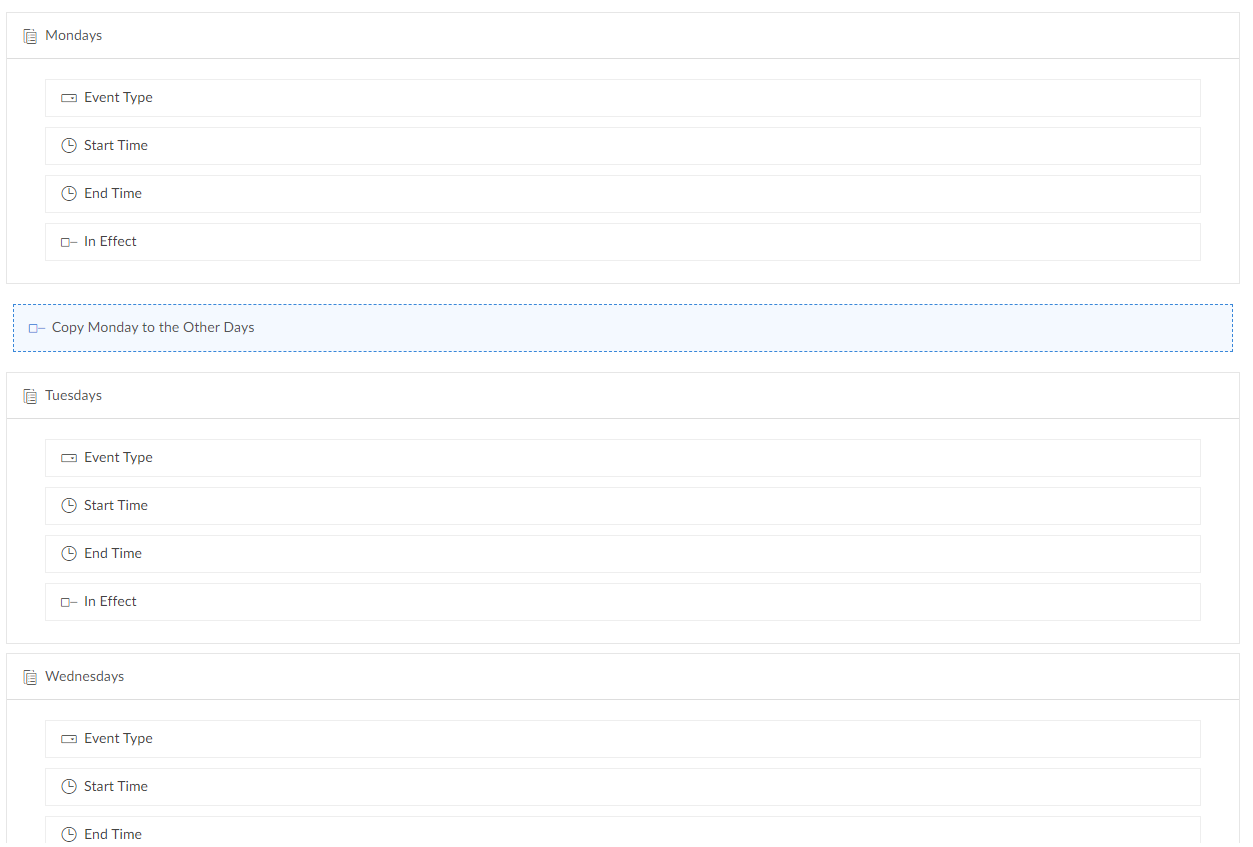
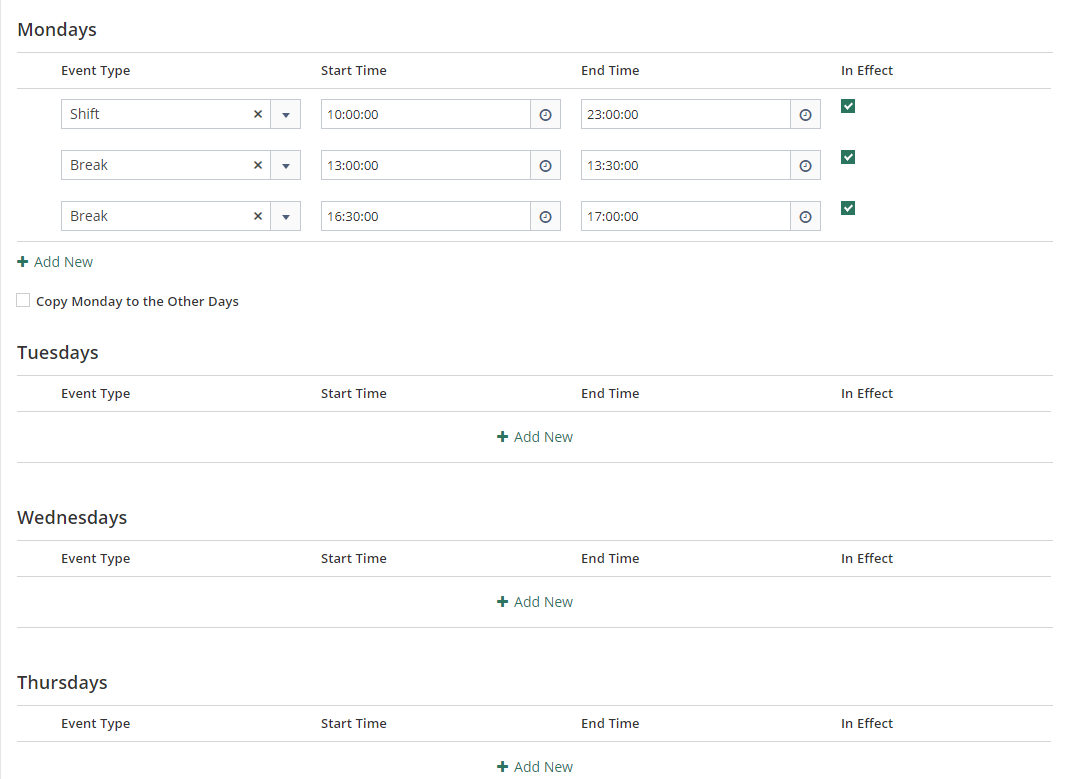
The code
I create a workflow that when the decision box "Copy Monday to the Other Days" is clicked it runs the following deluge script:
copyraw
// only run if true
if(input.Copy_Monday_to_the_Other_Days)
{
    // init
    c_Tuesday = Collection();
    c_Wednesday = Collection();
    c_Thursday = Collection();
    c_Friday = Collection();
    c_Saturday = Collection();
    //
    // loop through Monday subform
    for each r_Row in input.Mondays
    {
        if(r_Row.In_Effect)
        {
            // get Monday entries/rows
            v_EventType = r_Row.Event_Type;
            v_EventStart = r_Row.Start_Time;
            v_EventEnd = r_Row.End_Time;
            //
            // create Tuesdays subform entries
            r_RowTu = Shifts.Tuesdays();
            r_RowTu.Event_Type = v_EventType;
            r_RowTu.Start_Time = v_EventStart;
            r_RowTu.End_Time = v_EventEnd;
            r_RowTu.In_Effect = true;
            c_Tuesday.insert(r_RowTu);
            //
            // create Wednesdays subform entries
            r_RowWe = Shifts.Wednesdays();
            r_RowWe.Event_Type = v_EventType;
            r_RowWe.Start_Time = v_EventStart;
            r_RowWe.End_Time = v_EventEnd;
            r_RowWe.In_Effect = true;
            c_Wednesday.insert(r_RowWe);
            //
            // create Thursdays subform entries
            r_RowTh = Shifts.Thursdays();
            r_RowTh.Event_Type = v_EventType;
            r_RowTh.Start_Time = v_EventStart;
            r_RowTh.End_Time = v_EventEnd;
            r_RowTh.In_Effect = true;
            c_Thursday.insert(r_RowTh);
            //
            // create Fridays subform entries
            r_RowFr = Shifts.Fridays();
            r_RowFr.Event_Type = v_EventType;
            r_RowFr.Start_Time = v_EventStart;
            r_RowFr.End_Time = v_EventEnd;
            r_RowFr.In_Effect = true;
            c_Friday.insert(r_RowFr);
            //
            // create Saturdays subform entries
            r_RowSa = Shifts.Saturdays();
            r_RowSa.Event_Type = v_EventType;
            r_RowSa.Start_Time = v_EventStart;
            r_RowSa.End_Time = v_EventEnd;
            r_RowSa.In_Effect = true;
            c_Saturday.insert(r_RowSa);
        }
    }
    //
    // clear the other subforms of their entries
    input.Tuesdays.clear();
    input.Wednesdays.clear();
    input.Thursdays.clear();
    input.Fridays.clear();
    input.Saturdays.clear();
    //
    // populate the other subforms with our collections
    input.Tuesdays.insert(c_Tuesday);
    input.Wednesdays.insert(c_Wednesday);
    input.Thursdays.insert(c_Thursday);
    input.Fridays.insert(c_Friday);
    input.Saturdays.insert(c_Saturday);
    //
    // [OPTIONAL] Reset the decision box to false
    input.Copy_Monday_to_the_Other_Days = false;
}
- // only run if true
- if(input.Copy_Monday_to_the_Other_Days)
- {
- // init
- c_Tuesday = Collection();
- c_Wednesday = Collection();
- c_Thursday = Collection();
- c_Friday = Collection();
- c_Saturday = Collection();
- //
- // loop through Monday subform
- for each r_Row in input.Mondays
- {
- if(r_Row.In_Effect)
- {
- // get Monday entries/rows
- v_EventType = r_Row.Event_Type;
- v_EventStart = r_Row.Start_Time;
- v_EventEnd = r_Row.End_Time;
- //
- // create Tuesdays subform entries
- r_RowTu = Shifts.Tuesdays();
- r_RowTu.Event_Type = v_EventType;
- r_RowTu.Start_Time = v_EventStart;
- r_RowTu.End_Time = v_EventEnd;
- r_RowTu.In_Effect = true;
- c_Tuesday.insert(r_RowTu);
- //
- // create Wednesdays subform entries
- r_RowWe = Shifts.Wednesdays();
- r_RowWe.Event_Type = v_EventType;
- r_RowWe.Start_Time = v_EventStart;
- r_RowWe.End_Time = v_EventEnd;
- r_RowWe.In_Effect = true;
- c_Wednesday.insert(r_RowWe);
- //
- // create Thursdays subform entries
- r_RowTh = Shifts.Thursdays();
- r_RowTh.Event_Type = v_EventType;
- r_RowTh.Start_Time = v_EventStart;
- r_RowTh.End_Time = v_EventEnd;
- r_RowTh.In_Effect = true;
- c_Thursday.insert(r_RowTh);
- //
- // create Fridays subform entries
- r_RowFr = Shifts.Fridays();
- r_RowFr.Event_Type = v_EventType;
- r_RowFr.Start_Time = v_EventStart;
- r_RowFr.End_Time = v_EventEnd;
- r_RowFr.In_Effect = true;
- c_Friday.insert(r_RowFr);
- //
- // create Saturdays subform entries
- r_RowSa = Shifts.Saturdays();
- r_RowSa.Event_Type = v_EventType;
- r_RowSa.Start_Time = v_EventStart;
- r_RowSa.End_Time = v_EventEnd;
- r_RowSa.In_Effect = true;
- c_Saturday.insert(r_RowSa);
- }
- }
- //
- // clear the other subforms of their entries
- input.Tuesdays.clear();
- input.Wednesdays.clear();
- input.Thursdays.clear();
- input.Fridays.clear();
- input.Saturdays.clear();
- //
- // populate the other subforms with our collections
- input.Tuesdays.insert(c_Tuesday);
- input.Wednesdays.insert(c_Wednesday);
- input.Thursdays.insert(c_Thursday);
- input.Fridays.insert(c_Friday);
- input.Saturdays.insert(c_Saturday);
- //
- // [OPTIONAL] Reset the decision box to false
- input.Copy_Monday_to_the_Other_Days = false;
- }
The Result
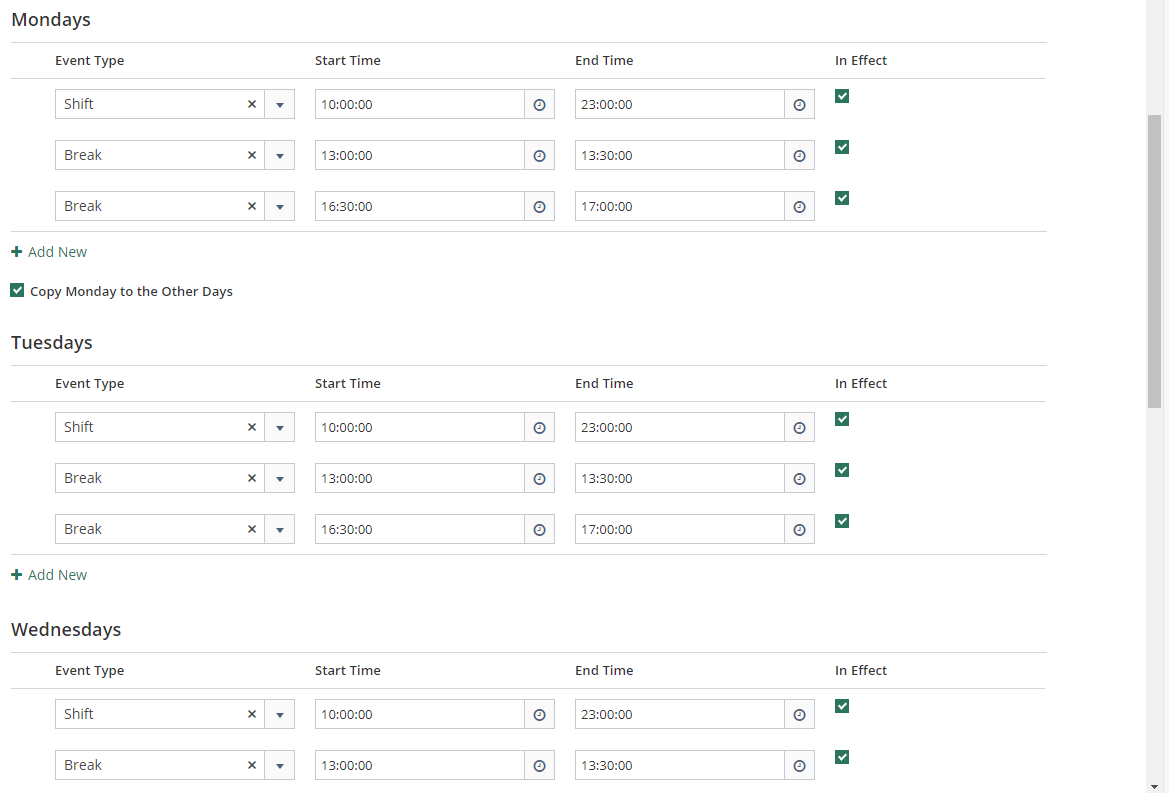
So now when I tick this decision box, I get something like the following:
Source(s):
-
Zoho Creator/Deluge: Insert rows in Subform
Quick refresher:copyraw// declaring the row <row1> = <mainForm_linkName>.<subForm_linkName>(); // assigning values for various subform fields in the row <row1>.<field_linkName> = <value>; <row1>.<field_linkName> = <value>; // declaring another row (declare as many rows as required) <row2> = <mainForm_linkName>.<subForm_linkName>(); // assigning values for various subform fields in the row <row2>.<field_linkName> = <value>; <row2>.<field_linkName> = <value>; // declare a variable to hold the collection of rows <variable> = Collection(); <variable>.insert( <row1>, <row2> ); // insert the rows into the subform through the variable input.<subForm_linkName>.insert( <variable> );
- // declaring the row
- <row1> = <mainForm_linkName>.<subForm_linkName>();
- // assigning values for various subform fields in the row
- <row1>.<field_linkName> = <value>;
- <row1>.<field_linkName> = <value>;
- // declaring another row (declare as many rows as required)
- <row2> = <mainForm_linkName>.<subForm_linkName>();
- // assigning values for various subform fields in the row
- <row2>.<field_linkName> = <value>;
- <row2>.<field_linkName> = <value>;
- // declare a variable to hold the collection of rows
- <variable> = Collection();
- <variable>.insert( <row1>, <row2> );
- // insert the rows into the subform through the variable
- input.<subForm_linkName>.insert( <variable> );
Category: Zoho Creator :: Article: 321