So I thought I'd write a quick article to remind me and to develop a simple notification system that will popup for any user on the submit of a form, or on the click of a button or on the click of a link on a page.
Why?
Because alert (alert task) can only be used on a load of a form, on a change of a field or on the validate process. And because info can only be displayed to an admin and even in some cases only as an additional link in the form. The example below is for use in a customer portal on the click of a report button (report workflow).
How?
This will create a popup using the built-in popup of Zoho creator and gives you the freedom to style the notification as any modal would.
1. Create a page
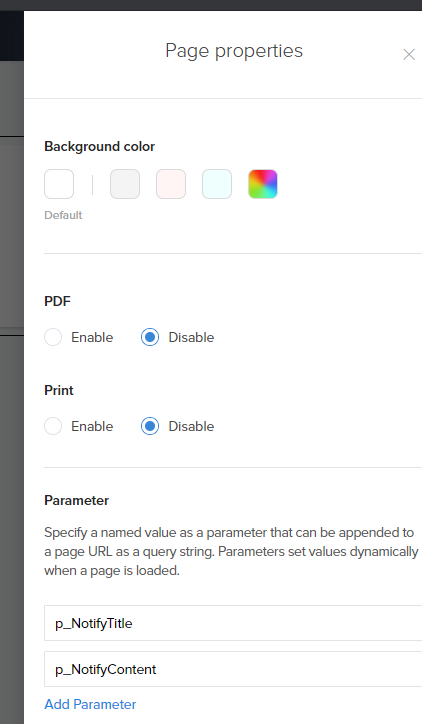
This will be the page containing the styled modal. I'm going to call it "Notify". Add the 2 parameters p_NotifyTitle and p_NotifyContent to the page:
copyraw
<%{
	v_Title = ifnull(p_NotifyTitle,"");
	v_Text = ifnull(p_NotifyContent,"");
	%>
<style>
	/* optional: hide some of the wrapper div boxes: leaves a modal with rounded corners */
	.popupboxOuter{background:none;border:0;}
	.zc-pb-tile-card{padding: 0px 20px 10px;}
	/* optional: move the close button to the top right of the modal */
	.popupClose{position:relative !important;z-index:1000;top:28px;right:46px !important;}
	.fa.fa-close::before,.fa.fa-close::after{background:#999 !important;}
	</style>
<h3><%=v_Title%></h3>
<p><%=v_Text%></p>
<%}%>
- <%{
- v_Title = ifnull(p_NotifyTitle,"");
- v_Text = ifnull(p_NotifyContent,"");
- %>
- <style>
- /* optional: hide some of the wrapper div boxes: leaves a modal with rounded corners */
- .popupboxOuter{background:none;border:0;}
- .zc-pb-tile-card{padding: 0px 20px 10px;}
- /* optional: move the close button to the top right of the modal */
- .popupClose{position:relative !important;z-index:1000;top:28px;right:46px !important;}
- .fa.fa-close::before,.fa.fa-close::after{background:#999 !important;}
- </style>
- <h3><%=v_Title%></h3>
- <p><%=v_Text%></p>
- <%}%>
2. Trigger the notification
There are several ways to display this as a popup, the first use example is on report workflow (click of a button in a report row) but I've also used this on the submission of a stateless form, in deluge:
copyraw
v_nTitle = encodeUrl("Test");
v_nText = encodeUrl("Test Content");
openUrl( "#Page:Notify?p_NotifyTitle="+v_nTitle+"&p_NotifyContent="+v_nText+"", "popup window", "height=150,width=300");
- v_nTitle = encodeUrl("Test");
- v_nText = encodeUrl("Test Content");
- openUrl( "#Page:Notify?p_NotifyTitle="+v_nTitle+"&p_NotifyContent="+v_nText+"", "popup window", "height=150,width=300");
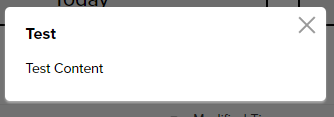
If you want to do this on the click of a link, include the URL parameter zc_LoadIn=dialog:
copyraw
<a href="#Page:Notify?zc_LoadIn=dialog&p_NotifyTitle=Test&p_NotifyContent=Test%20Content">Click Here to Popup my Notification Dialog</a>
- <a href="#Page:Notify?zc_LoadIn=dialog&p_NotifyTitle=Test&p_NotifyContent=Test%20Content">Click Here to Popup my Notification Dialog</a>
Additional
This is optional but it allows your client/users to edit the text of any notification without knowing any code and without needing to use your creator knowledge. I haven't been using this because I edit the content based on the action using values from the form invoking it but for generic messages you could get the "Notify" page to read from a form/report:
- Click on the plus icon to create a new form
- Select a blank form, let's call it "Notifications".
- Drag a single-line field and a multi-line field onto the form called "Title" and "Content" respectively.
- If you use this method to populate your notifications, you can send the ID of the record to show
- On the Creator page, retrieve the title and content of the modal dialog from the record by using the following:
copyraw
v_NotifyID = ifnull(input.p_NotifyID,0).toLong();
r_NotifyDetails = Notifications[ID == v_NotifyID];
v_Text = r_NotifyDetails.Title;
v_Content = r_NotifyDetails.Content;
- v_NotifyID = ifnull(input.p_NotifyID,0).toLong();
- r_NotifyDetails = Notifications[ID == v_NotifyID];
- v_Text = r_NotifyDetails.Title;
- v_Content = r_NotifyDetails.Content;
- To close the dialog on the receiving page, you can add the following code:
Known Issues
- Popup opens in the parent window: This only happens on certain machines and I couldn't narrow down the cause. I have tested on both Mac and PC but I had a client using a Mac with admin privileges which would open the same popup link in the parent window. The solution however is to remove the base URL and only keep the URL as something like #Page:Notify. Do NOT add the base URL such as https://creatorapp.zoho.com/myowner/myapp/#Page:Notify.
- CSS styling affects all contents: Any styling on an embedded form on the popup would need to apply specifically to the contents in the popup. Find the modal or popup name to isolate these from other CSS tags sharing the same name.
Alternative Solution
Some of you may be asking why not use openUrl with a popup parameter, such as:
copyraw
The reason being, is that the top solution offers a very generic popup box that can be quickly modified with content/text and the popup size will automatically resize based on content. I tend to use the first solution combined with a form/table of standard messages allowing the client to enter their own text to display to their users. A preset form/page with openUrl could do the same thing but it's a fixed width/height and question of preference. There are cases however when the openUrl method might be better, for example, for confirmation dialogs (embedded form).openUrl("#Form:My_Confirmation_Popup?zc_Header=false","popup window","height=144,width=555");
- openUrl("#Form:My_Confirmation_Popup?zc_Header=false","popup window","height=144,width=555");
Source(s):
- Zoho Creator v4 - Functionality based URLs - Opening a form with a record pre-loaded.
- Zoho Creator v5 - Print and export using URL - Export a record template as PDF
- Zoho Creator v4 - Style based URLs for Embedded forms - Loading forms/reports without headers/functionality,
- Zoho Creator v4 - Navigational URLs - Tips on Closing Dialog via Script
- Zoho Creator v5 - Send mail - Instructions on using a send mail task with template as PDF.
Category: Zoho Creator :: Article: 272