For Zoho services only


I'm currently part of a wider delivery team at Ascent Business Solutions, recognised as a leading Zoho Premium Solutions Partner in the United Kingdom.

Ascent Business Solutions support organisations with everything from targeted technical fixes through to full Zoho CRM implementations and long-term platform adoption. Working as a team rather than a one-person consultancy allows projects to move forward consistently, with access to the right skills at each stage.

The team I manage specialises in API integrations between Zoho and third-party finance and commerce platforms such as Xero, Shopify, WooCommerce, and eBay. Much of our work involves solving integration challenges that fall outside standard documentation, supporting new ideas, new sectors, and evolving business models.

Success is measured through practical outcomes and return on investment, ranging from scaling small operations into high-turnover businesses to delivering rapid gains through online payments, automation, and streamlined digital workflows.

If you are looking for structured Zoho expertise backed by an established consultancy, you can contact Ascent Business Solutions on 0121 392 8140 (UK), email info@ascentbusiness.co.uk, or visit https://www.ascentbusiness.co.uk.
Zoho Creator: Two submit buttons on a non-stateless form with 2 different redirects

Zoho Creator: Two submit buttons on a non-stateless form with 2 different redirects

What?
This is an article to document how to have two submit buttons on a non-stateless form which both submit the form but one leaves the current record open while the other redirects to the reports view.

Why?
A client wanted a "Save" button on their form as well as a "Save & Close" button. The "Save" button would submit the form but keep the user on the record form. The "Save & Close" button would submit the form and then redirect the user to the report view of the records.
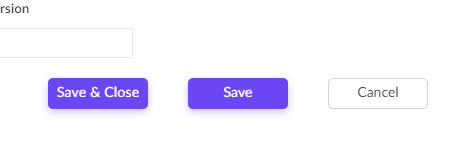
Zoho Creator: Two submit buttons on a non-stateless form: Result

Sounds simple but you can only set a form to redirect to one link and adding a HTML anchor link (<a href>) to the page won't help as you need to submit the form before redirecting the user.  A HTML <input type=submit> element to the page won't help either as you need to redirect the user to the specified report after submitting the form.

How?
Well as always, I'm going to cheat. My solution here was to simply repurpose a decision box field in Creator; then re-style it to look like a button; then add a workflow on click of this field.

  1. Set the form to reload the existing record when it is submitted (either on "Successful form submission", or on properties "On Successful Submission" > "Direct To", or my favorite, Deluge "openUrl()"). Standard as for any usual form without a redirect.
  2. Drag a decision box field on to the form; we are calling ours "Save & Close" with the field link name as "Save_and_Close" (the field link name is important for the next step: CSS styling):
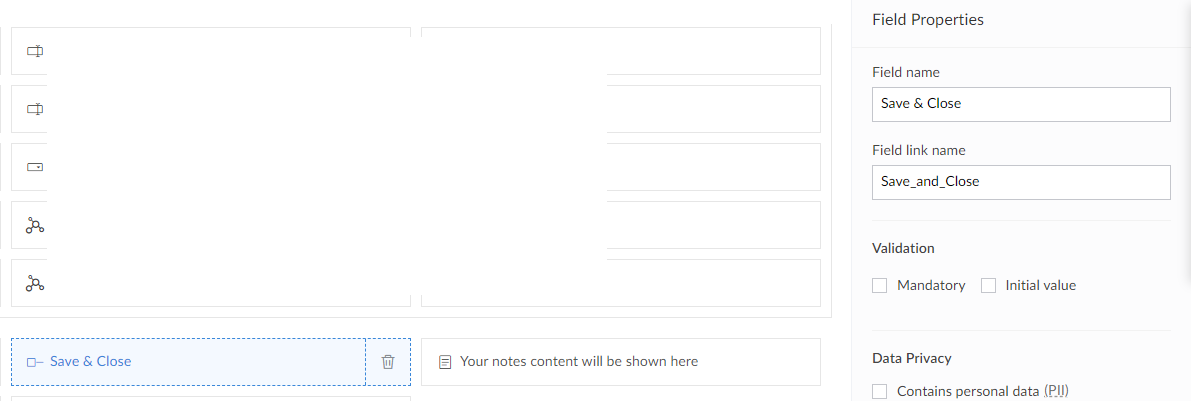
    Zoho Creator: Two submit buttons on a non-stateless form: Decision Box field
  3. Apply the following styling (this will depend on the theme you are using):
    copyraw
    <style>
    		.zc-Save_and_Close-group .decision-box-field label{
    			display:none !important;
    		}
    		.zc-Save_and_Close-group label{
    			cursor:pointer;
    			outline:none;
    			text-align:center !important;
    			white-space:nowrap;
    			line-height:19px;
    			height:31px;
    			background-color: #6B47F4;
    			color:#fff !important;
    			font-weight: 400 !important;
    			font-size: 14px !important;
    			padding:7px !important;
    			box-shadow: 0 3px 8px 0 rgb(107 71 244 / 33%);
    			border-radius:5px;
    			width:100px;
    			max-width: 100px !important;
    			min-width: 100px !important;
    			float: right !important;
    			margin-right: 40px !important;			
    		}
    		.zc-Save_and_Close-group label:hover{
    			background-color: #613DEA;
    		}
    </style>
    1.  <style> 
    2.          .zc-Save_and_Close-group .decision-box-field label{ 
    3.              display:none !important; 
    4.          } 
    5.          .zc-Save_and_Close-group label{ 
    6.              cursor:pointer; 
    7.              outline:none; 
    8.              text-align:center !important; 
    9.              white-space:nowrap; 
    10.              line-height:19px
    11.              height:31px
    12.              background-color: #6B47F4; 
    13.              color:#fff !important; 
    14.              font-weight: 400 !important; 
    15.              font-size: 14px !important; 
    16.              padding:7px !important; 
    17.              box-shadow: 0 3px 8px 0 rgb(107 71 244 / 33%)
    18.              border-radius:5px
    19.              width:100px
    20.              max-width: 100px !important; 
    21.              min-width: 100px !important; 
    22.              float: right !important; 
    23.              margin-right: 40px !important; 
    24.          } 
    25.          .zc-Save_and_Close-group label:hover{ 
    26.              background-color: #613DEA; 
    27.          } 
    28.  </style> 
  4. In Workflow > Form workflows > Click on "New Workflow"
    1. Choose your form
    2. Run when a record is "Created or Edited"
    3. When to trigger workflow is "User input of a field"
    4. Choose Field "Save & Close"
    5. Name the workflow "OnSubmit_SaveClose"
      Zoho Creator: Two submit buttons on a non-stateless form: Workflow
    6. Add your deluge code that should:
      • Validate the fields (checks mandatory fields have been entered) for example:
        copyraw
        //
        // check mandatory fields have been entered
        l_Errors = List();
        if(isnull(input.Record_Name))
        {
        	l_Errors.add("- Record Name");
        }
        if(l_Errors.size() > 0)
        {
        	alert "Please enter the following required fields:\n" + l_Errors.toString("\n");
        }
        else
        {
        	// ... code to submit form/save to record here
        }
        1.  // 
        2.  // check mandatory fields have been entered 
        3.  l_Errors = List()
        4.  if(isnull(input.Record_Name)) 
        5.  { 
        6.      l_Errors.add("- Record Name")
        7.  } 
        8.  if(l_Errors.size() > 0) 
        9.  { 
        10.      alert "Please enter the following required fields:\n" + l_Errors.toString("\n")
        11.  } 
        12.  else 
        13.  { 
        14.      // ... code to submit form/save to record here 
        15.  } 
      • Then save the data by adding the record or updating the existing record
        copyraw
        if(!isnull(input.ID))
        {
        	// ... code to update existing record
        	r_Details = myForm[ID == input.ID];
        	r_Details.Account = input.Account.toLong();
        }
        else
        {
        	// ... code to create new record
        	r_NewRecord = insert into <formname>
        	[
        		<fieldname1> = <expression>
        		<fieldname2> = <expression>
        		<fieldname3> = <expression>
        	];
        }
        1.  if(!isnull(input.ID)) 
        2.  { 
        3.      // ... code to update existing record 
        4.      r_Details = myForm[ID == input.ID]
        5.      r_Details.Account = input.Account.toLong()
        6.  } 
        7.  else 
        8.  { 
        9.      // ... code to create new record 
        10.      r_NewRecord = insert into <formname> 
        11.      [ 
        12.          <fieldname1> = <expression> 
        13.          <fieldname2> = <expression> 
        14.          <fieldname3> = <expression> 
        15.      ]
        16.  } 
  5. Done:
    Zoho Creator: Two submit buttons on a non-stateless form: Result

Additional
  • Remember that an integration field on the interface is returned as a string and needs to be converted to a number to be assigned, eg:
    copyraw
    r_Details = myForm[ID == 1234567980123456789];
    r_Details.Account = input.Account.toLong();
    1.  r_Details = myForm[ID == 1234567980123456789]
    2.  r_Details.Account = input.Account.toLong()
Category: Zoho Creator :: Article: 291

Joes Word Cloud

label   submit   field   workflow   help   button   well   page   redirect   input   html   fields   need   name   decision   click   group   save   link   existing   view   user   would   close   either   have   record   form   report   adding   JoelLipman.Com

Accreditation

Badge - Zoho Creator Certified Developer Associate
Badge - Zoho Deluge Certified Developer
Badge - Certified Zoho CRM Developer

Donate & Support

If you like my content, and would like to support this sharing site, feel free to donate using a method below:

Paypal:
Donate to Joel Lipman via PayPal

Bitcoin:
Donate to Joel Lipman with Bitcoin bc1qf6elrdxc968h0k673l2djc9wrpazhqtxw8qqp4

Ethereum:
Donate to Joel Lipman with Ethereum 0xb038962F3809b425D661EF5D22294Cf45E02FebF

Credit where Credit is Due:


Feel free to copy, redistribute and share this information. All that we ask is that you attribute credit and possibly even a link back to this website as it really helps in our search engine rankings.

Disclaimer: Please note that the information provided on this website is intended for informational purposes only and does not represent a warranty. The opinions expressed are those of the author only. We recommend testing any solutions in a development environment before implementing them in production. The articles are based on our good faith efforts and were current at the time of writing, reflecting our practical experience in a commercial setting.

Thank you for visiting and, as always, we hope this website was of some use to you!

Kind Regards,

Joel Lipman
www.joellipman.com