This is an article detailing the client script to fix any fields which exceed their decimal places limit in ZohoCRM.
Why?
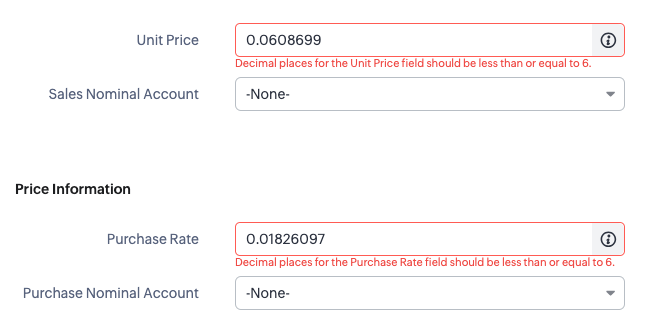
So we have a customer that has some decimal fields on the products module that are calculated and will sometimes return numbers with more than 6 decimal places. As this is more than specified on the ZohoCRM field properties, as soon as the staff user tries to save the record, they will get a validation error on the decimal field even if that's not the field that is being changed:
Decimal places for the Unit Price field should be less than or equal to 6.
How?
The workaround for staff is to round this up manually and then save the record. But this can be an annoying overhead, especially if it can be auto-corrected with a client script.
Pre-amble
For both of the methods below, you will need to setup a client script which runs when the product page is being modified:
- Login to ZohoCRM as a system administrator
- Give it a name, I'm calling mine "Products - Correct Decimals"
- Give it a description, I'm giving it the one I have in the function header below
- Category is "Module"
- Page is "Edit Page (Standard)"
- Module is "Products"
- Layout is "Standard"
- Event Type is "Page Event"
- Event is "onLoad"
- Click "Next"
Method 1 This includes a function which counts the number of decimals. I didn't need to use this method for my client; just rounding the decimals would suffice but here is my first version of the script:
copyraw
/* *******************************************************************************
Function:       -
Label:          Products - Correct Decimals
Trigger:        On Products Edit Page (Standard) > Page Event OnLoad
Purpose:	    ZohoCRM only allows up to 6 decimals but some calculations are resulting in more than this
                which blocks users from saving a record without changing this.  This script will round up decimal fields onload.
Inputs:         -
Outputs:        -

Date Created:   2023-12-13 (Joel Lipman)
                - Initial release
		        - Correctly rounds any decimal fields to their maximum decimal place.
Date Modified:	???
                - ???

******************************************************************************* */

// freezes the GUI?
ZDK.UI.freeze(true);

// attempt
try {

    // taken from stackoverflow: https://stackoverflow.com/questions/17369098/simplest-way-of-getting-the-number-of-decimals-in-a-number-in-javascript
    var fn_CountDecimals = function(value) {
        if (Math.floor(value) !== value)
            return value.toString().split(".")[1].length || 0;
        return 0;
    }

    // get the value from the field "Weight (kg)" (decimal field only allowed 2 decimals)
    var v_ProductWeight = ZDK.Page.getField('Weight_kg').getValue();

    // count if more than 2 decimals, then round it to 2 decimals else use the current value
    var v_ProductWeightFormatted = fn_CountDecimals(v_ProductWeight) > 2 ? parseFloat(v_ProductWeight).toFixed(2) : v_ProductWeight;

    // set the field value to the formatted value
    ZDK.Page.getField("Weight_kg").setValue(v_ProductWeightFormatted);

    // now for currency fields
    var v_ProductPrice = ZDK.Page.getField('Unit_Price').getValue();
    var v_ProductPriceFormatted = fn_CountDecimals(v_ProductPrice) > 6 ? parseFloat(v_ProductPrice).toFixed(6) : v_ProductPrice;
    ZDK.Page.getField("Unit_Price").setValue(v_ProductPriceFormatted);

    // and if we don't want/need to check, just round em (also means you don't need the above function to count decimals)
    var v_ProductCost = ZDK.Page.getField('Purchase_Rate').getValue();
    ZDK.Page.getField("Purchase_Rate").setValue(parseFloat(v_ProductCost).toFixed(6));

} catch (e) {

    // return error (don't display it, just show it in the logs)
    console.log(e);
    //ZDK.Client.showMessage("Client Script error");
}

// unfreeze the GUI
ZDK.UI.freeze(false);
- /* *******************************************************************************
- Function: -
- Label: Products - Correct Decimals
- Trigger: On Products Edit Page (Standard) > Page Event OnLoad
- Purpose: ZohoCRM only allows up to 6 decimals but some calculations are resulting in more than this
- which blocks users from saving a record without changing this. This script will round up decimal fields onload.
- Inputs: -
- Outputs: -
- Date Created: 2023-12-13 (Joel Lipman)
- - Initial release
- - Correctly rounds any decimal fields to their maximum decimal place.
- Date Modified: ???
- - ???
- ******************************************************************************* */
- // freezes the GUI?
- ZDK.UI.freeze(true);
- // attempt
- try {
- // taken from stackoverflow: https://stackoverflow.com/questions/17369098/simplest-way-of-getting-the-number-of-decimals-in-a-number-in-javascript
- var fn_CountDecimals = function(value) {
- if (Math.floor(value) !== value)
- return value.toString().split(".")[1].length || 0;
- return 0;
- }
- // get the value from the field "Weight (kg)" (decimal field only allowed 2 decimals)
- var v_ProductWeight = ZDK.Page.getField('Weight_kg').getValue();
- // count if more than 2 decimals, then round it to 2 decimals else use the current value
- var v_ProductWeightFormatted = fn_CountDecimals(v_ProductWeight) > 2 ? parseFloat(v_ProductWeight).toFixed(2) : v_ProductWeight;
- // set the field value to the formatted value
- ZDK.Page.getField("Weight_kg").setValue(v_ProductWeightFormatted);
- // now for currency fields
- var v_ProductPrice = ZDK.Page.getField('Unit_Price').getValue();
- var v_ProductPriceFormatted = fn_CountDecimals(v_ProductPrice) > 6 ? parseFloat(v_ProductPrice).toFixed(6) : v_ProductPrice;
- ZDK.Page.getField("Unit_Price").setValue(v_ProductPriceFormatted);
- // and if we don't want/need to check, just round em (also means you don't need the above function to count decimals)
- var v_ProductCost = ZDK.Page.getField('Purchase_Rate').getValue();
- ZDK.Page.getField("Purchase_Rate").setValue(parseFloat(v_ProductCost).toFixed(6));
- } catch (e) {
- // return error (don't display it, just show it in the logs)
- console.log(e);
- //ZDK.Client.showMessage("Client Script error");
- }
- // unfreeze the GUI
- ZDK.UI.freeze(false);
Method #2
Get value, round it up, set value:
copyraw
/* *******************************************************************************
Function:       -
Label:          Products - Correct Decimals
Trigger:        On Products Edit Page (Standard) > Page Event OnLoad
Purpose:	    ZohoCRM only allows up to 6 decimals but some calculations are resulting in more than this
                which blocks users from saving a record without changing this.  This script will round up decimal fields onload.
Inputs:         -
Outputs:        -

Date Created:   2023-12-13 (Joel Lipman)
                - Initial release
		        - Correctly rounds any decimal fields to their maximum decimal place.
Date Modified:	???
                - ???

******************************************************************************* */

// freezes the GUI?
ZDK.UI.freeze(true);

// attempt
try {

    // 2 decimal places allowed
    var v_ProductWeight = ZDK.Page.getField('Weight_kg').getValue();
    ZDK.Page.getField("Weight_kg").setValue(parseFloat(v_ProductWeight).toFixed(2));

    // 6 decimal places allowed
    var v_ProductPrice = ZDK.Page.getField('Unit_Price').getValue();
    ZDK.Page.getField("Unit_Price").setValue(parseFloat(v_ProductPrice).toFixed(6));
    var v_ProductCost = ZDK.Page.getField('Purchase_Rate').getValue();
    ZDK.Page.getField("Purchase_Rate").setValue(parseFloat(v_ProductCost).toFixed(6));

} catch (e) {

    // return error (don't display it, just show it in the logs)
    console.log(e);
}

// unfreeze the GUI
ZDK.UI.freeze(false);
- /* *******************************************************************************
- Function: -
- Label: Products - Correct Decimals
- Trigger: On Products Edit Page (Standard) > Page Event OnLoad
- Purpose: ZohoCRM only allows up to 6 decimals but some calculations are resulting in more than this
- which blocks users from saving a record without changing this. This script will round up decimal fields onload.
- Inputs: -
- Outputs: -
- Date Created: 2023-12-13 (Joel Lipman)
- - Initial release
- - Correctly rounds any decimal fields to their maximum decimal place.
- Date Modified: ???
- - ???
- ******************************************************************************* */
- // freezes the GUI?
- ZDK.UI.freeze(true);
- // attempt
- try {
- // 2 decimal places allowed
- var v_ProductWeight = ZDK.Page.getField('Weight_kg').getValue();
- ZDK.Page.getField("Weight_kg").setValue(parseFloat(v_ProductWeight).toFixed(2));
- // 6 decimal places allowed
- var v_ProductPrice = ZDK.Page.getField('Unit_Price').getValue();
- ZDK.Page.getField("Unit_Price").setValue(parseFloat(v_ProductPrice).toFixed(6));
- var v_ProductCost = ZDK.Page.getField('Purchase_Rate').getValue();
- ZDK.Page.getField("Purchase_Rate").setValue(parseFloat(v_ProductCost).toFixed(6));
- } catch (e) {
- // return error (don't display it, just show it in the logs)
- console.log(e);
- }
- // unfreeze the GUI
- ZDK.UI.freeze(false);
Category: Zoho CRM :: Article: 394