This is a very quick article with examples of managing a multi-user or multi-lookup field in CRM using Zoho Deluge.
Why?
Sometimes you might need this when data mapping fields from one module to another, sometimes you need to manage existing multi-lookups/users in a record.
How?
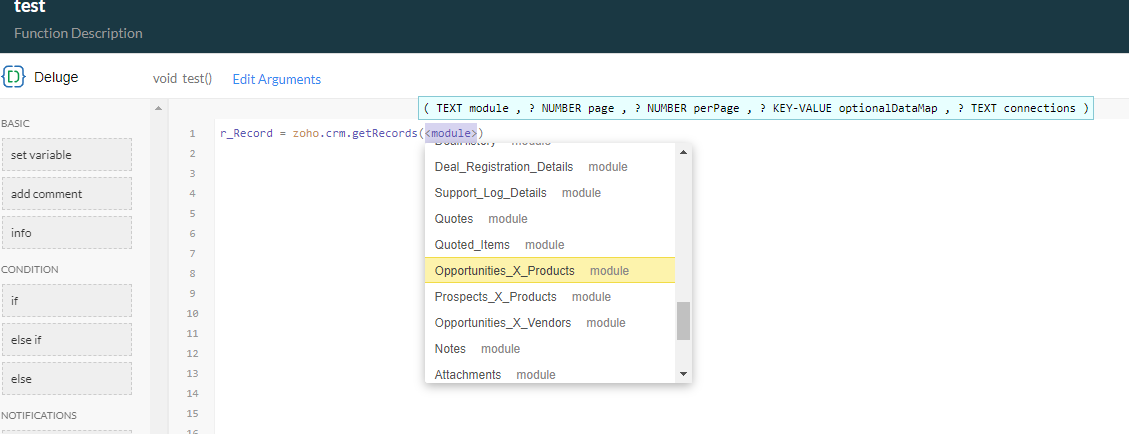
So the key point to remember is that all multi-select lookup and multi-user lookup fields are held in temporary CRM modules called a "LinkingModule" (as opposed to standard modules and custom modules).
Quick way to determine the API name of the linking module:
- Go to setup > Developer Space > functions.
- Create a standalone function called "Test".
- Type in line 1: r_Record = zoho.crm.getRecords
- then press Enter (DO NOT START TYPING FOR A MODULE NAME - LET THE SYSTEM POPUP YOUR OPTIONS AS PER THE FOLLOWING SCREENSHOT - USE ARROW KEYS OR MOUSE):
Find records relevant to this module:
copyraw
l_LinkedRecords = zoho.crm.searchRecords("Opportunities_X_Products","(Opportunity:equals:" + v_DealID + ")");
- l_LinkedRecords = zoho.crm.searchRecords("Opportunities_X_Products","(Opportunity:equals:" + v_DealID + ")");
Find records relevant to this user:
copyraw
v_SearchCriteria = "(field0:equals:" + v_UserID + ")";
l_SearchResults = zoho.crm.searchRecords("Vendors_X_Users",v_SearchCriteria);
- v_SearchCriteria = "(field0:equals:" + v_UserID + ")";
- l_SearchResults = zoho.crm.searchRecords("Vendors_X_Users",v_SearchCriteria);
Code to Add a value to a multi-lookup (on Create Record):
copyraw
// sample code when creating a record in a module that contains a lookup
m_Create = Map();
m_Create.put("Name","Joels Amazing Test");
r_Create = zoho.crm.createRecord("Tests", m_Create);

// now take the ID that was created and use the following code to populate the multi-lookup field
if(!isnull(r_Create.get("id")))
{
    m_Link = Map();

    // using record IDs cos there's nothing better
    m_Link.put("Test",r_Create.get("id"));

    // using record IDs cos there's nothing better
    m_Link.put("Joel",123456789012345678);

    // create link
    r_Link = zoho.crm.createRecord("Tests_X_Contacts", m_Link);
}
- // sample code when creating a record in a module that contains a lookup
- m_Create = Map();
- m_Create.put("Name","Joels Amazing Test");
- r_Create = zoho.crm.createRecord("Tests", m_Create);
- // now take the ID that was created and use the following code to populate the multi-lookup field
- if(!isnull(r_Create.get("id")))
- {
- m_Link = Map();
- // using record IDs cos there's nothing better
- m_Link.put("Test",r_Create.get("id"));
- // using record IDs cos there's nothing better
- m_Link.put("Joel",123456789012345678);
- // create link
- r_Link = zoho.crm.createRecord("Tests_X_Contacts", m_Link);
- }
Code to Add a value to a multi-lookup (on Update Record):
copyraw
v_DealID = ifnull(input.p_DealID,0);
if(v_DealID != 0)
{
    m_Link = Map();
    m_Link.put("Deal", v_DealID);
    m_Link.put("Product", 123456789012345678);
    r_Link = zoho.crm.createRecord("Deals_X_Products", m_Link);
}
- v_DealID = ifnull(input.p_DealID,0);
- if(v_DealID != 0)
- {
- m_Link = Map();
- m_Link.put("Deal", v_DealID);
- m_Link.put("Product", 123456789012345678);
- r_Link = zoho.crm.createRecord("Deals_X_Products", m_Link);
- }
Code to Delete a value from a multi-lookup:
copyraw
v_ID2Delete = 123456789012345678;
v_SearchCriteria = "(field0:equals:" + v_myRecordID + ")";
l_SearchResults = zoho.crm.searchRecords("Tests_X_Users",v_SearchCriteria);
for each  r_Link in l_SearchResults
{
    if(!isnull(r_Link.get("id")) && r_Link.get("Test").get("id")==v_ID2Delete)
    {
        m_Delete = Map();
        m_Delete.put("module","Tests_X_Users");
        m_Delete.put("id",r_Link.get("id"));
        r_Delete = zoho.crm.invokeConnector("crm.delete", m_Delete);
    }
}
- v_ID2Delete = 123456789012345678;
- v_SearchCriteria = "(field0:equals:" + v_myRecordID + ")";
- l_SearchResults = zoho.crm.searchRecords("Tests_X_Users",v_SearchCriteria);
- for each r_Link in l_SearchResults
- {
- if(!isnull(r_Link.get("id")) && r_Link.get("Test").get("id")==v_ID2Delete)
- {
- m_Delete = Map();
- m_Delete.put("module","Tests_X_Users");
- m_Delete.put("id",r_Link.get("id"));
- r_Delete = zoho.crm.invokeConnector("crm.delete", m_Delete);
- }
- }
Update 2025
Having to do this again in 2025 and things seem to have changed. I've added a multi-user lookup on the quotes record called "Requires_Approval_Users". A quick setup method is now to use the CRM interface to add a couple of users to the field and then save the changes. I now query all the records held so far in this linking module which I'm guessing is called Quotes_X_Users (would appear in the popup once you start typing zoho.crm.getRecords. I'll get an array back of 2 records and I'll be looking for the 2 lookup fields (contains an ID and name) per record. In my case:
copyraw
So I'll just refer to https://www.zoho.com/crm/developer/docs/api/v8/insert-records.html and here's the code to associate 1 user in the multi-user lookup:
..
"Requires_Approval_Users":{
     "name":"Joel Lipman",
     "id":"12345600000987654"
},
...

AND

..
"userlookup221_2":{
     "name":"Another Joel",
     "id":"12345600000987653"
},
...
- ..
- "Requires_Approval_Users":{
- "name":"Joel Lipman",
- "id":"12345600000987654"
- },
- ...
- AND
- ..
- "userlookup221_2":{
- "name":"Another Joel",
- "id":"12345600000987653"
- },
- ...
copyraw
Another method to check for API names is to query the metadata in the linking module:
m_AssociateMultiUserLookup = {"data":[{"id":p_QuoteID, "Requires_Approval_Users":[{"Requires_Approval_Users":{"id":m_ApprovalUser.get("id")}}]}]};
r_AssociateMultiUserLookup = invokeurl
[
	url: "https://www.zohoapis.eu/crm/v8/Quotes"
	type: PUT
	parameters: m_AssociateMultiUserLookup.toString()
	connection: "my_crm_connection"
];
info "Response from associating user " + _ApprovalUser.get("id");
info r_AssociateMultiUserLookup;
- m_AssociateMultiUserLookup = {"data":[{"id":p_QuoteID, "Requires_Approval_Users":[{"Requires_Approval_Users":{"id":m_ApprovalUser.get("id")}}]}]};
- r_AssociateMultiUserLookup = invokeurl
- [
- url: "https://www.zohoapis.eu/crm/v8/Quotes"
- type: PUT
- parameters: m_AssociateMultiUserLookup.toString()
- connection: "my_crm_connection"
- ];
- info "Response from associating user " + _ApprovalUser.get("id");
- info r_AssociateMultiUserLookup;
copyraw
My full snippet of code
//
// used for checking api names and the linking module (not visible via the interface)
v_Endpoint = "https://www.zohoapis.com/crm/v8/settings/fields?module=Quotes_X_Users";
r_MetaData = invokeurl
[
	url: v_Endpoint2
	type: GET
	connection:"my_crm_connection"
];
info r_MetaData;
//
// I can see 2 api names for lookups
// userlookup221_2
// Requires_Approval_Users
- //
- // used for checking api names and the linking module (not visible via the interface)
- v_Endpoint = "https://www.zohoapis.com/crm/v8/settings/fields?module=Quotes_X_Users";
- r_MetaData = invokeurl
- [
- url: v_Endpoint2
- type: GET
- connection:"my_crm_connection"
- ];
- info r_MetaData;
- //
- // I can see 2 api names for lookups
- // userlookup221_2
- // Requires_Approval_Users
copyraw
//
	// loop through users to find the approver
	for each  m_User in l_Users
	{
		if(m_User.get("Job_Title").equalsIgnoreCase("CFO"))
		{
			l_ApprovalUsers.add(m_User.get("id"));
		}
	}
	//
	// check list of IDs
	if(l_ApprovalUsers.size() > 0)
	{
		//
		// reset multi-user lookup field (clear out values)
		v_SearchCriteria = "(userlookup221_2:equals:" + p_QuoteID + ")";
		l_SearchResults = zoho.crm.searchRecords("Quotes_X_Users",v_SearchCriteria);
		info l_SearchResults;
		for each  m_DeleteResult in l_SearchResults
		{
			if(!isNull(m_DeleteResult.get("id")))
			{
				m_Delete = Map();
				m_Delete.put("module","Quotes_X_Users");
				m_Delete.put("id",m_DeleteResult.get("id"));
				r_Delete = zoho.crm.invokeConnector("crm.delete",m_Delete);
				info "Deleted record " + m_DeleteResult.get("id");
			}
		}
		//
		// update linking module
		for each  v_ApprovalUserID in l_ApprovalUsers
		{
			m_AssociateMultiUserLookup = {"data":{{"id":p_QuoteID,"Requires_Approval_Users":{{"Requires_Approval_Users":{"id":v_ApprovalUserID}}}}}};
			r_AssociateMultiUserLookup = invokeurl
			[
				url :"https://www.zohoapis.com/crm/v8/Quotes"
				type :PUT
				parameters:m_AssociateMultiUserLookup.toString()
				connection:"my_crm_connection"
			];
			info "Response from associating user " + v_ApprovalUserID;
			info r_AssociateMultiUserLookup;
		}
	}
- //
- // loop through users to find the approver
- for each m_User in l_Users
- {
- if(m_User.get("Job_Title").equalsIgnoreCase("CFO"))
- {
- l_ApprovalUsers.add(m_User.get("id"));
- }
- }
- //
- // check list of IDs
- if(l_ApprovalUsers.size() > 0)
- {
- //
- // reset multi-user lookup field (clear out values)
- v_SearchCriteria = "(userlookup221_2:equals:" + p_QuoteID + ")";
- l_SearchResults = zoho.crm.searchRecords("Quotes_X_Users",v_SearchCriteria);
- info l_SearchResults;
- for each m_DeleteResult in l_SearchResults
- {
- if(!isNull(m_DeleteResult.get("id")))
- {
- m_Delete = Map();
- m_Delete.put("module","Quotes_X_Users");
- m_Delete.put("id",m_DeleteResult.get("id"));
- r_Delete = zoho.crm.invokeConnector("crm.delete",m_Delete);
- info "Deleted record " + m_DeleteResult.get("id");
- }
- }
- //
- // update linking module
- for each v_ApprovalUserID in l_ApprovalUsers
- {
- m_AssociateMultiUserLookup = {"data":{{"id":p_QuoteID,"Requires_Approval_Users":{{"Requires_Approval_Users":{"id":v_ApprovalUserID}}}}}};
- r_AssociateMultiUserLookup = invokeurl
- [
- url :"https://www.zohoapis.com/crm/v8/Quotes"
- type :PUT
- parameters:m_AssociateMultiUserLookup.toString()
- connection:"my_crm_connection"
- ];
- info "Response from associating user " + v_ApprovalUserID;
- info r_AssociateMultiUserLookup;
- }
- }
Category: Zoho CRM :: Article: 280