


This code snippet took me a while to do and the documentation is flaky so I thought I'd make a note here just in case I need to refer to it again.
Why?
I want to modify a picklist and fill it with options from a certain time of the day to the closing time of the day (working hours).
How?
The plan is to iterate through a 24-hour clock, enable adding to the picklist when the starting hour is found and stop adding when the closing hour is found. The picklist field is called "Time_Field".
The following reads from a form (creator data table) where thisServiceRecord.Opening_Time is returning an hour value (eg. "08:00") and thisServiceRecord.Closing_Time returns an hour value (eg. "20:00"). This will output a picklist which populates as: 08:00, 08:30, 09:00, 09:30 ... 19:30, 20:00.
copyraw
// get rid of all picklist options
	clear Time_field;
	// begin populating options
	thisStartHour = thisServiceRecord.Opening_Time.toString("HH");
	thisClosingHour = thisServiceRecord.Closing_Time.toString("HH");
	hourString = "00/01/02/03/04/05/06/07/08/09/10/11/12/13/14/15/16/17/18/19/20/21/22/23";
	hourList = hourString.toList("/");
	v_includeInPicklist = false;
	for each index timeSlot in hourList
	{
		timeSlotStr = timeSlot.toString();
		if(timeSlotStr.length()<2)
		{
			timeSlotStr = "0" + timeSlotStr;
		}
		thisStartHourStr = thisStartHour.toString().substring(0,2);
		thisCloseHourStr = thisClosingHour.toString().substring(0,2);
		if(timeSlotStr==thisStartHourStr)
		{
			v_includeInPicklist=true;
		}
		if(timeSlotStr==thisCloseHourStr)
		{
			input.Time_field:ui.add(timeSlotStr + ":00");  // this is the last entry in the picklist
			v_includeInPicklist=false;
		}
		if(v_includeInPicklist)
		{
			input.Time_field:ui.add(timeSlotStr + ":00");
			input.Time_field:ui.add(timeSlotStr + ":30");
		}
	}
- // get rid of all picklist options
- clear Time_field;
- // begin populating options
- thisStartHour = thisServiceRecord.Opening_Time.toString("HH");
- thisClosingHour = thisServiceRecord.Closing_Time.toString("HH");
- hourString = "00/01/02/03/04/05/06/07/08/09/10/11/12/13/14/15/16/17/18/19/20/21/22/23";
- hourList = hourString.toList("/");
- v_includeInPicklist = false;
- for each index timeSlot in hourList
- {
- timeSlotStr = timeSlot.toString();
- if(timeSlotStr.length()<2)
- {
- timeSlotStr = "0" + timeSlotStr;
- }
- thisStartHourStr = thisStartHour.toString().substring(0,2);
- thisCloseHourStr = thisClosingHour.toString().substring(0,2);
- if(timeSlotStr==thisStartHourStr)
- {
- v_includeInPicklist=true;
- }
- if(timeSlotStr==thisCloseHourStr)
- {
- input.Time_field:ui.add(timeSlotStr + ":00"); // this is the last entry in the picklist
- v_includeInPicklist=false;
- }
- if(v_includeInPicklist)
- {
- input.Time_field:ui.add(timeSlotStr + ":00");
- input.Time_field:ui.add(timeSlotStr + ":30");
- }
- }
Update 2021
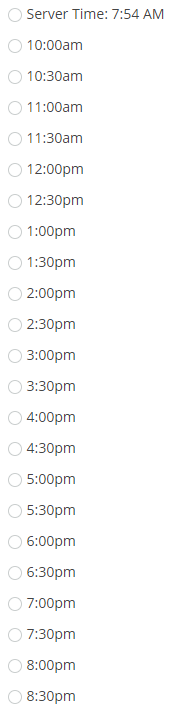
I spent a long time again on this so this is the same as the above but with opening/closing times and a few more time calculations. In other words, show me the next available time slots between an opening and closing time but that isn't in the past (where my radio field link name is Time_field):
copyraw
Yields the following:
//
// declare opening and closing hour
v_OpeningHour = 10;
v_ClosingHour = 21;
//
// set all hours of the day
v_Hours = "00/01/02/03/04/05/06/07/08/09/10/11/12/13/14/15/16/17/18/19/20/21/22/23";
l_Hours = v_Hours.toList("/");
//
// set earliest time slot to display
v_OpeningTime = zoho.currentdate.toString("yyyy-MM-dd ") + v_OpeningHour.leftpad(2).replaceAll(" ", "0") + ":00";
//
// don't want to display times that are before the current time
if(v_OpeningTime.toTime() < zoho.currenttime)
{
	v_OpeningTime = zoho.currenttime.toString("yyyy-MM-dd HH") + ":00";
}
//
// set latest time slot to display
v_ClosingTime = zoho.currentdate.toString("yyyy-MM-dd ") + v_ClosingHour.leftpad(2).replaceAll(" ", "0") + ":00";
//
// clear time slots radio options
clear Time_field;
//
// comment out this first addition after testing (just for debug to tell us the current server time)
input.Time_field:ui.add("Server Time: " + zoho.currenttime.toString("h:mm a"));
//
// begin populating options
for each index v_TimeSlot in l_Hours
{
	v_HourStr = v_TimeSlot.leftpad(2).replaceAll(" ", "0");
	v_CheckTime1a = zoho.currentdate.toString("yyyy-MM-dd ") + v_HourStr + ":00";
	v_CheckTime1b = v_CheckTime1a.toTime();
	v_CheckTime2a = zoho.currentdate.toString("yyyy-MM-dd ") + v_HourStr + ":30";
	v_CheckTime2b = v_CheckTime2a.toTime();
	if(v_CheckTime1b > zoho.currenttime && v_CheckTime1b >= v_OpeningTime.toTime() && v_CheckTime1b < v_ClosingTime.toTime())
	{
		input.Time_field:ui.add(v_CheckTime1b.toString("h:mm") + v_CheckTime1b.toString("a").toLowerCase());
	}
	if(v_CheckTime2b > zoho.currenttime && v_CheckTime2b >= v_OpeningTime.toTime() && v_CheckTime2b < v_ClosingTime.toTime())
	{
		input.Time_field:ui.add(v_CheckTime2b.toString("h:mm") + v_CheckTime2b.toString("a").toLowerCase());
	}
}
- //
- // declare opening and closing hour
- v_OpeningHour = 10;
- v_ClosingHour = 21;
- //
- // set all hours of the day
- v_Hours = "00/01/02/03/04/05/06/07/08/09/10/11/12/13/14/15/16/17/18/19/20/21/22/23";
- l_Hours = v_Hours.toList("/");
- //
- // set earliest time slot to display
- v_OpeningTime = zoho.currentdate.toString("yyyy-MM-dd ") + v_OpeningHour.leftpad(2).replaceAll(" ", "0") + ":00";
- //
- // don't want to display times that are before the current time
- if(v_OpeningTime.toTime() < zoho.currenttime)
- {
- v_OpeningTime = zoho.currenttime.toString("yyyy-MM-dd HH") + ":00";
- }
- //
- // set latest time slot to display
- v_ClosingTime = zoho.currentdate.toString("yyyy-MM-dd ") + v_ClosingHour.leftpad(2).replaceAll(" ", "0") + ":00";
- //
- // clear time slots radio options
- clear Time_field;
- //
- // comment out this first addition after testing (just for debug to tell us the current server time)
- input.Time_field:ui.add("Server Time: " + zoho.currenttime.toString("h:mm a"));
- //
- // begin populating options
- for each index v_TimeSlot in l_Hours
- {
- v_HourStr = v_TimeSlot.leftpad(2).replaceAll(" ", "0");
- v_CheckTime1a = zoho.currentdate.toString("yyyy-MM-dd ") + v_HourStr + ":00";
- v_CheckTime1b = v_CheckTime1a.toTime();
- v_CheckTime2a = zoho.currentdate.toString("yyyy-MM-dd ") + v_HourStr + ":30";
- v_CheckTime2b = v_CheckTime2a.toTime();
- if(v_CheckTime1b > zoho.currenttime && v_CheckTime1b >= v_OpeningTime.toTime() && v_CheckTime1b < v_ClosingTime.toTime())
- {
- input.Time_field:ui.add(v_CheckTime1b.toString("h:mm") + v_CheckTime1b.toString("a").toLowerCase());
- }
- if(v_CheckTime2b > zoho.currenttime && v_CheckTime2b >= v_OpeningTime.toTime() && v_CheckTime2b < v_ClosingTime.toTime())
- {
- input.Time_field:ui.add(v_CheckTime2b.toString("h:mm") + v_CheckTime2b.toString("a").toLowerCase());
- }
- }
Category: Zoho Deluge :: Article: 228







