Zoho Inventory: Enable Tracking using the API
- Category: Zoho Inventory
- Hits: 30790
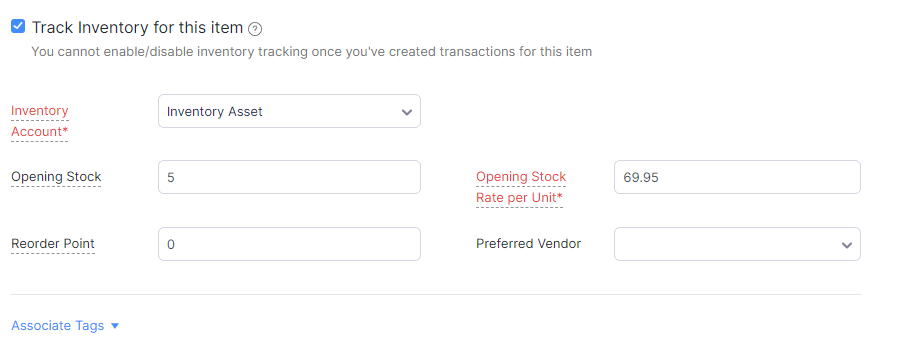
One of these articles because I spent so long trying different snippets of code to enable tracking when using Deluge code to create an item in Zoho Inventory:
Why?
Who uses ZohoInventory for anything else than tracking stock...?
How?
So the quick answer is one missing parameter to send through which is "item_type=inventory"... A little longer, is do ensure you have Zoho Inventory enabled.
ZohoCRM Webhook: Create ZohoInventory Records from an eBay order
- Category: Zoho Inventory
- Hits: 58437
This is a not-so-quick article that queries an eBay order and creates the relevant ZohoInventory item, contact, sales order, package slip, shipment order, invoice, payment records...
Why?
I'm storing this here as a reference and taking the bits that I need for the various clients that request an eBay integration. This is a comprehensive snippet which does the whole lot.
How?
Using the method of "mega-functions", here is the code snippet for one function which will accept as parameter the eBay order reference and generate all the respective records in Zoho Inventory. We're using a ZohoCRM webhook, because CRM webhooks run more reliably then the ones we have found in ZohoBooks and other Zoho Apps.
Zoho Inventory: Mark a package slip as delivered and shipped
- Category: Zoho Inventory
- Hits: 29428
A quick article on a code snippet to mark a package as shipped and delivered in Zoho Inventory.
Why?
As usual, any task like this that takes me longer than an hour, I'd like to document for future use. The use-case is the client has their own delivery drivers and want them to mark a sales order & package as shipped and delivered.
How?
Here's a code snippet that works for me. It is triggered when a user ticks a decision box in Zoho Creator (on iPad displays as an on/off switch). My connection here called "jl_inventory" has the minimum required scopes:
- ZohoInventory.salesorders.READ
- ZohoInventory.packages.READ
- ZohoInventory.shipmentorders.CREATE
- ZohoInventory.shipmentorders.READ

Zoho Inventory Template Issue: First Page is Blank
- Category: Zoho Inventory
- Hits: 19011
So I thought I'd write an article to help me resolve the particular issue where the organization details and the header of the product line items table would display on the first page, the product line items would then print on the second page, with the terms and conditions or small print notes on a third page.
How?