One of these articles because I spent so long trying different snippets of code to enable tracking when using Deluge code to create an item in Zoho Inventory:
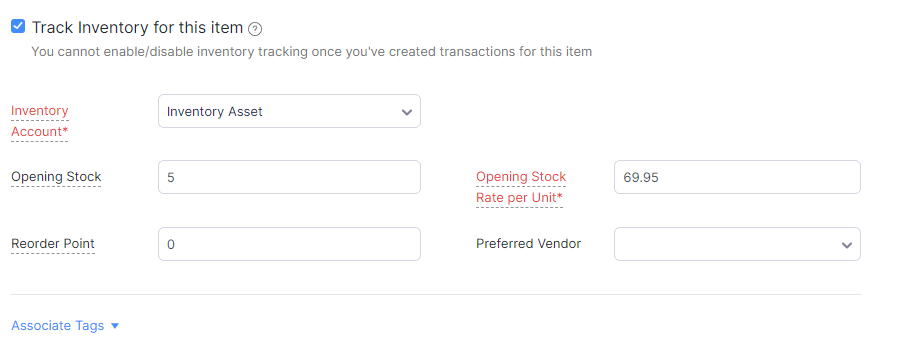
Why?
Who uses ZohoInventory for anything else than tracking stock...?
How?
So the quick answer is one missing parameter to send through which is "item_type=inventory"... A little longer, is do ensure you have Zoho Inventory enabled.
But to flesh that out a little more along with setting the other options under "Advanced Tracking"
copyraw
//
// get chart of accounts to use
r_ChartOfAccounts = invokeurl
[
	url :"https://books.zoho.eu/api/v3/chartofaccounts?organization_id=" + v_BooksOrgID
	type :GET
	connection:"zinventory"
];
m_Accounts = Map();
if(!isnull(r_ChartOfAccounts.get("chartofaccounts")))
{
	for each  r_Account in r_ChartOfAccounts.get("chartofaccounts")
	{
		m_Accounts.put(r_Account.get("account_name"),r_Account.get("account_id"));
	}
}
//
// build the update or create request
m_CreateBooksItem = Map();
m_CreateBooksItem.put("name",v_ItemTitle);
m_CreateBooksItem.put("sku",v_ItemSKU);
m_CreateBooksItem.put("rate",v_ItemPrice.toDecimal());
//
// key here to enable inventory tracking
m_CreateBooksItem.put("item_type","inventory");
//
// other less important values to include re purchase information
m_CreateBooksItem.put("product_type","goods");
m_CreateBooksItem.put("reorder_level",0);
m_CreateBooksItem.put("available_stock",v_QuantityAvailable.toLong());
m_CreateBooksItem.put("initial_stock",v_Quantity.toLong());
m_CreateBooksItem.put("initial_stock_rate",v_ItemPrice.toDecimal());
m_CreateBooksItem.put("inventory_account_id",m_Accounts.get("Inventory Asset").toLong());
m_CreateBooksItem.put("purchase_rate",v_PurchaseRate.toDecimal());
m_CreateBooksItem.put("purchase_account_id",m_Accounts.get("Cost of Goods Sold").toLong());
//
// advanced tracking ones
m_CreateBooksItem.put("track_serial_number",true);
m_CreateBooksItem.put("track_batch_number",true);
//
// let's try creating it
r_CreateItem = zoho.inventory.createRecord("items",v_BooksOrgID,m_CreateBooksItem,"zinventory");
info "ITEM CREATE RESPONSE FOR " + v_ItemID;
info r_CreateItem.get("message");
- //
- // get chart of accounts to use
- r_ChartOfAccounts = invokeurl
- [
- url :"https://books.zoho.eu/api/v3/chartofaccounts?organization_id=" + v_BooksOrgID
- type :GET
- connection:"zinventory"
- ];
- m_Accounts = Map();
- if(!isnull(r_ChartOfAccounts.get("chartofaccounts")))
- {
- for each r_Account in r_ChartOfAccounts.get("chartofaccounts")
- {
- m_Accounts.put(r_Account.get("account_name"),r_Account.get("account_id"));
- }
- }
- //
- // build the update or create request
- m_CreateBooksItem = Map();
- m_CreateBooksItem.put("name",v_ItemTitle);
- m_CreateBooksItem.put("sku",v_ItemSKU);
- m_CreateBooksItem.put("rate",v_ItemPrice.toDecimal());
- //
- // key here to enable inventory tracking
- m_CreateBooksItem.put("item_type","inventory");
- //
- // other less important values to include re purchase information
- m_CreateBooksItem.put("product_type","goods");
- m_CreateBooksItem.put("reorder_level",0);
- m_CreateBooksItem.put("available_stock",v_QuantityAvailable.toLong());
- m_CreateBooksItem.put("initial_stock",v_Quantity.toLong());
- m_CreateBooksItem.put("initial_stock_rate",v_ItemPrice.toDecimal());
- m_CreateBooksItem.put("inventory_account_id",m_Accounts.get("Inventory Asset").toLong());
- m_CreateBooksItem.put("purchase_rate",v_PurchaseRate.toDecimal());
- m_CreateBooksItem.put("purchase_account_id",m_Accounts.get("Cost of Goods Sold").toLong());
- //
- // advanced tracking ones
- m_CreateBooksItem.put("track_serial_number",true);
- m_CreateBooksItem.put("track_batch_number",true);
- //
- // let's try creating it
- r_CreateItem = zoho.inventory.createRecord("items",v_BooksOrgID,m_CreateBooksItem,"zinventory");
- info "ITEM CREATE RESPONSE FOR " + v_ItemID;
- info r_CreateItem.get("message");
Error(s) Encountered
- items with opening stock cannot be deleted, set the opening stock to zero: Guess who's going to have their opening stock set to zero, save the record, then delete it.
Source(s)
Category: Zoho Inventory :: Article: 377