


A quick article on the SPF & DKIM setup to improve email deliverability from a ZohoApp and methods to check.
Why?
Not sure how I came across it as most of our customers don't use ZohoMail, but there is a Zoho Toolkit to run some checks on the email deliverability for a customer: https://zohomail.tools/#runChecks.
How?
So first I'll outline the steps to set this up in ZohoCRM and then how to troubleshoot issues with this. One important thing to note is that the setup needs to be done by whoever manages the domain for the client.
Who owns the domain (eg. mycompany.com)
So this setup involves creating the TXT records on the DNS. Ideally, we would not want access to the DNS as Zoho Support as we could be blamed for any website / mail server issues not related to any of this setup / configuration. Instead, we prepare the following set of instructions for the client to give to their IT administrator. If the client registered their domain with a domain registrar, then they need to sign in to their domain registrar's website and need to be assisted, perhaps via a remote session, on setting these up. If they have someone or a company which manages their domain, then they can give the following instructions to these instead.
ZohoCRM: Get Details as Zoho User
The values are the same for the CRM app for all organizations, but in case these change since time-of-print of this article, this is how to get to them
- Login to ZohoCRM
- Go to Setup (cog icon in the top right next to your profile picture)
- Under Channels, go to Email
- Click on the "Email Deliverability" tab
- Under Authentication, click on "Validate Records"
- Note the DKIM and SPF values as well as the subdomain value:
- DKIM Subdomain: 1522905495316._domainkey.<mycompany.com>
- DKIM Value: k=rsa; p=<A pretty long alphanumeric key>
- SPF Value: v=spf1 include:one.zoho.eu ~all
ZohoCRM: Get IT to do the DKIM
The following are steps as to what to add in the TXT record. How to add the TXT record itself will depend on your mail server or the domain registrar's website to manage your DNS:
- Create a TXT record
- Specify the Host as 1522905495316._domainkey.mycompany.com // Important: if hosted by GoDaddy, Ionos, FastHosts, and similar domain providers, you do not include the domain name as this gets appended automatically: so just 1522905495316._domainkey will do.
- Set the TXT Value to the DKIM Value you noted earlier
ZohoCRM: Get IT to do the SPF
The following are steps as to what to add in the TXT record. How to add the TXT record itself will depend on your mail server or the domain registrar's website to manage your DNS:
- If no TXT record exists for the SPF, then create a TXT record
- Specify the Host as @
- Set the TXT Value to v=spf1 include:one.zoho.eu ~all
- If the TXT record already exists for the SPF, then include the TXT value such as v=spf1 mx a ip4:123.245.123.245 include:spf.mycompany.com include:spf.protection.outlook.com include:one.zoho.eu ~all
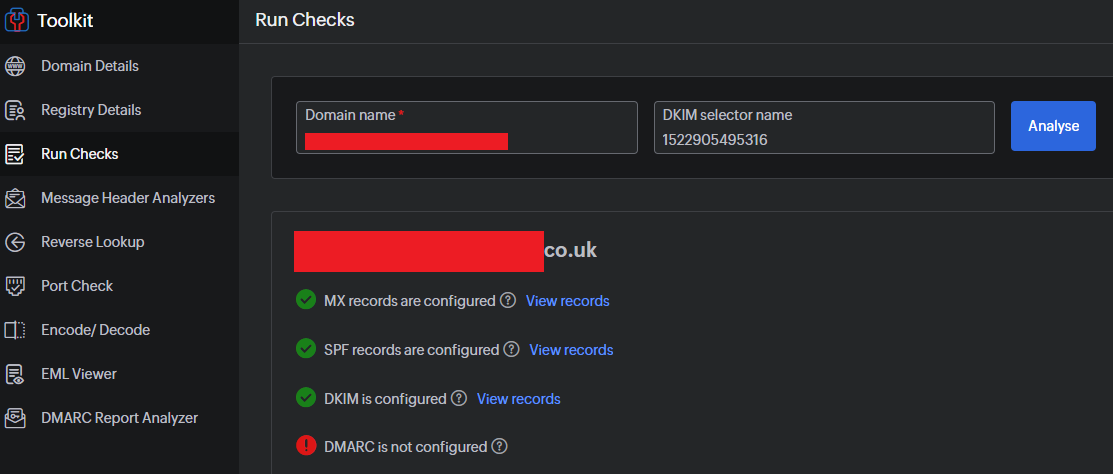
Check using the toolkit:
Some registrars will say this can take between 24 to 72 hours to propagate. In our cases, a working example can return within the hour as authenticated. Use the following link to continue monitoring for when this has taken effect: https://zohomail.tools/#runChecks
Source(s):
Category: Zoho Other :: Article: 376







