This is an article to demonstrate how to log a time event under a Zoho Projects Issue using code (Zoho Deluge) rather than the graphical user interface (GUI). Note this would probably be similar to when trying to enter a time against a project Task but this article is focused on getting this working against Project Issues. Also note, we will refer to Project Issues in this article, but in the backend code, Zoho refer to Issues as "Bugs".
Why?
At time of this article (Apr-2021), we could not find a working example that could allow us to do this. I have provided some links at the end of this article for you which we tried to use but only helped us out about half-way, the rest we guessed on our own:
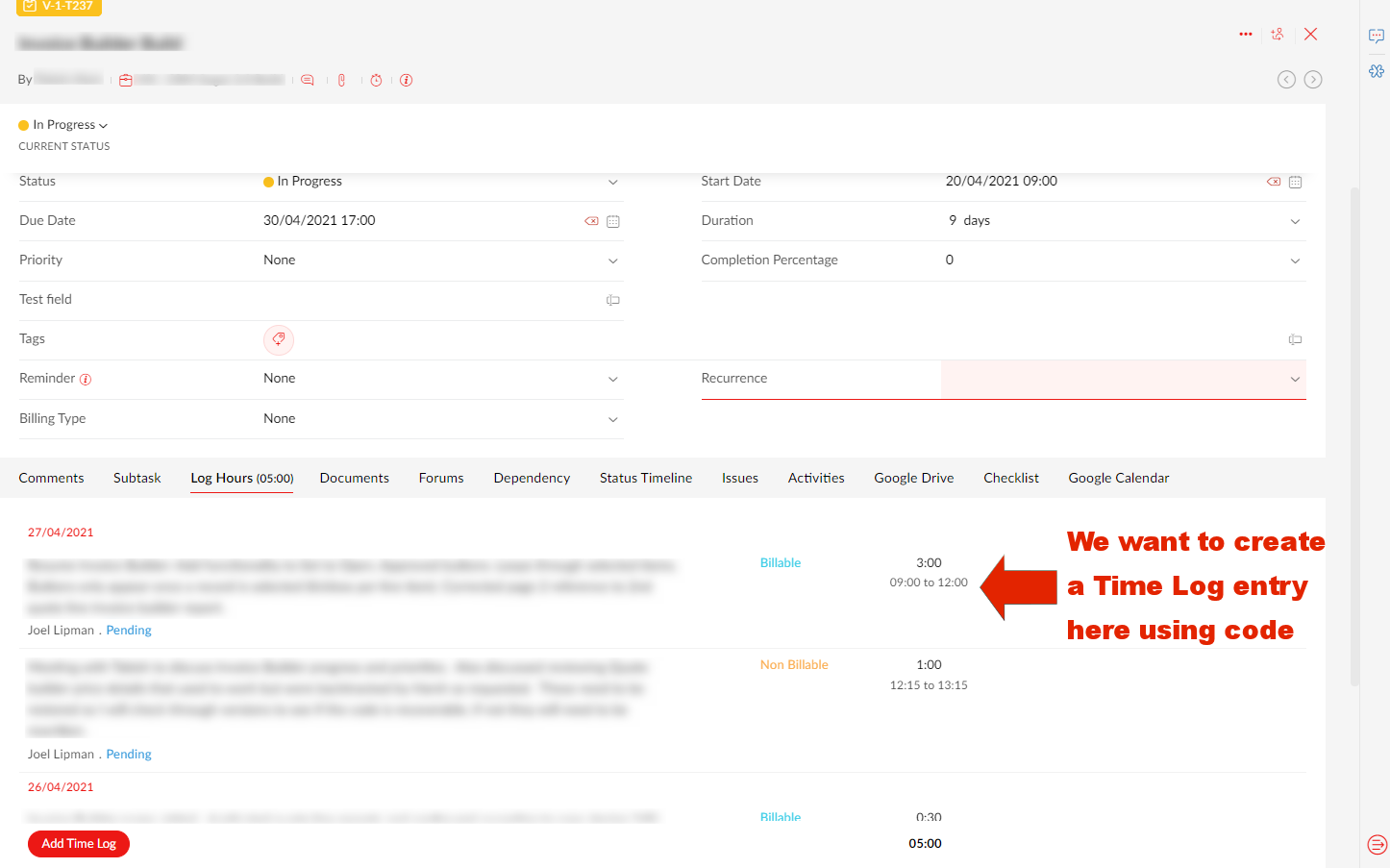
Our use case, is that we are developing a Zoho Creator app that will help staff log time and then push the creator record to Zoho Projects.
How?
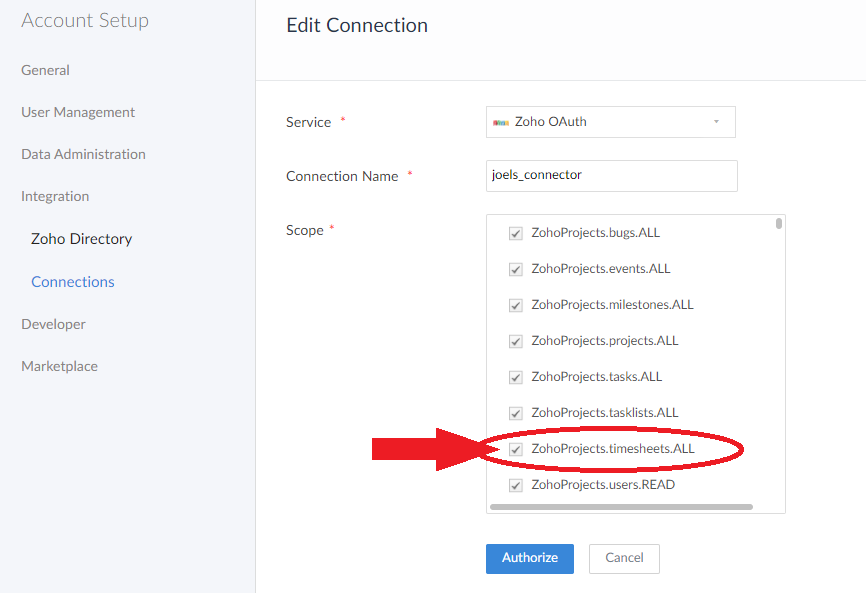
For the following example, you will need to have setup a Zoho Oauth Connection with the appropriate authorized scopes and have access to all related systems such as Zoho Projects and the originating app (in this example, Zoho Creator).
1. Setup up Zoho Oauth Connection:
- Go to connections (in creator this is icon in top-left > Setup > Connections)
- Click on "Add Connection" and click on "Zoho OAuth"
- Give a lower connection name, eg. "joels_connector"
- Select the scope ZohoProjects.timesheets.ALL as a minimum (or CREATE/READ):
2. Code to push Time Log entry to Zoho Projects:
- Example #1: Pushing a time log with a specified start date/time (requires end time field if using):copyraw
// // init (from dropdowns you have made applicable to your Zoho Projects system) v_PortalID = ifnull(input.ZohoProject_Portal,0); v_ProjectID = ifnull(input.ZohoProject_Project,0); v_IssueID = ifnull(input.ZohoProject_Issue,0); // // get data from form v_StartTime = ifnull(input.Start_Time.toTime(),zoho.currenttime); v_EndTime = ifnull(input.End_Time.toTime(),zoho.currenttime.addHour(1)); v_Billable = if(input.Billing == "Paid", "Billable", "Non Billable"); v_WorkNotes = ifnull(input.Work_Notes,""); v_TaskOrIssue = if(input.Type == "Task", "tasks", "bugs"); // // eval v_HoursDecimal = (v_EndTime.toLong() - v_StartTime.toLong()) / 1000 / 60 / 60; v_TimeHour = ((v_EndTime.toLong() - v_StartTime.toLong()) / 1000 / 60 / 60).round(0).leftpad(2).replaceAll(" ", "0"); v_TimeMinutes = ((v_EndTime.toLong() - v_StartTime.toLong()) / 1000 / 60 % 60).round(0).leftpad(2).replaceAll(" ", "0"); v_HoursHHmm = v_TimeHour + ":" + v_TimeMinutes; // // build map m_CreateTimeLog = Map(); m_CreateTimeLog.put("date",v_StartTime.toDate().toString("MM-dd-yyyy")); m_CreateTimeLog.put("bill_status",v_Billable); m_CreateTimeLog.put("hours",v_HoursHHmm); m_CreateTimeLog.put("start_time",v_StartTime.toString("hh:mm a")); m_CreateTimeLog.put("end_time",v_EndTime.toString("hh:mm a")); m_CreateTimeLog.put("notes",v_WorkNotes); v_Url = "https://projects.zoho.eu/restapi/portal/"+v_PortalID+"/projects/"+v_ProjectID+"/"+v_TaskOrIssue+"/"+v_IssueID+"/logs/"; r_CreateTimeLog = invokeurl [ url :v_Url type :POST parameters:m_CreateTimeLog connection:"joels_connector" ]; info r_CreateTimeLog;- //
- // init (from dropdowns you have made applicable to your Zoho Projects system)
- v_PortalID = ifnull(input.ZohoProject_Portal,0);
- v_ProjectID = ifnull(input.ZohoProject_Project,0);
- v_IssueID = ifnull(input.ZohoProject_Issue,0);
- //
- // get data from form
- v_StartTime = ifnull(input.Start_Time.toTime(),zoho.currenttime);
- v_EndTime = ifnull(input.End_Time.toTime(),zoho.currenttime.addHour(1));
- v_Billable = if(input.Billing == "Paid", "Billable", "Non Billable");
- v_WorkNotes = ifnull(input.Work_Notes,"");
- v_TaskOrIssue = if(input.Type == "Task", "tasks", "bugs");
- //
- // eval
- v_HoursDecimal = (v_EndTime.toLong() - v_StartTime.toLong()) / 1000 / 60 / 60;
- v_TimeHour = ((v_EndTime.toLong() - v_StartTime.toLong()) / 1000 / 60 / 60).round(0).leftpad(2).replaceAll(" ", "0");
- v_TimeMinutes = ((v_EndTime.toLong() - v_StartTime.toLong()) / 1000 / 60 % 60).round(0).leftpad(2).replaceAll(" ", "0");
- v_HoursHHmm = v_TimeHour + ":" + v_TimeMinutes;
- //
- // build map
- m_CreateTimeLog = Map();
- m_CreateTimeLog.put("date",v_StartTime.toDate().toString("MM-dd-yyyy"));
- m_CreateTimeLog.put("bill_status",v_Billable);
- m_CreateTimeLog.put("hours",v_HoursHHmm);
- m_CreateTimeLog.put("start_time",v_StartTime.toString("hh:mm a"));
- m_CreateTimeLog.put("end_time",v_EndTime.toString("hh:mm a"));
- m_CreateTimeLog.put("notes",v_WorkNotes);
- v_Url = "https://projects.zoho.eu/restapi/portal/"+v_PortalID+"/projects/"+v_ProjectID+"/"+v_TaskOrIssue+"/"+v_IssueID+"/logs/";
- r_CreateTimeLog = invokeurl
- [
- url :v_Url
- type :POST
- parameters:m_CreateTimeLog
- connection:"joels_connector"
- ];
- info r_CreateTimeLog;
- Example #2: Pushing a time log defaulting to the current time as start time:copyraw
// // init (from dropdowns you have made applicable to your Zoho Projects system) v_PortalID = ifnull(input.ZohoProject_Portal,0); v_ProjectID = ifnull(input.ZohoProject_Project,0); v_IssueID = ifnull(input.ZohoProject_Issue,0); // // get data from form v_StartTime = ifnull(input.Start_Time.toTime(),zoho.currenttime); v_EndTime = ifnull(input.End_Time.toTime(),zoho.currenttime.addHour(1)); v_Billable = if(input.Billing == "Paid", "Billable", "Non Billable"); v_WorkNotes = ifnull(input.Work_Notes,""); v_TaskOrIssue = if(input.Type == "Task", "tasks", "bugs"); // // eval v_HoursDecimal = (v_EndTime.toLong() - v_StartTime.toLong()) / 1000 / 60 / 60; v_TimeHour = ((v_EndTime.toLong() - v_StartTime.toLong()) / 1000 / 60 / 60).round(0).leftpad(2).replaceAll(" ", "0"); v_TimeMinutes = ((v_EndTime.toLong() - v_StartTime.toLong()) / 1000 / 60 % 60).round(0).leftpad(2).replaceAll(" ", "0"); v_HoursHHmm = v_TimeHour + ":" + v_TimeMinutes; // // build map m_CreateTimeLog = Map(); m_CreateTimeLog.put("date",v_StartTime.toDate().toString("MM-dd-yyyy")); m_CreateTimeLog.put("bill_status",v_Billable); m_CreateTimeLog.put("hours",v_HoursHHmm); m_CreateTimeLog.put("notes",v_WorkNotes); v_Url = "https://projects.zoho.eu/restapi/portal/"+v_PortalID+"/projects/"+v_ProjectID+"/"+v_TaskOrIssue+"/"+v_IssueID+"/logs/"; r_CreateTimeLog = invokeurl [ url :v_Url type :POST parameters:m_CreateTimeLog connection:"joels_connector" ]; info r_CreateTimeLog;- //
- // init (from dropdowns you have made applicable to your Zoho Projects system)
- v_PortalID = ifnull(input.ZohoProject_Portal,0);
- v_ProjectID = ifnull(input.ZohoProject_Project,0);
- v_IssueID = ifnull(input.ZohoProject_Issue,0);
- //
- // get data from form
- v_StartTime = ifnull(input.Start_Time.toTime(),zoho.currenttime);
- v_EndTime = ifnull(input.End_Time.toTime(),zoho.currenttime.addHour(1));
- v_Billable = if(input.Billing == "Paid", "Billable", "Non Billable");
- v_WorkNotes = ifnull(input.Work_Notes,"");
- v_TaskOrIssue = if(input.Type == "Task", "tasks", "bugs");
- //
- // eval
- v_HoursDecimal = (v_EndTime.toLong() - v_StartTime.toLong()) / 1000 / 60 / 60;
- v_TimeHour = ((v_EndTime.toLong() - v_StartTime.toLong()) / 1000 / 60 / 60).round(0).leftpad(2).replaceAll(" ", "0");
- v_TimeMinutes = ((v_EndTime.toLong() - v_StartTime.toLong()) / 1000 / 60 % 60).round(0).leftpad(2).replaceAll(" ", "0");
- v_HoursHHmm = v_TimeHour + ":" + v_TimeMinutes;
- //
- // build map
- m_CreateTimeLog = Map();
- m_CreateTimeLog.put("date",v_StartTime.toDate().toString("MM-dd-yyyy"));
- m_CreateTimeLog.put("bill_status",v_Billable);
- m_CreateTimeLog.put("hours",v_HoursHHmm);
- m_CreateTimeLog.put("notes",v_WorkNotes);
- v_Url = "https://projects.zoho.eu/restapi/portal/"+v_PortalID+"/projects/"+v_ProjectID+"/"+v_TaskOrIssue+"/"+v_IssueID+"/logs/";
- r_CreateTimeLog = invokeurl
- [
- url :v_Url
- type :POST
- parameters:m_CreateTimeLog
- connection:"joels_connector"
- ];
- info r_CreateTimeLog;
Error(s)
- Input Parameter Missing (6831):
Can happen when there are either too many parameters or one is missing. Instead of abiding by the API documentation which was out of date at time of print, trial and error will resolve this or use our examples above.copyraw// fields required if submitting time log without start time (uses current time and adds hours to it) - date (in US format irrespective of your datacenter: MM-dd-yyyy) - bill_status (either "Billable" or "Non Billable") - hours (eg. "01:00") - notes (the actual work notes: eg. "Twiddled thumbs and spun on chair") // fields required if submitting time lot with a start date/time - date (in US format irrespective of your datacenter: MM-dd-yyyy this is also to be the start date of the time entry) - bill_status (either "Billable" or "Non Billable") - start_time (eg. "01:00 PM" - note you will get error if you try to submit "13:00 PM") - end_time (required because of start_time, also in format "02:00 PM") - notes (the actual work notes: eg. "Twiddled thumbs and spun on chair")
- // fields required if submitting time log without start time (uses current time and adds hours to it)
- - date (in US format irrespective of your datacenter: MM-dd-yyyy)
- - bill_status (either "Billable" or "Non Billable")
- - hours (eg. "01:00")
- - notes (the actual work notes: eg. "Twiddled thumbs and spun on chair")
- // fields required if submitting time lot with a start date/time
- - date (in US format irrespective of your datacenter: MM-dd-yyyy this is also to be the start date of the time entry)
- - bill_status (either "Billable" or "Non Billable")
- - start_time (eg. "01:00 PM" - note you will get error if you try to submit "13:00 PM")
- - end_time (required because of start_time, also in format "02:00 PM")
- - notes (the actual work notes: eg. "Twiddled thumbs and spun on chair")
- Input Parameter does not match the pattern specified (6832):
Can happen when you are on the EU datacenter and you are trying to use European date format or time format to push to Zoho Projects.copyraw// your date format input.Start_Date.toString("dd-MM-yyyy"); // correct to US format (even if you are using projects.zoho.eu) input.Start_Date.toString("MM-dd-yyyy");- // your date format
- input.Start_Date.toString("dd-MM-yyyy");
- // correct to US format (even if you are using projects.zoho.eu)
- input.Start_Date.toString("MM-dd-yyyy");
copyraw// your time format input.Start_Time.toString("HH:mm"); // correct to 12-hour with meridian (even if you are using projects.zoho.eu) input.Start_Time.toString("hh:mm a"); // additional note: "13:00 PM" will return this error as well- // your time format
- input.Start_Time.toString("HH:mm");
- // correct to 12-hour with meridian (even if you are using projects.zoho.eu)
- input.Start_Time.toString("hh:mm a");
- // additional note: "13:00 PM" will return this error as well
Source(s)
Category: Zoho Projects :: Article: 281