

Basically I thought that the regional settings of a report generated using Report Builder 2.0 on a MS SQL Server 2008 instance were dependent on either the server or the client machine. Realised that this was actually specified in the report. Here's a quick note on how to set Dates and Times used in parameter fields to UK format (dd/MM/yyyy).
You can override this in the report by:
- Go to Design
-
Select the View tab
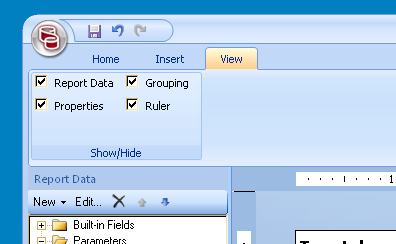
- Check that the "Properties" pane is displayed/ticked
-
Change Language under Report Properties > Localization to en-GB
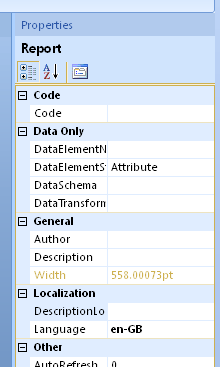
- Save the report and test.
Category: SQL Server Reporting Services :: Article: 585