

Zoho CRM: Get Unique Values of a Text Field
- Category: Zoho CRM
- Hits: 51895
This article demonstrates how to return a list of unique values in a particular field in a CRM module.
Why?
My use-case is a data-migration where the records exist in a staging module in CRM but I want to transform/translate one of the column values into the target
How?
So this is my plan:
- Setup a connector to CRM with the scopes ZohoCRM.coql.READ and ZohoCRM.modules.ALL
- Build up a SQL query, or more specifically, a COQL - CRM Object Query Language
- Try using distinct on a single-line text field
- Adapt the query for unique values in a lookup field

Zoho CRM: Upload a Product Photo using Deluge
- Category: Zoho CRM
- Hits: 27633
A quick article to remind me on how to upload a photo using CRM API v2. Yes it's documented and yes it still confuses me now and again. So I'm writing this to remind me and to keep reminding me of how to do this.
Why?
My use-case is that I have a photo in Zoho Creator but the source doesn't really matter as the part I struggled on was uploading it to CRM. I want to update the photo in the CRM record.
How?
So we have to do the usual which is download the photo using invokeUrl then we set the paramname not to attachment but to file. We then use another invokeUrl to upload the photo to CRM:
Zoho CRM: Standard Setup for Tax Rates
- Category: Zoho CRM
- Hits: 38745
This is an article for training purposes. I'm pretty sure there is official documentation on how to do this but I thought I'd write this article to make it simpler for new developers to follow and learn as a quick point of reference.
Why?
Some clients systems will presume that they don't need their sales or CRM users to think about tax and probably manage it in Zoho Books leaving it to their finance team. This is a quick run-through for a standard setup to include UK tax/vat.
How?
Here's a quick step-by-step to follow:

Zoho CRM: Permission Denied for Quote Conversion Mapping
- Category: Zoho CRM
- Hits: 23119
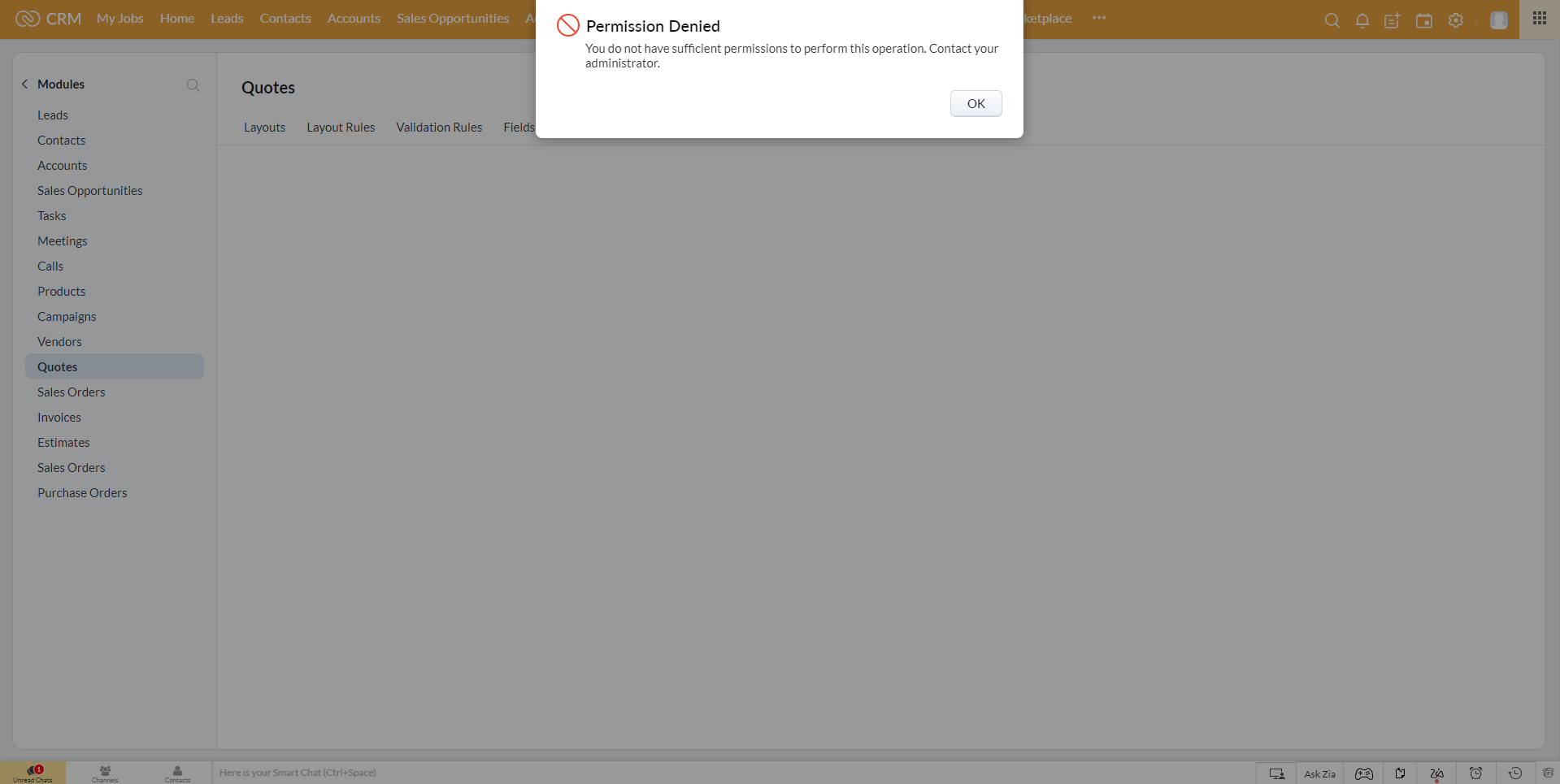
A really quick article for anyone experiencing the same issue: As a super admin in CRM, I am denied permission to access the Quote Conversion Mapping page...
Why?
I wanted to map a billing street 2 and shipping street 2 from the Account module to the Quote module, then on convert, to map these to the Sales Order in CRM. As my client's sales team would only create sales orders in CRM and don't use the invoice module (that's for their finance team using ZohoBooks), we disabled the CRM Invoice module.
How?
Therein lies the reason. For the quote conversion mapping, it needs the CRM Invoice module as well.
ZohoCRM: Deluge: Map a custom field from user profile
- Category: Zoho CRM
- Hits: 23521
A quick article to remind me how to quickly get a field from a user's settings based on the owner of a record.
Why?
A client had added a custom lookup field to the users settings called "Division" (similar to team name) and wanted any Opportunity record to have a field showing the user's Division. This would help in reporting later down the line.
How?
The following code snippet will get the Opportunity/Deal/Potential record details, then get the Owner frrom the CRM users table, find the value of the custom field and search for this (if it is a lookup to a module - only returns as string), and updates the Opportunity/Deal/Potential record.

Zoho CRM & Zoho Bookings Issue: Full Name appears in Last Name (first name first name last name)
- Category: Zoho CRM
- Hits: 24090
A quick article to explain why the full name might appear in the last name field in Zoho CRM.
Why?
We had a customer report the issue that sometimes the full name of a contact was appearing in the last name field and creating a contact called "Firstname Firstname Lastname" (eg. "Joel Joel Lipman" - when Joel is not my middle name).
How?
This is a setting that is enabled by default in Zoho Bookings as documented in the official documentation. Not sure why anyone would want to leave this enabled without applying the fix.

ZohoCRM: Process all records of a module
- Category: Zoho CRM
- Hits: 41399
A quick article to document a method of looping through all the records of a module and processing these with the ability auto-resume without processing the same record twice.
Why?
Whether you have a few hundred records, or a few hundred thousand records, we sometimes want to write a function that will check each record and mark it so that the process doesn't repeat on records that have already been checked.
Some solutions have worked in the past where you could simply add a checkbox and do a search where this value is false; but lately this hasn't been working for me. To this end, I have thought of an alternative that I now use frequently in client systems.
How?
The gist is that we add a checkbox called "Processed" which will have a datatype Boolean. Our function will then loop through each record and do what it has to do. The workaround here is that we order this by modified time. When the checkbox gets updated, this modifies the record and puts it at the bottom of the list.

ZohoCRM: zoho.crm.searchRecords only returns certain records
- Category: Zoho CRM
- Hits: 22973
This is an article to hopefully resolve for you quicker than it took me, why a zoho.crm.searchRecords() returns some of the records but omits others.
Why?
The use-case was that we were creating a custom related list on a Zoho Finance > Sales Orders module but it wasn't finding all the Quotes related to this Sales Order.
How?
The quick answer is buried in Zoho documentation and due to the searchRecords function requiring it's 5th parameter which defaults to "not converted" records:
<variable>=zoho.crm.searchRecords(<module_name>,<criteria>,<page>,<per_page>,<search_value>,<connection>);