


Zoho CRM: Updating a CRM record Custom Line Items using API v7
- Category: Zoho CRM
- Hits: 54668
What?
This is a quick bit of code for my reference so that I don't have to keep finding a function that gives me the syntax of how to either create or update a record using invokeUrl.
Why?
Because my designers keep including custom fields in their transactional modules line items (quotes, sales orders, invoices, purchase orders). The only way to update these are by using the API and deluge function invokeURL rather than the usual shortcode of zoho.crm.updateRecord() or zoho.crm.createRecord().
How?
This is somewhere in the official documentation but here's the bits that I need:
ZohoCRM: Make either Mobile or Email mandatory
- Category: Zoho CRM
- Hits: 21824
A really quick article on a pretty cool requirement, making 2 fields mandatory but if one is completed then making the other optional.
Why?
My use-case is that the mobile or email field on a Zoho CRM contact record is used to authenticate the contact on a Wordpress portal. OTP or 2FA or MFA or OTC is in effect however; so a contact email OR phone number is required. Both aren't required but at least one should be.
How?
We can do this without code and only using ZohoCRM layout rules. Let's take a contact record for demo purposes:

If I enter a phone number:

If I enter an email:


Zoho CRM & Zoho Sign: Send CRM Merged Template for Zoho Sign
- Category: Zoho CRM
- Hits: 84217
I think I have a similar article on this website but the article below documents the full process to create a button that will map the values/fields from the record into a CRM Mail Merge template and send it off for signing, then return the Signed document attached to the initial record (where the button was).
Why?
If anyone has the envious task of sending a document out for signing by a customer, you will know this takes a while to do:
- You have to find the contact record in CRM for example
- Click on "Send for Zoho Sign"
- Select the template document or upload one
- Add the fields that you will complete, and the ones that other recipients will complete
- Send it for your end-user to complete and sign it
- This comes back to a section called "ZohoSign Documents", download the attachment
- Go back to the contact record, and upload the file to the attachment...
What if I told you we can code a single button on the record which does all of that for you; with only you needing to approve the document before it gets sent to the end user, and when they finish signing it, it attaches automatically back on to the record?... It is possible. The article below documents it but as this is a fair bit of coding, you may want to ask us to build this solution for you. It can take a few days but it will save your staff a ton of time per week!
What your staff see:

How?
So we're going to create a button. Let's use the example of a credit application you want to send to your customer, and when they complete it, the PDF version gets attached to their contact record... all from one click of a button:

ZohoCRM: Daily Follow Up and Remind Record Owner to Convert Lead
- Category: Zoho CRM
- Hits: 73526
An article to ensure I never spend this long on such a request again. The brief is: "Follow up when a lead is created and not converted within 1 day send an email and notification to sales person everyday for 3 days then escalate to a specified user".
Why?
Sorry Zoho! I tried using the interface to set up a workflow or any other mechanisms within ZohoCRM that allowed me to set up a daily reminder to the lead record owner but to no avail. An assignment rule wouldn't work in this case as it had to be the lead owner (there is no owner at assignment rule stage). A workflow email notification doesn't do the popup on the CRM as well. A workflow notify by email didn't give the option to remind daily... only weekly or monthly.
Spent a while trying not to use code but here we are. Code is our friend.
How?
So we'll run a workflow that triggers on the creation of a lead and runs a function which will simultaneously create a task with a reminder both on popup and email which repeats every day until an end date.
We then carry out the last bit of the brief with a separate workflow that runs exactly 4 days after the lead creation time and assigns it to the specified user (full name of user was given in the brief but removed here for privacy).
Finally, we delete any of these tasks when they get transferred to the contact record.

Zoho CRM: Client Script Confirmation Box and Popup Mailer
- Category: Zoho CRM
- Hits: 46551
This is an article just repeating a script from the Zoho Kaizen series allowing a confirmation box (something lacking in Zoho Creator - but that every app outside of Zoho has) as well as a popup to email from CRM with a rich-text interface.
Why?
The use-case here is non-existent. It's more of a play around to see what can be achieved and how much this can be customized. The task I've set for myself is as follows:
- Trigger if the contact record has a tickbox called "Extra Confidential" ticked/checked=true
- Popup a confirmation box to proceed or cancel.
- Popup the email from CRM mailer with the to email address, bcc, subject and message content already populated.
How?
The example from the Kaizen series uses a record with canvas mode applied; but I wanted to try it without a canvas to see if we can have this functionality using the out-of-the-box ZohoCRM.

ZCRM Client Script: Correct Decimal Fields OnLoad
- Category: Zoho CRM
- Hits: 43364
This is an article detailing the client script to fix any fields which exceed their decimal places limit in ZohoCRM.
Why?
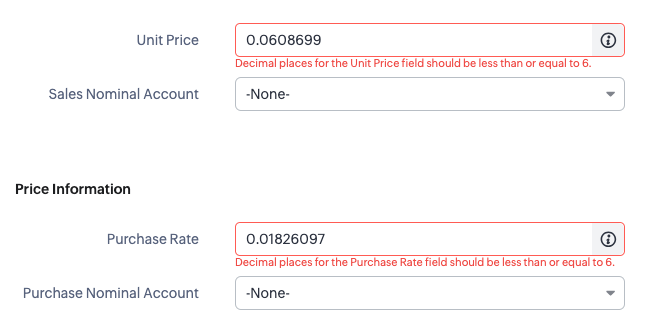
So we have a customer that has some decimal fields on the products module that are calculated and will sometimes return numbers with more than 6 decimal places. As this is more than specified on the ZohoCRM field properties, as soon as the staff user tries to save the record, they will get a validation error on the decimal field even if that's not the field that is being changed:
Decimal places for the Unit Price field should be less than or equal to 6.
How?
The workaround for staff is to round this up manually and then save the record. But this can be an annoying overhead, especially if it can be auto-corrected with a client script.

ZohoCRM & ZohoWriter: Generate Rich-Text / HTML Email Signatures in CRM
- Category: Zoho CRM
- Hits: 64988
This is an article to show you how to, using Deluge code, generate all the email signatures in the user profile in ZohoCRM.
Why?
To simplify the on-boarding process. A client of ours has a rather rich HTML email signature with a profile photo included. When sending an email from CRM, they want CRM to include this rich signature (different per user) at the bottom of the email message.
How?
So there are a few issues with displaying images which would have other solutions, such as hosting the images on a web-server, or converting to a base64 or an SVG. ZohoCRM signatures seem to be unable to handle a lot of code or long URLs such as a base64 source URL for an image.

ZohoCRM: Using Criteria with Module Record Count
- Category: Zoho CRM
- Hits: 48538
An example of code using the new API call "Module Record Count" with some criteria.
Why?
At time of print, I couldn't find an example of how to use this API call with search filters or criteria. Not sure about the rest of you, but I've been using this for pagination purposes and for the system to work out how many pages or loops in total it would need to do.
How?
Here's a couple of working examples I use in production systems: