

Performance Report - Background colors based on dataset values
- Category: SQL Server Reporting Services
- Hits: 48819
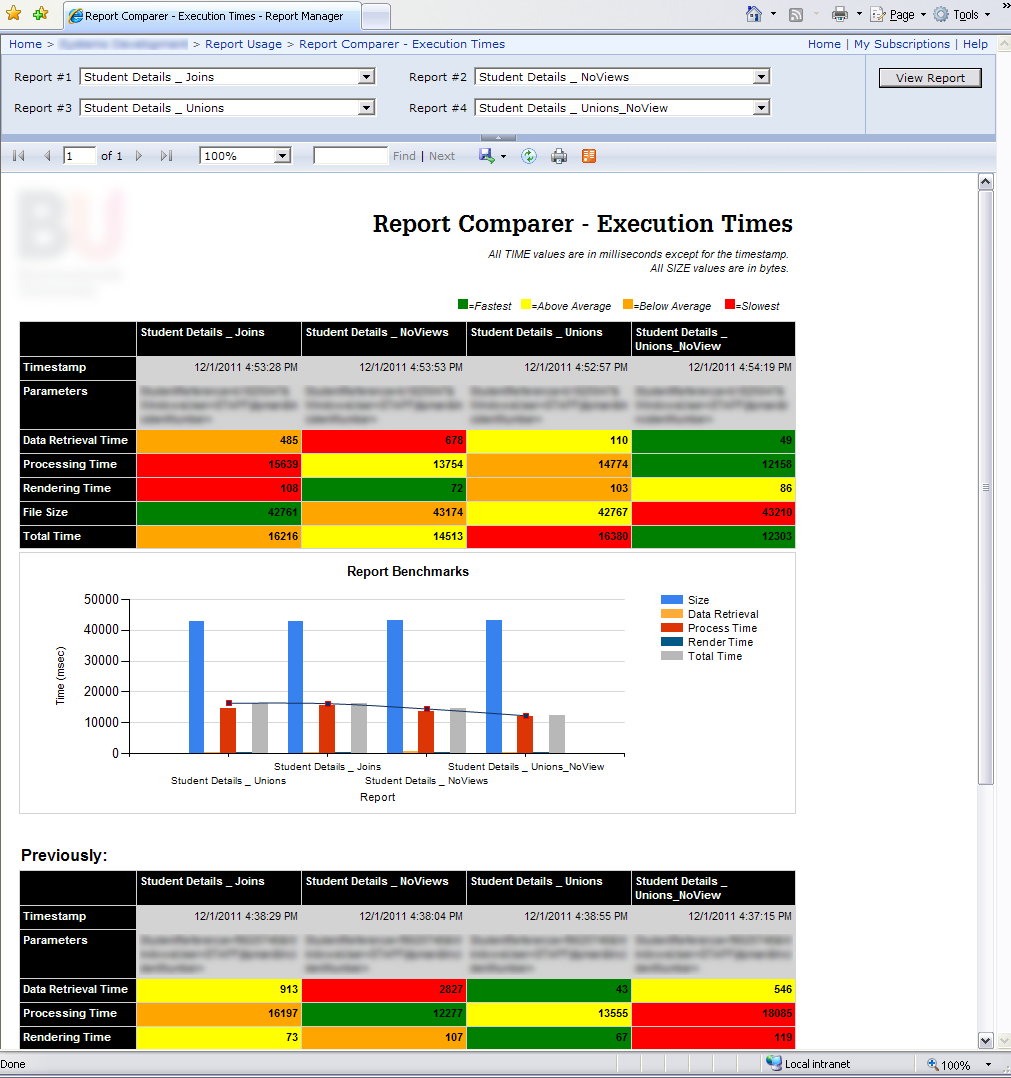
I've recently written a report for SQL Server Reporting Services 2008 R2 (SSRS) which will compare up to 4 reports and will compare the time taken for each one. The breakdown or what I was able to measure with the default installation are the times taken for "data retrieval", "processing", "rendering", and then the totals of these.
I haven't Googled this at the time of print so there may be a million better solutions out there, this is just how I did it. This may look like a horrible report which would fail an accessibility test but visually it says straight away which is the better report; and when comparing to the previous runs (using a second dataset) you can tell where changes were made and how this affected the reports' performance.
What?
What I'm trying to do is display a set of results (comparing various reports) in a table and then to color the backgrounds based on whether they are the fastest or slowest in the set.
Something like:
How to Display Report Execution Time in SSRS (milliseconds)
- Category: SQL Server Reporting Services
- Hits: 83545
So there are other articles out there but I was looking to display in milliseconds the execution time it took for a particular report (which searches for results matching the submitted parameter) to run.
Lifted from Dattatray Sindol's blog
Other sites have this solution as well so who copied off who is not my concern as this is not the solution to our problem. This is the solution that I initially used but my end-users were asking why is it always 0 seconds. This was because we were using the following MDX statement which had seconds as its smallest denominator:
="Execution Time: " +
CStr(System.DateTime.Now.Subtract(Globals!ExecutionTime).Hours) + " hour(s)" + " , " +
CStr(System.DateTime.Now.Subtract(Globals!ExecutionTime).Minutes) + " minute(s)" + ", " +
CStr(System.DateTime.Now.Subtract(Globals!ExecutionTime).Seconds) + " second(s)"

// yields
// 0 hour(s), 1 minute(s), 2 second(s)
This isn't what I want... It wasn't accurate enough and always saying 0 seconds was just confusing the end-user...
SSRS Zero Padding
- Category: SQL Server Reporting Services
- Hits: 225855
I didn't want to do this at the database level, mainly because it meant modifying the SQL query. The zero padding would need to be applicable within an MDX query.
The Situation
We have a database using Oracle 10g, and a SQL Server Reporting Services v2008 R2 environment. My use for this was when displaying an audit log displaying the oracle errors.
Oracle Errors
An Oracle error usually returns in the format of -12345. If we want to look them up the error is ORA-12345. Unfortunately Oracle also returns errors of less than 10000 so ORA-00201 would actually be returned as "-201". As I wanted a link so that the user can just click on this link and it would take them to http://ora-00201.ora-code.com/.
SSRS AlphaNumeric Parameter Validation
- Category: SQL Server Reporting Services
- Hits: 34432
If you ever want to check the parameters submitted with a report for alpha numeric characters (so it doesn't contain symbols, punctuations, etc) then you should do this at the database level, and then get the report to complete the check:
The Plan
- User enters value in parameters and clicks on "View Report"
- Report passes parameter to dataset which gets formatted by the database
- Report retrieves (select) formatted parameter as a field value to use
- Report loads with changes based on returned value.
The Gist
- Add database level parameter check
- Add IIF in SSRS to confirm
SSRS Retrieving Oracle Stored Procedure Success or ErrorLevel
- Category: SQL Server Reporting Services
- Hits: 57965
We have a report in SQL Server Reporting Services 2008 R2 (SSRS) reading from an Oracle 10g database which works great and lists all the details on a specific student. An additional request is that there appears a link that will run a stored procedure which
- Updates a timestamp in an existing table
- Inserts a row into an audit table
How?
Reminder on SSRS row separator
- Category: SQL Server Reporting Services
- Hits: 30519
- XP SP3 Workstation
- Business Intelligence Development Studio 2008 (BIDS)
- SQL Server Reporting Services 2008 R2 (SSRS)
I have a report displaying room bookings. Each row lists the day, date, room name, start/finish times, booking details and the staff contact. I want an empty row to appear between each day in the list, so I have:
SSRS Repeat Headers in PDF Report
- Category: SQL Server Reporting Services
- Hits: 35597
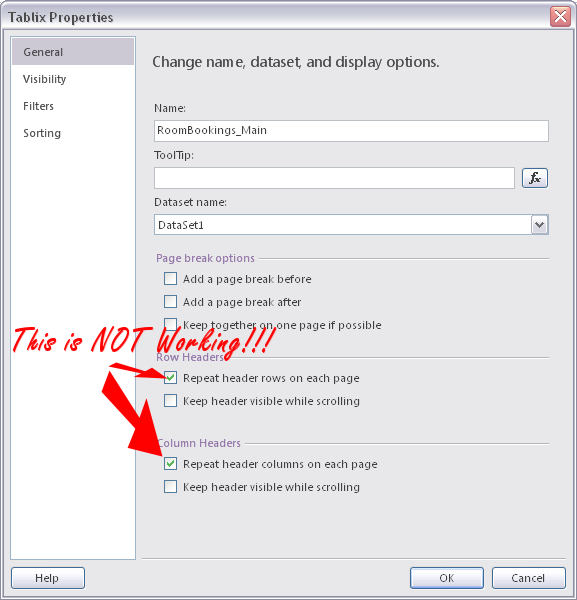
I've set some tablix headers but when I request the same report in PDF format, the tablix headers only appear once on the first page. Every subsequent page simply displays the report header (which does not include the tablix header... obviously). I right-clicked on the header row of the tablix and checked the box "Repeat header columns on each page.

SSRS External Images don't display
- Category: SQL Server Reporting Services
- Hits: 111413
We want some photos taken from another website of ours to display in our report. These are not stored locally on the Reporting Server because other services use these photos on our Intranet and we only want one location to upload the photos. These images are provided via a website address (http) or network share (file).
Before you ask, we have several MS Sharepoint sites but we didn't go down the route of uploading 10000+ images into a Sharepoint database though we are still considering it; so this article is more about just getting external images to display when they are provided over an authenticated URL (You shouldn't be having any issues with this if the image is available to anonymous users - eg. Google Logo).
Our Setup
- Windows XP Workstation
- Business Intelligence Development Studio 2008 (BIDS)
- SQL Server 2008 R2 Reporting Server (SSRS) running on Windows Server 2003
- Team Foundation Server 2010 (TFS)
Problem #1: Image does not appear within SSRS
When previewing the report in BIDS, the photo appears fine. If we deploy the report to our Reporting Server and attempt to view it using a Web-Browser, the image does not display:
- Get report to see images hosted on an external URL
- Check if image exists to display alternative placeholding image.