


Zoho CRM & Zoho Creator: Query returns some fields missing other data on the record
- Category: Zoho
- Hits: 18024
A super quick article to demonstrate how an idiot like myself can misread the documentation. This particular article shows you how to customize the search results or response from using zoho.creator.getRecordById().
Why?
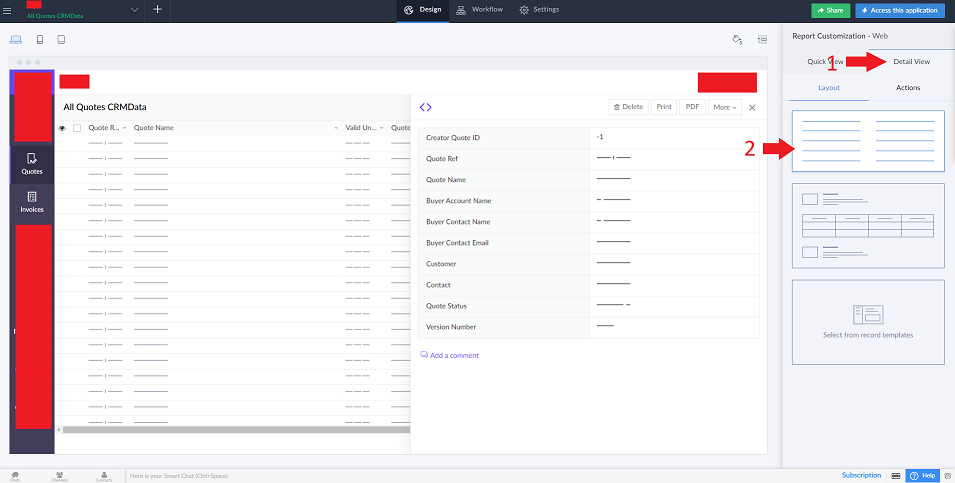
My use case scenario is that I was trying to build a related list in Zoho CRM with a view on to related records in Zoho Creator. For some reason, only some random fields were being returned, all pretty much useless to me. Well the "for some reason" turned out to be because my detail view on the report was displaying a report/document template.
How?
The quick answer is:
Add the fields you want to the detail view of the report you are accessing.

Zoho Creator: Assign an integration field value with an integration value
- Category: Zoho
- Hits: 14821
This is a quick article to help anyone encountering this gotcha: I have an integration field, if someone changes it, I want to save the value to the record immediately.
Why?
If you try to update an integration field via deluge with another integration field or even the same integration field, it will return an error
Unable to update the value to r_RecordDetails.Account. Line:(442)
How?
It is written in the documentation albeit difficult to find: an integration field returns an ID as a string. If you want to assign it to an integration field, you have to convert it to a number with .toLong().

Zoho Creator: Two submit buttons on a non-stateless form with 2 different redirects
- Category: Zoho
- Hits: 34302
This is an article to document how to have two submit buttons on a non-stateless form which both submit the form but one leaves the current record open while the other redirects to the reports view.
Why?
A client wanted a "Save" button on their form as well as a "Save & Close" button. The "Save" button would submit the form but keep the user on the record form. The "Save & Close" button would submit the form and then redirect the user to the report view of the records.
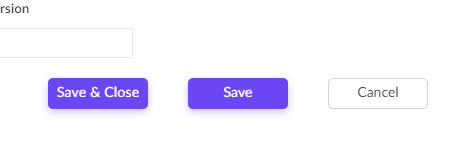
Sounds simple but you can only set a form to redirect to one link and adding a HTML anchor link (<a href>) to the page won't help as you need to submit the form before redirecting the user. A HTML <input type=submit> element to the page won't help either as you need to redirect the user to the specified report after submitting the form.
How?
Well as always, I'm going to cheat. My solution here was to simply repurpose a decision box field in Creator; then re-style it to look like a button; then add a workflow on click of this field.

ZohoCRM: zoho.crm.searchRecords only returns certain records
- Category: Zoho
- Hits: 18511
This is an article to hopefully resolve for you quicker than it took me, why a zoho.crm.searchRecords() returns some of the records but omits others.
Why?
The use-case was that we were creating a custom related list on a Zoho Finance > Sales Orders module but it wasn't finding all the Quotes related to this Sales Order.
How?
The quick answer is buried in Zoho documentation and due to the searchRecords function requiring it's 5th parameter which defaults to "not converted" records:
<variable>=zoho.crm.searchRecords(<module_name>,<criteria>,<page>,<per_page>,<search_value>,<connection>);

ZohoCRM: Process all records of a module
- Category: Zoho
- Hits: 31974
A quick article to document a method of looping through all the records of a module and processing these with the ability auto-resume without processing the same record twice.
Why?
Whether you have a few hundred records, or a few hundred thousand records, we sometimes want to write a function that will check each record and mark it so that the process doesn't repeat on records that have already been checked.
Some solutions have worked in the past where you could simply add a checkbox and do a search where this value is false; but lately this hasn't been working for me. To this end, I have thought of an alternative that I now use frequently in client systems.
How?
The gist is that we add a checkbox called "Processed" which will have a datatype Boolean. Our function will then loop through each record and do what it has to do. The workaround here is that we order this by modified time. When the checkbox gets updated, this modifies the record and puts it at the bottom of the list.
Zoho Deluge: Handle Commas between Quotes in a CSV (and New Lines)
- Category: Zoho
- Hits: 35863
This is an article to demonstrate how to handle commas in a CSV file that were enclosed between two double-quotes. I've added to this the handling of new lines or carriage returns in between a pair of double-quotes.
Why?
Our use case is that we were trying to loop through rows of a CSV file which contained addresses which in turn contained commas. Saving this as a CSV and asking Deluge to parse the data in the appropriate columns was not working as expected.
How?
The quick answer is a regex that will replace any commas between two quotes with a custom string, to be exact:
v_FormattedData = r_Data.replaceAll("(\"[^\",]+)[,]([^\"]+\")","$1|mySpecialComma|$2",false);

Zoho CRM & Zoho Books: Get SalesPersons
- Category: Zoho
- Hits: 17813
An article so that I don't spend so long in trying to find sales persons in Zoho Books.
Why?
My use case is that I want to create a Sales Order in ZohoBooks based on one in ZohoCRM and wanted to assign the sales person.
How?
So after an hour or so trying to get the Zoho.books.getRecords() function to filter the sales persons, I gave up and used a for each loop instead.

Zoho CRM & Zoho Bookings Issue: Full Name appears in Last Name (first name first name last name)
- Category: Zoho
- Hits: 18875
A quick article to explain why the full name might appear in the last name field in Zoho CRM.
Why?
We had a customer report the issue that sometimes the full name of a contact was appearing in the last name field and creating a contact called "Firstname Firstname Lastname" (eg. "Joel Joel Lipman" - when Joel is not my middle name).
How?
This is a setting that is enabled by default in Zoho Bookings as documented in the official documentation. Not sure why anyone would want to leave this enabled without applying the fix.
Page 14 of 26
Latest Articles





Accreditation



Donate & Support
If you like my content, and would like to support this sharing site, feel free to donate using a method below:

 bc1qf6elrdxc968h0k673l2djc9wrpazhqtxw8qqp4
 0xb038962F3809b425D661EF5D22294Cf45E02FebF
Paypal:
Bitcoin:
bc1qf6elrdxc968h0k673l2djc9wrpazhqtxw8qqp4
Ethereum:
0xb038962F3809b425D661EF5D22294Cf45E02FebF