


Zoho Analytics: Set Up a Widget Displaying Sales Person
- Category: Zoho
- Hits: 20613
A quick article to display a value in a column in a widget in Zoho Analytics.
Why?
Because I keep forgetting how to do it.
How?
I've done this for a query that amalgamated all the deals against a deal owner and needed to repeat this for all the invoices against a sales person.
It adds to the effect on loading the page that a widget has clearly defined values based on the filters I select on a dashboard.
Zoho Deluge - Some Useful Regular Expressions
- Category: Zoho
- Hits: 51248
A more comprehensive post on some other regex (regular expressions) to format values in Zoho.
How?
Zoho Deluge - Generate 5 Letter Booking Retrieval Code
- Category: Zoho
- Hits: 29734
This is a quick article on how to generate a 5 letter code from several functions: one which returns 5 randomly selected characters and another two which convert a number to 5 letters.
Why?
Zoho doesn't have a function to generate random numbers or strings. There are workarounds however.
How?
Zoho Deluge - Modify the product line items in an invoice module
- Category: Zoho
- Hits: 22981
This is a reminder on how to swap out a product in an invoice.
Why?
A client wanted one of their products to be swapped out with another as they had a 3rd-party feed that kept creating a product that they didn't stock.
How?
Zoho Deluge: Adding / Removing Total Tax from a Quote Record
- Category: Zoho
- Hits: 19286
A quick reminder on when I want to apply overall Tax or remove Tax from a quotes product line items.
Why?
I would apply the standard update function and although the response would say it modified the record, the tax wouldn't apply both visually and programmatically.
How?
A little undocumented this "feature" but the gist is if you want to add tax, it has to be built up in the tax options, if you want this to be zero, you need to pass the option of tax as zero and remove all other options.
Zoho CRM: Update a custom field in line items / product details using REST API v2.1
- Category: Zoho
- Hits: 53200
This is a quick article documenting how to update custom fields in a line items or product details section of a transactional module such as Quotes, Sales Orders or Invoices using code: Zoho Deluge.
Why?
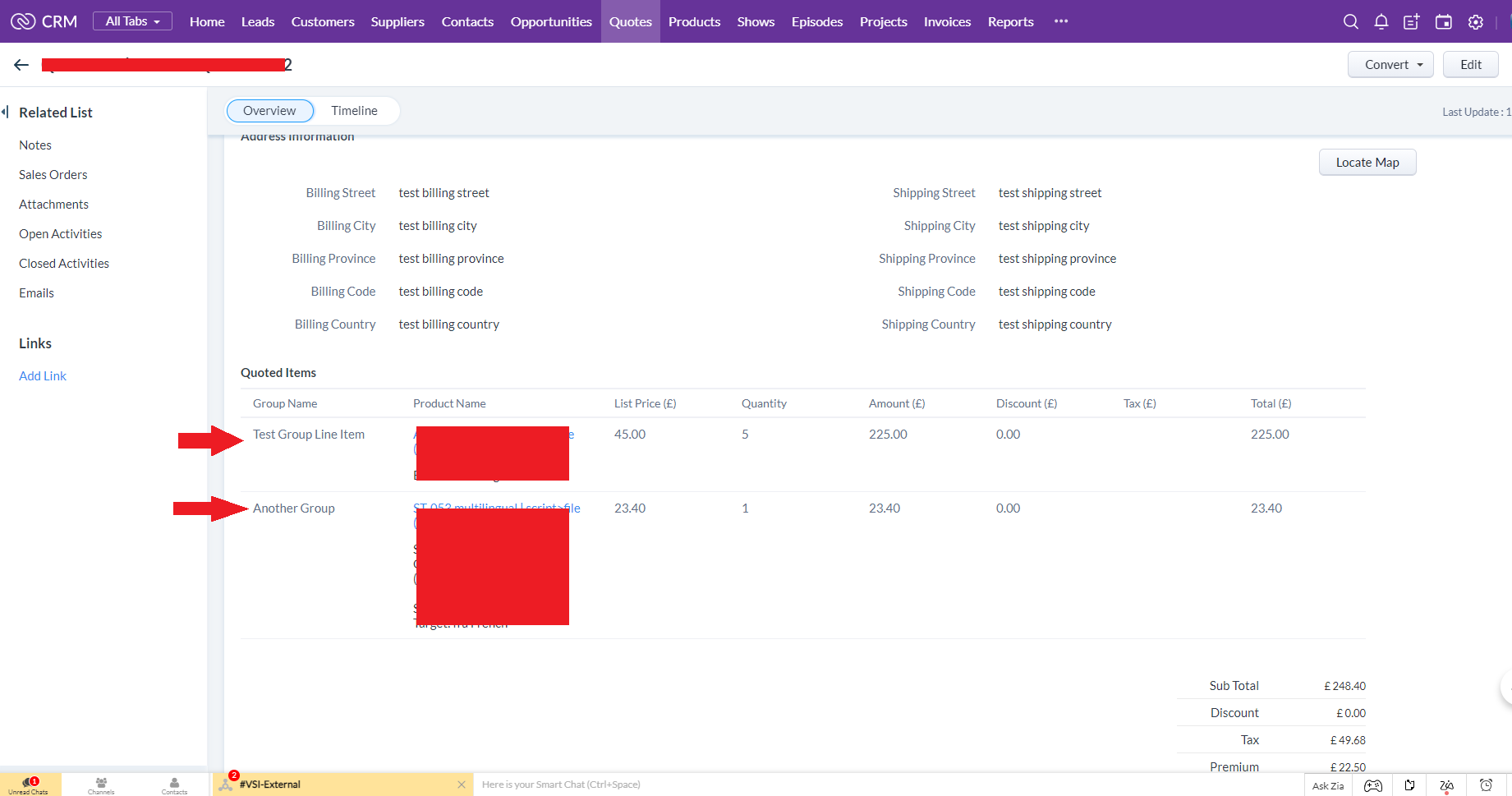
At time of print, Zoho had recently introduced the ability to have custom fields in your line items, alongside the product name, list price, quantity, tax, etc. In the example below, we have added a column called "Group Name" in the CRM Quote module as per the following screenshot:
How?
Again at the time of this article, this is only modifiable when using REST API v2.1. We are going to update the field with label "Group Name" but API name "Grouping" in a list item column.
Expecting ZC_SUBFORM_250 expression found COLLECTION
- Category: Zoho
- Hits: 22922
A very quick article as I couldn't find anything on the WWW to document this error.
Why?
During a data migration, I was using a custom function to copy all the data from one app to another. The specific form was for "Leads" which contained a subform with a product line item list. If I run this code, I would get the error:
Expecting ZC_SUBFORM_250 expression found COLLECTION expressionAnother error you may get when using the deluge script is:
LIST value cannot be assigned to 'mySubform'
-- or --
COLLECTION value cannot be assigned to 'mySubform'
or
expecting ZC_SUBFORM_70 expression found COLLECTION expression
How?
Quite simply the error is because the Creator Deluge syntax I was using to insert subform rows was wrong.
Zoho Deluge - InvokeConnector and useful snippets
- Category: Zoho
- Hits: 18810
So this is an article with some common snippets of code that use the InvokeConnector and do things we can't do in shortcode.
Page 20 of 26
Latest Articles





Accreditation



Donate & Support
If you like my content, and would like to support this sharing site, feel free to donate using a method below:

 bc1qf6elrdxc968h0k673l2djc9wrpazhqtxw8qqp4
 0xb038962F3809b425D661EF5D22294Cf45E02FebF
Paypal:
Bitcoin:
bc1qf6elrdxc968h0k673l2djc9wrpazhqtxw8qqp4
Ethereum:
0xb038962F3809b425D661EF5D22294Cf45E02FebF