

SSRS - Lost window with datasets

Re: Business Intelligence Development Studio 2008

Often happens to me and not sure why. You open the project and the window panel for the Report Data containing the parameters and datasets isn't there. I spent a bit of time enabling/disabling toolbars before I found this.
  1. Open a Report solution (or have one open already?)
  2. The menu link is "report data" and it's right at the bottom of the "View" menu.
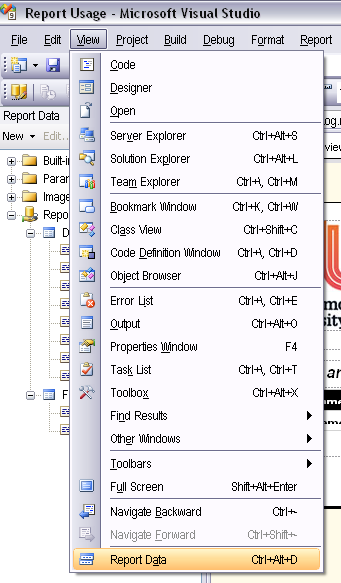
Report Data at the bottom of the View menu when a report is loaded in the editor
Category: SQL Server Reporting Services :: Article: 333

Add comment

Your rating:

Submit

Accreditation

Badge - Zoho Creator Certified Developer Associate
Badge - Zoho Deluge Certified Developer
Badge - Certified Zoho CRM Developer

Donate & Support

If you like my content, and would like to support this sharing site, feel free to donate using a method below:

Paypal:
Donate to Joel Lipman via PayPal

Bitcoin:
Donate to Joel Lipman with Bitcoin bc1qf6elrdxc968h0k673l2djc9wrpazhqtxw8qqp4

Ethereum:
Donate to Joel Lipman with Ethereum 0xb038962F3809b425D661EF5D22294Cf45E02FebF

Please publish modules in offcanvas position.








