For Zoho services only


I'm currently part of a wider delivery team at Ascent Business Solutions, recognised as a leading Zoho Premium Solutions Partner in the United Kingdom.

Ascent Business Solutions support organisations with everything from targeted technical fixes through to full Zoho CRM implementations and long-term platform adoption. Working as a team rather than a one-person consultancy allows projects to move forward consistently, with access to the right skills at each stage.

The team I manage specialises in API integrations between Zoho and third-party finance and commerce platforms such as Xero, Shopify, WooCommerce, and eBay. Much of our work involves solving integration challenges that fall outside standard documentation, supporting new ideas, new sectors, and evolving business models.

Success is measured through practical outcomes and return on investment, ranging from scaling small operations into high-turnover businesses to delivering rapid gains through online payments, automation, and streamlined digital workflows.

If you are looking for structured Zoho expertise backed by an established consultancy, you can contact Ascent Business Solutions on 0121 392 8140 (UK), email info@ascentbusiness.co.uk, or visit https://www.ascentbusiness.co.uk.
Zoho Analytics: Set Up Widget Displaying Sales Person

Zoho Analytics: Set Up a Widget Displaying Sales Person

What?
A quick article to display a value in a column in a widget in Zoho Analytics.

Why?
Because I keep forgetting how to do it.

How?
I've done this for a query that amalgamated all the deals against a deal owner and needed to repeat this for all the invoices against a sales person.

It adds to the effect on loading the page that a widget has clearly defined values based on the filters I select on a dashboard.

First you will need a table or query that has a bunch of columns and rows with one of the columns containing the sale person name. Something like the following:

Zoho Analytics Setup Widget - Query Header

With these kind of columns available to you:
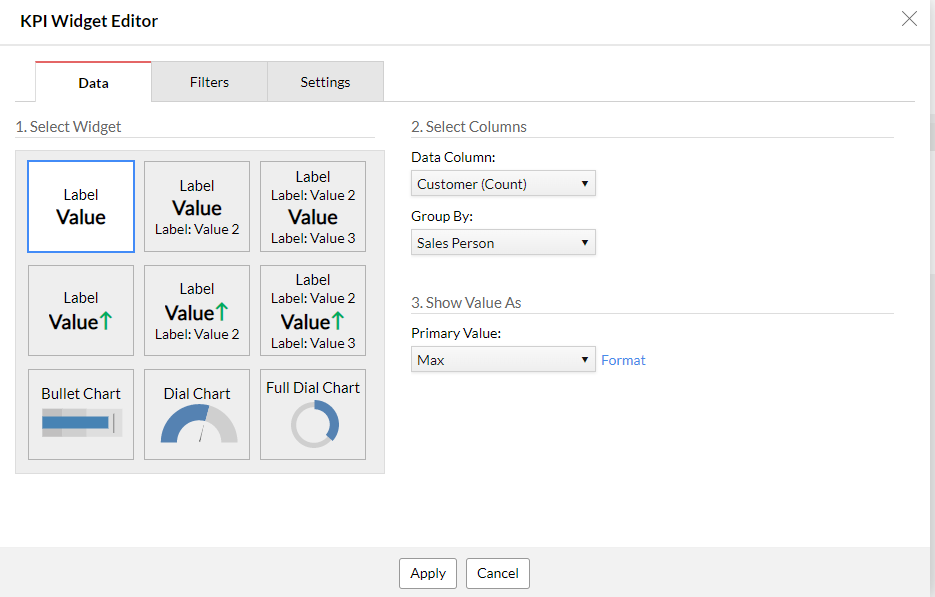
  1. Click on Widget in the top right
  2. Under "Data Column", select any field in your table/query which is not the one to display
  3. Under "Group By", select the field that has the value you want to display.
  4. Under "Show Value As", select Max
Zoho Analytics Setup Widget - KPI Widget Editor - Data

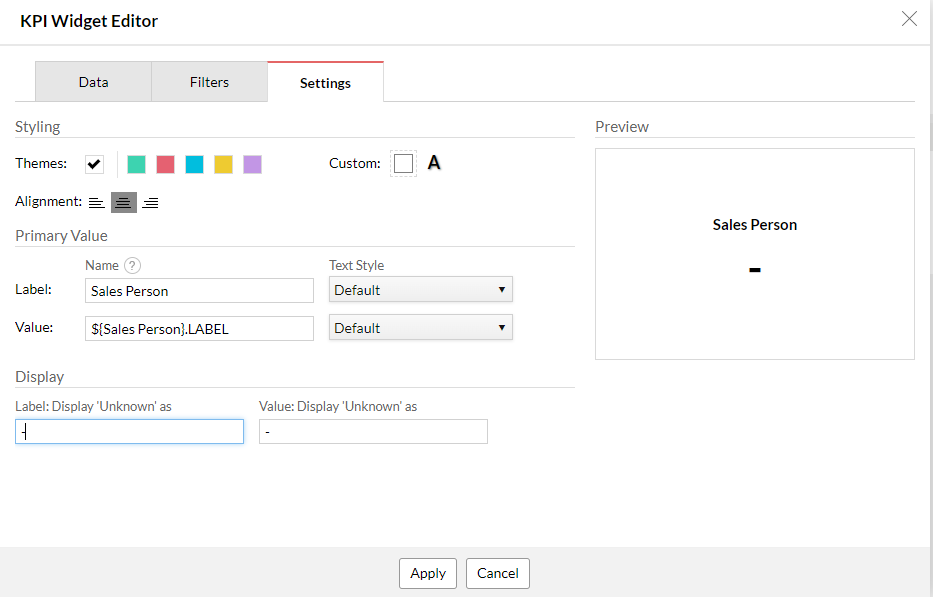
Then click on the "Settings" tab and do the following:
  1. Under Primary Value - Label, enter the static text you want to display above the sales person (eg. "Sales Person")
  2. Alongside the Value field, enter ${Sales Person}.LABEL
  3. Under Label: Display 'Unknown' as, enter a dash/hyphen to indicate not known.
  4. Click on the button Apply
Zoho Analytics Setup Widget - KPI Widget Editor - Settings

Then on the dashboard, if you map your user filter, this will produce a widget similar to the following (ignore my sales person filter "Unknown"):
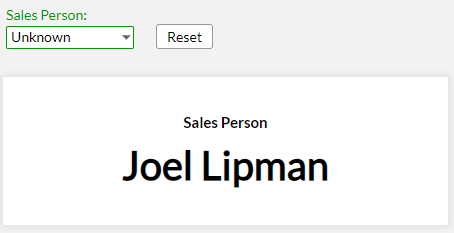
Zoho Analytics Setup Widget - End Result
Category: Zoho Analytics :: Article: 357

Credit where Credit is Due:


Feel free to copy, redistribute and share this information. All that we ask is that you attribute credit and possibly even a link back to this website as it really helps in our search engine rankings.

Disclaimer: Please note that the information provided on this website is intended for informational purposes only and does not represent a warranty. The opinions expressed are those of the author only. We recommend testing any solutions in a development environment before implementing them in production. The articles are based on our good faith efforts and were current at the time of writing, reflecting our practical experience in a commercial setting.

Thank you for visiting and, as always, we hope this website was of some use to you!

Kind Regards,

Joel Lipman
www.joellipman.com