
This is an article to remind me how to calculate various times for an appointment booking system based on the timezones of each party.
Why?
The use-case scenario is that our Creator server uses the US datacenter but has it's server timezone set to "US/Eastern" or "America/New_York" (-05:00). Our sales person is on the west coast in the timezone "America/Los_Angeles" (-08:00). And our customer is in "Europe/Luxembourg" (+01:00).
We want to tell our customer they have an appointment at 4pm their time in Luxembourg; tell the agent/salesperson to call the customer at 7am in Los Angeles; and tell headquarters or the system calendar that the appointment is at 10am.
How?
So adding a datetime field and calling this one the "Customers Appointment Time" is the wrong first step. Reason being is that datetime fields hold the time zone they are set in (ZohoCreator > Settings > Date and Time Settings); so as soon as you try to insert a date time and perhaps accompany that value with a timezone, several calculations happen in real-time making it really difficult to extract and use.
The key trick I used was to actually use a single-line text to store the customer's requested time. Let's use the appointment example mentioned above for a customer in UTC+1 @ 4pm their time. The server is on Eastern time UTC-5 and the agent is in Los Angeles UTC-8. For this first example, we're not bother with Daylight Savings Time. The field is a text line field called Customers_Requested_Time and I have added a few more date time fields called GMT_Date_Time_Start, GMT_Date_Time_End, System_Date_Time_Start, System_Date_Time_End, Agent_Date_Time_Start, and Agent_Date_Time_End:
copyraw
// defaults
v_AppointmentDuration = 30;
//
// get customer's requested time
v_CustomersRequestedTime = input.Customers_Requested_Time.toTime();
v_CustomerTimeZoneName = "(+01:00) Europe/Luxembourg";
v_CustomerOffset = "+01:00";
//
// calculate GMT
v_CustomerPlusMinus = v_CustomerOffset.subString(0,1);
v_CustomerHours = v_CustomerOffset.subString(1,3).toLong();
v_CustomerMinutes = v_CustomerOffset.subString(4,6).toLong();
if(v_CustomerPlusMinus == "+")
{
    input.GMT_Date_Time_Start = v_CustomersRequestedTime.subHour(v_CustomerHours).subMinutes(v_CustomerMinutes);
}
else
{
    input.GMT_Date_Time_Start = v_CustomersRequestedTime.addHour(v_CustomerHours).addMinutes(v_CustomerMinutes);
}
if(!isnull(input.GMT_Date_Time_Start))
{
    input.GMT_Date_Time_End = input.GMT_Date_Time_Start.addMinutes(v_AppointmentDuration);
}
//
// calculate Eastern time (System HQ)
if(!isnull(input.GMT_Date_Time_Start))
{
    // subtract 5 hours from GMT as system is based in US/Eastern time
    input.System_Date_Time_Start = input.GMT_Date_Time_Start.subHour(5);
    input.System_Date_Time_End = input.System_Date_Time_Start.addMinutes(v_AppointmentDuration);
}
//
// calculate Agents time
v_AgentTimeZoneName = "(-08:00) America/Los_Angeles";
v_AgentOffset = "-08:00";
v_AgentPlusMinus = v_AgentOffset.subString(0,1);
v_AgentHours = v_AgentOffset.subString(1,3).toLong();
v_AgentMinutes = v_AgentOffset.subString(4,6).toLong();
if(v_AgentPlusMinus == "+")
{
    input.Agent_Date_Time_Start = input.GMT_Date_Time_Start.addHour(v_AgentHours).addMinutes(v_AgentMinutes);
    input.Agent_Date_Time_End = input.Agent_Date_Time_Start.addMinutes(v_AppointmentDuration);
}
else
{
    input.Agent_Date_Time_Start = input.GMT_Date_Time_Start.subHour(v_AgentHours).subMinutes(v_AgentMinutes);
    input.Agent_Date_Time_End = input.Agent_Date_Time_Start.addMinutes(v_AppointmentDuration);
}
//
// display confirmation text
v_ResultInformation = "<table>";
v_ResultInformation = v_ResultInformation.concat("<tr><td><b>Customer:</b></td><td>" + input.Name + "</td></tr>");
v_ResultInformation = v_ResultInformation.concat("<tr><td><b>Phone:</b></td><td>" + input.Phone_Number + "</td></tr>");
v_ResultInformation = v_ResultInformation.concat("<tr><td><b>Email:</b></td><td>" + input.Email + "</td></tr>");
v_ResultInformation = v_ResultInformation.concat("<tr><td><b>Event:</b></td><td>" + v_AppointmentType + "</td></tr>");
v_ResultInformation = v_ResultInformation.concat("<tr><td><b>Duration:</b></td><td>" + v_AppointmentDuration + " Minutes</td></tr>");
v_ResultInformation = v_ResultInformation.concat("<tr><td><b>Customer's Appointment Date/Time:</b>   </td>");
v_ResultInformation = v_ResultInformation.concat("<td>" + v_CustomersRequestedTime.toString("EEEE, MMMM dd, yyyy @ h:mma") + "   " + v_CustomerTimeZoneName + "</td></tr>");
v_ResultInformation = v_ResultInformation.concat("<tr><td><b>Agent's Appointment Date/Time:</b></td>");
v_ResultInformation = v_ResultInformation.concat("<td>" + input.Agent_Date_Time_Start.toString("EEEE, MMMM dd, yyyy @ h:mma") + "   " + v_AgentTimeZoneName + "</td></tr>");
v_ResultInformation = v_ResultInformation.concat("</table>");
input.Note_BookedTimeSelection = v_ResultInformation;
- // defaults
- v_AppointmentDuration = 30;
- //
- // get customer's requested time
- v_CustomersRequestedTime = input.Customers_Requested_Time.toTime();
- v_CustomerTimeZoneName = "(+01:00) Europe/Luxembourg";
- v_CustomerOffset = "+01:00";
- //
- // calculate GMT
- v_CustomerPlusMinus = v_CustomerOffset.subString(0,1);
- v_CustomerHours = v_CustomerOffset.subString(1,3).toLong();
- v_CustomerMinutes = v_CustomerOffset.subString(4,6).toLong();
- if(v_CustomerPlusMinus == "+")
- {
- input.GMT_Date_Time_Start = v_CustomersRequestedTime.subHour(v_CustomerHours).subMinutes(v_CustomerMinutes);
- }
- else
- {
- input.GMT_Date_Time_Start = v_CustomersRequestedTime.addHour(v_CustomerHours).addMinutes(v_CustomerMinutes);
- }
- if(!isnull(input.GMT_Date_Time_Start))
- {
- input.GMT_Date_Time_End = input.GMT_Date_Time_Start.addMinutes(v_AppointmentDuration);
- }
- //
- // calculate Eastern time (System HQ)
- if(!isnull(input.GMT_Date_Time_Start))
- {
- // subtract 5 hours from GMT as system is based in US/Eastern time
- input.System_Date_Time_Start = input.GMT_Date_Time_Start.subHour(5);
- input.System_Date_Time_End = input.System_Date_Time_Start.addMinutes(v_AppointmentDuration);
- }
- //
- // calculate Agents time
- v_AgentTimeZoneName = "(-08:00) America/Los_Angeles";
- v_AgentOffset = "-08:00";
- v_AgentPlusMinus = v_AgentOffset.subString(0,1);
- v_AgentHours = v_AgentOffset.subString(1,3).toLong();
- v_AgentMinutes = v_AgentOffset.subString(4,6).toLong();
- if(v_AgentPlusMinus == "+")
- {
- input.Agent_Date_Time_Start = input.GMT_Date_Time_Start.addHour(v_AgentHours).addMinutes(v_AgentMinutes);
- input.Agent_Date_Time_End = input.Agent_Date_Time_Start.addMinutes(v_AppointmentDuration);
- }
- else
- {
- input.Agent_Date_Time_Start = input.GMT_Date_Time_Start.subHour(v_AgentHours).subMinutes(v_AgentMinutes);
- input.Agent_Date_Time_End = input.Agent_Date_Time_Start.addMinutes(v_AppointmentDuration);
- }
- //
- // display confirmation text
- v_ResultInformation = "<table>";
- v_ResultInformation = v_ResultInformation.concat("<tr><td><b>Customer:</b></td><td>" + input.Name + "</td></tr>");
- v_ResultInformation = v_ResultInformation.concat("<tr><td><b>Phone:</b></td><td>" + input.Phone_Number + "</td></tr>");
- v_ResultInformation = v_ResultInformation.concat("<tr><td><b>Email:</b></td><td>" + input.Email + "</td></tr>");
- v_ResultInformation = v_ResultInformation.concat("<tr><td><b>Event:</b></td><td>" + v_AppointmentType + "</td></tr>");
- v_ResultInformation = v_ResultInformation.concat("<tr><td><b>Duration:</b></td><td>" + v_AppointmentDuration + " Minutes</td></tr>");
- v_ResultInformation = v_ResultInformation.concat("<tr><td><b>Customer's Appointment Date/Time:</b> </td>");
- v_ResultInformation = v_ResultInformation.concat("<td>" + v_CustomersRequestedTime.toString("EEEE, MMMM dd, yyyy @ h:mma") + " " + v_CustomerTimeZoneName + "</td></tr>");
- v_ResultInformation = v_ResultInformation.concat("<tr><td><b>Agent's Appointment Date/Time:</b></td>");
- v_ResultInformation = v_ResultInformation.concat("<td>" + input.Agent_Date_Time_Start.toString("EEEE, MMMM dd, yyyy @ h:mma") + " " + v_AgentTimeZoneName + "</td></tr>");
- v_ResultInformation = v_ResultInformation.concat("</table>");
- input.Note_BookedTimeSelection = v_ResultInformation;
Additional: Daylight Savings Time
Just to cover all aspects of this, I create a Zoho Creator form with the timezone names, their offset and their DST offset as well as a boolean to say whether Daylight Savings Time is in effect for this timezone or not. So let's pretend we have a creator form wth the following fields:
- TZ Database Name (single-line)
- UTC Offset (single-line)
- UTC DST Offset (single-line)
- DST In Effect (boolean)
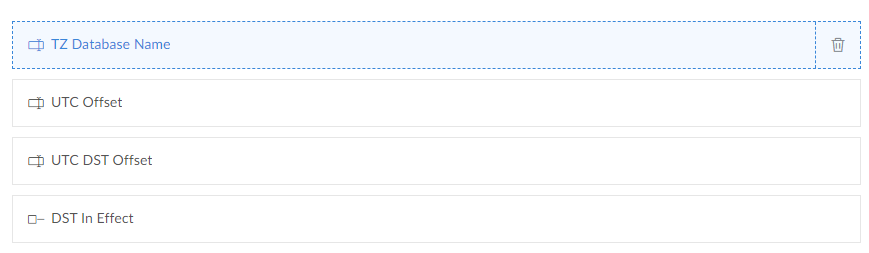
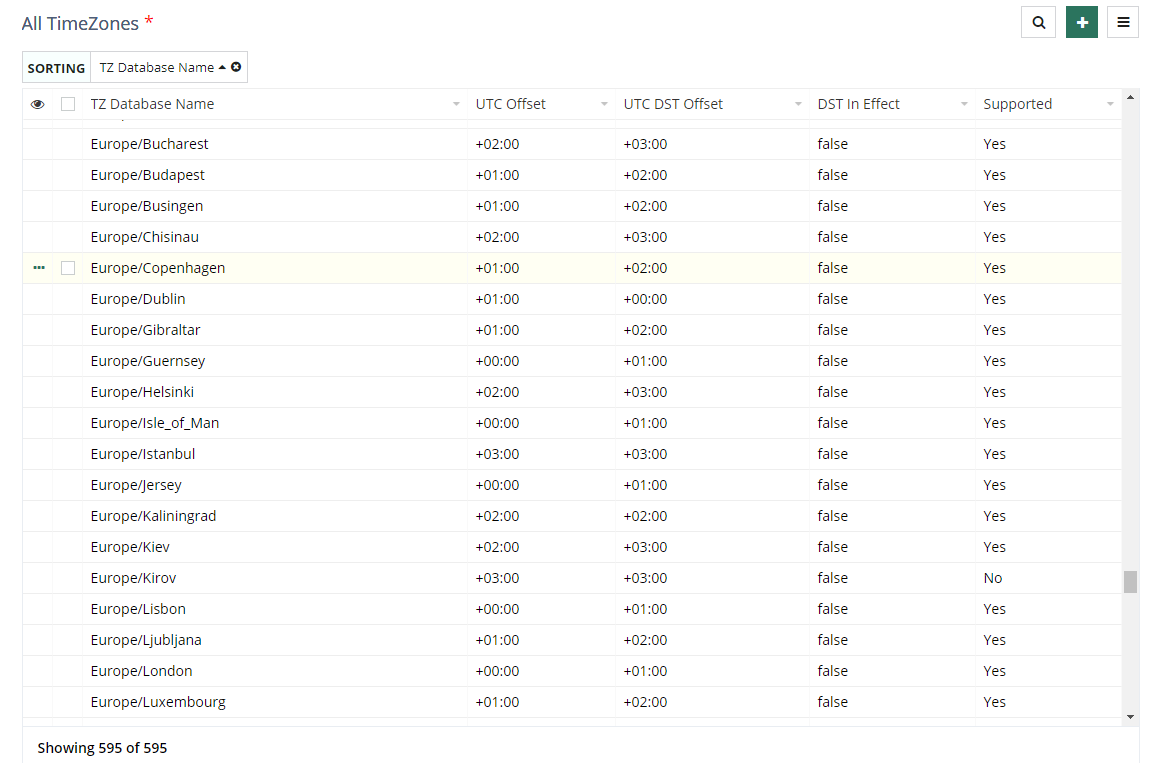
With the addition of 2 lookup fields to our booking form: one called "Customer's TimeZone" and the other called "Agent TimeZone", then our code needs to take these into account and will look more like the following:
copyraw
// defaults
v_AppointmentType = "Initial Consultation";
v_AppointmentDuration = 30;
v_CustomerTimeZoneName = "(+01:00 :: Europe/Luxembourg)";
v_CustomerOffset = "+01:00";
v_AgentTimeZoneName = "(-08:00 :: America/Los_Angeles)";
v_AgentOffset = "-08:00";
//
// get customer's requested time
v_CustomersRequestedTime = input.Customers_Requested_Time.toTime();
if(!isnull(input.Customer_s_TimeZone))
{
    r_CustomerTimezone = TimeZones[ID == input.Customer_s_TimeZone];
    if(r_CustomerTimezone.count() > 0)
    {
        if(r_CustomerTimezone.DST_In_Effect)
        {
            v_CustomerOffset = r_CustomerTimezone.UTC_DST_Offset;
        }
        else
        {
            v_CustomerOffset = r_CustomerTimezone.UTC_Offset;
        }
        v_CustomerTimeZoneName = "(" + v_CustomerOffset + " :: " + r_CustomerTimezone.TZ_Database_Name + ")";
    }
}
//
// calculate GMT
v_CustomerPlusMinus = v_CustomerOffset.subString(0,1);
v_CustomerHours = v_CustomerOffset.subString(1,3).toLong();
v_CustomerMinutes = v_CustomerOffset.subString(4,6).toLong();
if(v_CustomerPlusMinus == "+")
{
    input.GMT_Date_Time_Start = v_CustomersRequestedTime.subHour(v_CustomerHours).subMinutes(v_CustomerMinutes);
}
else
{
    input.GMT_Date_Time_Start = v_CustomersRequestedTime.addHour(v_CustomerHours).addMinutes(v_CustomerMinutes);
}
if(!isnull(input.GMT_Date_Time_Start))
{
    input.GMT_Date_Time_End = input.GMT_Date_Time_Start.addMinutes(v_AppointmentDuration);
}
//
// calculate Eastern time (System HQ)
if(!isnull(input.GMT_Date_Time_Start))
{
    // subtract 5 hours from GMT as system is based in US/Eastern time
    input.System_Date_Time_Start = input.GMT_Date_Time_Start.subHour(5);
    input.System_Date_Time_End = input.System_Date_Time_Start.addMinutes(v_AppointmentDuration);
}
//
// calculate Agents time
if(!isnull(input.Agent_TimeZone))
{
    r_AgentTimezone = TimeZones[ID == input.Agent_TimeZone];
    if(r_AgentTimezone.count() > 0)
    {
        if(r_AgentTimezone.DST_In_Effect)
        {
            v_AgentOffset = r_AgentTimezone.UTC_DST_Offset;
        }
        else
        {
            v_AgentOffset = r_AgentTimezone.UTC_Offset;
        }
        v_AgentTimeZoneName = "(" + v_AgentOffset + " :: " + r_AgentTimezone.TZ_Database_Name + ")";

    }
}
v_AgentPlusMinus = v_AgentOffset.subString(0,1);
v_AgentHours = v_AgentOffset.subString(1,3).toLong();
v_AgentMinutes = v_AgentOffset.subString(4,6).toLong();
if(v_AgentPlusMinus == "+")
{
    input.Agent_Date_Time_Start = input.GMT_Date_Time_Start.addHour(v_AgentHours).addMinutes(v_AgentMinutes);
    input.Agent_Date_Time_End = input.Agent_Date_Time_Start.addMinutes(v_AppointmentDuration);
}
else
{
    input.Agent_Date_Time_Start = input.GMT_Date_Time_Start.subHour(v_AgentHours).subMinutes(v_AgentMinutes);
    input.Agent_Date_Time_End = input.Agent_Date_Time_Start.addMinutes(v_AppointmentDuration);
}
//
// display confirmation text
v_ResultInformation = "<table>";
v_ResultInformation = v_ResultInformation.concat("<tr><td><b>Customer:</b></td><td>" + input.Name + "</td></tr>");
v_ResultInformation = v_ResultInformation.concat("<tr><td><b>Phone:</b></td><td>" + input.Phone_Number + "</td></tr>");
v_ResultInformation = v_ResultInformation.concat("<tr><td><b>Email:</b></td><td>" + input.Email + "</td></tr>");
v_ResultInformation = v_ResultInformation.concat("<tr><td><b>Event:</b></td><td>" + v_AppointmentType + "</td></tr>");
v_ResultInformation = v_ResultInformation.concat("<tr><td><b>Duration:</b></td><td>" + v_AppointmentDuration + " Minutes</td></tr>");
v_ResultInformation = v_ResultInformation.concat("<tr><td><b>Customer's Appointment Date/Time:</b>   </td>");
v_ResultInformation = v_ResultInformation.concat("<td>" + v_CustomersRequestedTime.toString("EEEE, MMMM dd, yyyy @ h:mma") + "   " + v_CustomerTimeZoneName + "</td></tr>");
v_ResultInformation = v_ResultInformation.concat("<tr><td><b>Agent Appointment Date/Time:</b></td>");
v_ResultInformation = v_ResultInformation.concat("<td>" + input.Agent_Date_Time_Start.toString("EEEE, MMMM dd, yyyy @ h:mma") + "   " + v_AgentTimeZoneName + "</td></tr>");
v_ResultInformation = v_ResultInformation.concat("</table>");
input.Note_BookedTimeSelection = v_ResultInformation;
- // defaults
- v_AppointmentType = "Initial Consultation";
- v_AppointmentDuration = 30;
- v_CustomerTimeZoneName = "(+01:00 :: Europe/Luxembourg)";
- v_CustomerOffset = "+01:00";
- v_AgentTimeZoneName = "(-08:00 :: America/Los_Angeles)";
- v_AgentOffset = "-08:00";
- //
- // get customer's requested time
- v_CustomersRequestedTime = input.Customers_Requested_Time.toTime();
- if(!isnull(input.Customer_s_TimeZone))
- {
- r_CustomerTimezone = TimeZones[ID == input.Customer_s_TimeZone];
- if(r_CustomerTimezone.count() > 0)
- {
- if(r_CustomerTimezone.DST_In_Effect)
- {
- v_CustomerOffset = r_CustomerTimezone.UTC_DST_Offset;
- }
- else
- {
- v_CustomerOffset = r_CustomerTimezone.UTC_Offset;
- }
- v_CustomerTimeZoneName = "(" + v_CustomerOffset + " :: " + r_CustomerTimezone.TZ_Database_Name + ")";
- }
- }
- //
- // calculate GMT
- v_CustomerPlusMinus = v_CustomerOffset.subString(0,1);
- v_CustomerHours = v_CustomerOffset.subString(1,3).toLong();
- v_CustomerMinutes = v_CustomerOffset.subString(4,6).toLong();
- if(v_CustomerPlusMinus == "+")
- {
- input.GMT_Date_Time_Start = v_CustomersRequestedTime.subHour(v_CustomerHours).subMinutes(v_CustomerMinutes);
- }
- else
- {
- input.GMT_Date_Time_Start = v_CustomersRequestedTime.addHour(v_CustomerHours).addMinutes(v_CustomerMinutes);
- }
- if(!isnull(input.GMT_Date_Time_Start))
- {
- input.GMT_Date_Time_End = input.GMT_Date_Time_Start.addMinutes(v_AppointmentDuration);
- }
- //
- // calculate Eastern time (System HQ)
- if(!isnull(input.GMT_Date_Time_Start))
- {
- // subtract 5 hours from GMT as system is based in US/Eastern time
- input.System_Date_Time_Start = input.GMT_Date_Time_Start.subHour(5);
- input.System_Date_Time_End = input.System_Date_Time_Start.addMinutes(v_AppointmentDuration);
- }
- //
- // calculate Agents time
- if(!isnull(input.Agent_TimeZone))
- {
- r_AgentTimezone = TimeZones[ID == input.Agent_TimeZone];
- if(r_AgentTimezone.count() > 0)
- {
- if(r_AgentTimezone.DST_In_Effect)
- {
- v_AgentOffset = r_AgentTimezone.UTC_DST_Offset;
- }
- else
- {
- v_AgentOffset = r_AgentTimezone.UTC_Offset;
- }
- v_AgentTimeZoneName = "(" + v_AgentOffset + " :: " + r_AgentTimezone.TZ_Database_Name + ")";
- }
- }
- v_AgentPlusMinus = v_AgentOffset.subString(0,1);
- v_AgentHours = v_AgentOffset.subString(1,3).toLong();
- v_AgentMinutes = v_AgentOffset.subString(4,6).toLong();
- if(v_AgentPlusMinus == "+")
- {
- input.Agent_Date_Time_Start = input.GMT_Date_Time_Start.addHour(v_AgentHours).addMinutes(v_AgentMinutes);
- input.Agent_Date_Time_End = input.Agent_Date_Time_Start.addMinutes(v_AppointmentDuration);
- }
- else
- {
- input.Agent_Date_Time_Start = input.GMT_Date_Time_Start.subHour(v_AgentHours).subMinutes(v_AgentMinutes);
- input.Agent_Date_Time_End = input.Agent_Date_Time_Start.addMinutes(v_AppointmentDuration);
- }
- //
- // display confirmation text
- v_ResultInformation = "<table>";
- v_ResultInformation = v_ResultInformation.concat("<tr><td><b>Customer:</b></td><td>" + input.Name + "</td></tr>");
- v_ResultInformation = v_ResultInformation.concat("<tr><td><b>Phone:</b></td><td>" + input.Phone_Number + "</td></tr>");
- v_ResultInformation = v_ResultInformation.concat("<tr><td><b>Email:</b></td><td>" + input.Email + "</td></tr>");
- v_ResultInformation = v_ResultInformation.concat("<tr><td><b>Event:</b></td><td>" + v_AppointmentType + "</td></tr>");
- v_ResultInformation = v_ResultInformation.concat("<tr><td><b>Duration:</b></td><td>" + v_AppointmentDuration + " Minutes</td></tr>");
- v_ResultInformation = v_ResultInformation.concat("<tr><td><b>Customer's Appointment Date/Time:</b> </td>");
- v_ResultInformation = v_ResultInformation.concat("<td>" + v_CustomersRequestedTime.toString("EEEE, MMMM dd, yyyy @ h:mma") + " " + v_CustomerTimeZoneName + "</td></tr>");
- v_ResultInformation = v_ResultInformation.concat("<tr><td><b>Agent Appointment Date/Time:</b></td>");
- v_ResultInformation = v_ResultInformation.concat("<td>" + input.Agent_Date_Time_Start.toString("EEEE, MMMM dd, yyyy @ h:mma") + " " + v_AgentTimeZoneName + "</td></tr>");
- v_ResultInformation = v_ResultInformation.concat("</table>");
- input.Note_BookedTimeSelection = v_ResultInformation;
Source(s):
- Joel Lipman: Zoho Deluge: Generate List of TimeZones
- Joel Lipman DataSources: Time zones supported by Zoho (MS Excel file)
- Wikipedia: Daylight saving time by country
- Wikipedia: List of tz database time zones
- Zoho Deluge: Supported Time Zones
Category: Zoho Creator :: Article: 325