


Zoho CRM & Deluge: Adding 10 minutes to a CRM Date Time field
- Category: Zoho CRM
- Hits: 24577
I already have an article documenting Pushing a value to a datetime field in CRM but wanted another article here to remind me of the Deluge code I need to add/subtract time.
Why?
Just want to add 10 minutes to a date/time field in ZohoCRM and wanted a refresher for use in a client system. The usual error is something similar to the following:
{ "code": "INVALID_DATA", "details": { "expected_data_type": "datetime", "api_name": "Check_Date_Time" }, "message": "invalid data", "status": "error" }How?
We're going to parse the created date and time parts as well as the timezone, add 10 minutes, re-assemble it in a format that CRM likes, and update the field:

Zoho CRM & Zoho Writer: Button to Merge Template, Send, and Attach
- Category: Zoho CRM
- Hits: 60961
An article to save time where a customer wants to click a button to generate a merged document in Writer and attach it to the CRM record.
Why?
Our use-case is that we have a client who has to go to the CRM record, click on Mail Merge, which opens Writer, then has to click on various settings and run the Mail Merge; then has to click on "execute function after merge" and select the function to run (this would initially attach the file to the CRM record). This wasn't working really as there are issues around tweaking the function and getting it to understand basic mapping and attachments.
How?
As per our use-case above, we are going to create a button off the contact record which when the user clicks on it will generate a PDF of the merged template and attach it to the CRM contact record under "Attachments".

Zoho CRM: Get Unique Values of a Text Field
- Category: Zoho CRM
- Hits: 51802
This article demonstrates how to return a list of unique values in a particular field in a CRM module.
Why?
My use-case is a data-migration where the records exist in a staging module in CRM but I want to transform/translate one of the column values into the target
How?
So this is my plan:
- Setup a connector to CRM with the scopes ZohoCRM.coql.READ and ZohoCRM.modules.ALL
- Build up a SQL query, or more specifically, a COQL - CRM Object Query Language
- Try using distinct on a single-line text field
- Adapt the query for unique values in a lookup field

Zoho CRM: Upload a Product Photo using Deluge
- Category: Zoho CRM
- Hits: 27573
A quick article to remind me on how to upload a photo using CRM API v2. Yes it's documented and yes it still confuses me now and again. So I'm writing this to remind me and to keep reminding me of how to do this.
Why?
My use-case is that I have a photo in Zoho Creator but the source doesn't really matter as the part I struggled on was uploading it to CRM. I want to update the photo in the CRM record.
How?
So we have to do the usual which is download the photo using invokeUrl then we set the paramname not to attachment but to file. We then use another invokeUrl to upload the photo to CRM:

Zoho CRM: Standard Setup for Tax Rates
- Category: Zoho CRM
- Hits: 38664
This is an article for training purposes. I'm pretty sure there is official documentation on how to do this but I thought I'd write this article to make it simpler for new developers to follow and learn as a quick point of reference.
Why?
Some clients systems will presume that they don't need their sales or CRM users to think about tax and probably manage it in Zoho Books leaving it to their finance team. This is a quick run-through for a standard setup to include UK tax/vat.
How?
Here's a quick step-by-step to follow:

Zoho CRM: Permission Denied for Quote Conversion Mapping
- Category: Zoho CRM
- Hits: 23067
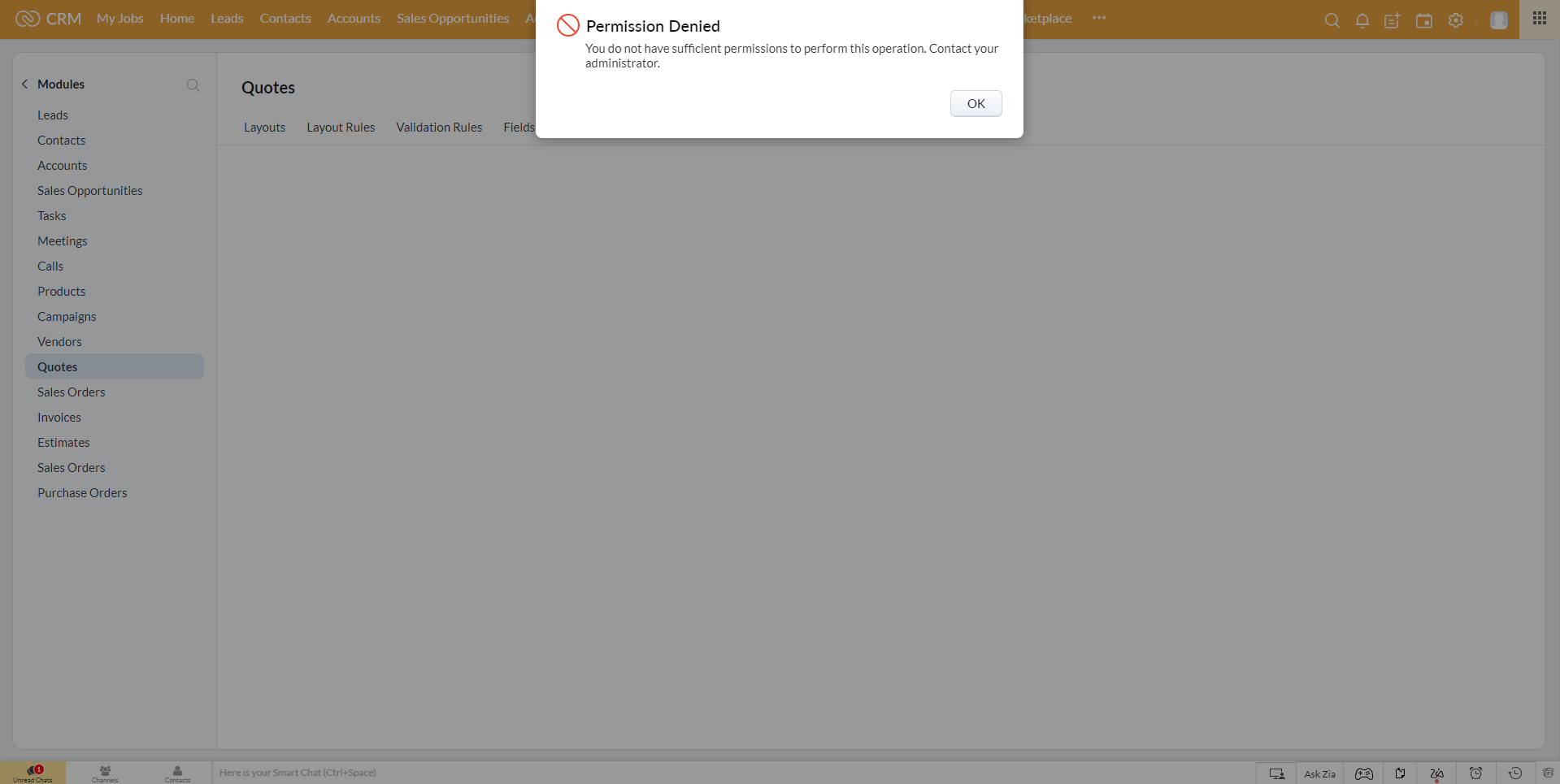
A really quick article for anyone experiencing the same issue: As a super admin in CRM, I am denied permission to access the Quote Conversion Mapping page...
Why?
I wanted to map a billing street 2 and shipping street 2 from the Account module to the Quote module, then on convert, to map these to the Sales Order in CRM. As my client's sales team would only create sales orders in CRM and don't use the invoice module (that's for their finance team using ZohoBooks), we disabled the CRM Invoice module.
How?
Therein lies the reason. For the quote conversion mapping, it needs the CRM Invoice module as well.
ZohoCRM: Deluge: Map a custom field from user profile
- Category: Zoho CRM
- Hits: 23460
A quick article to remind me how to quickly get a field from a user's settings based on the owner of a record.
Why?
A client had added a custom lookup field to the users settings called "Division" (similar to team name) and wanted any Opportunity record to have a field showing the user's Division. This would help in reporting later down the line.
How?
The following code snippet will get the Opportunity/Deal/Potential record details, then get the Owner frrom the CRM users table, find the value of the custom field and search for this (if it is a lookup to a module - only returns as string), and updates the Opportunity/Deal/Potential record.

Zoho CRM & Zoho Bookings Issue: Full Name appears in Last Name (first name first name last name)
- Category: Zoho CRM
- Hits: 24035
A quick article to explain why the full name might appear in the last name field in Zoho CRM.
Why?
We had a customer report the issue that sometimes the full name of a contact was appearing in the last name field and creating a contact called "Firstname Firstname Lastname" (eg. "Joel Joel Lipman" - when Joel is not my middle name).
How?
This is a setting that is enabled by default in Zoho Bookings as documented in the official documentation. Not sure why anyone would want to leave this enabled without applying the fix.
Recent Posts



Joes Word Cloud
Accreditation



Donate & Support
If you like my content, and would like to support this sharing site, feel free to donate using a method below:

 bc1qf6elrdxc968h0k673l2djc9wrpazhqtxw8qqp4
 0xb038962F3809b425D661EF5D22294Cf45E02FebF
Paypal:
Bitcoin:
bc1qf6elrdxc968h0k673l2djc9wrpazhqtxw8qqp4
Ethereum:
0xb038962F3809b425D661EF5D22294Cf45E02FebF
Credit where Credit is Due:
Feel free to copy, redistribute and share this information. All that we ask is that you attribute credit and possibly even a link back to this website as it really helps in our search engine rankings.
Disclaimer: Please note that the information provided on this website is intended for informational purposes only and does not represent a warranty. The opinions expressed are those of the author only. We recommend testing any solutions in a development environment before implementing them in production. The articles are based on our good faith efforts and were current at the time of writing, reflecting our practical experience in a commercial setting.
Thank you for visiting and, as always, we hope this website was of some use to you!
Kind Regards,
Joel Lipman
www.joellipman.com