
A quick article on how to get Zoho CRM to update the deal or opportunity type field with "New Business" or "Existing Business" depending on whether this won opportunity is the second time for this account.
Why?
Mainly for reporting purposes. We want ZohoCRM to report on what is repeat business and what is new business. As part of a process, you could get your staff to update the opportunity "Type" to "Existing Business" or "New Business" at the time they update the stage to "Closed Won". If you'd rather that staff don't have to remember to do this, then this snippet of code is for you.
How?
Note that here, the term "opportunity" is synonymous with the "deal". Also note that I have 2 versions of this, the first is if you have Enterprise or Ultimate edition (or Zoho One) which supports functions; the second is further down on the page applicable to Zoho CRM Professional (which doesn't support custom functions).
To be specific, we only want the opportunity type to be updated to "Existing Business" if the opportunity is the second "Won" opportunity against this account.
Zoho One, Zoho CRM Enterprise, or Zoho CRM Ultimate
To do this, we will need a specific workflow that picks up the change in status at the sales order level and where the sales order has been completed (fulfilled or invoiced). This will then see if any other opportunities were won against this account and then update the opportunity related to this sales order.
the Workflow
- Login to Zoho CRM as an administrator
- Go to Setup > Automation > Workflow Rules > Create Rule
- Set "Record Type" to "Sales Orders" and "Rule Name" to something like "Sales Orders - On Complete"
- Execute this workflow based on "Record Action" > "Edit" > "Specific Field(s) Get Modified" > tick the "Repeat every time" > Criteria is "When Status is modified to the value ..." then list all complete statuses of a sales order.
- Condition 1 is that the status must match one of the complete statuses of the sales order.
- Under "Instant action", select "Function" > "Configure Function" > "Write your own"
- Give it a displayed name such as "Fn - Sales Orders - On Complete"
- Give it a function name, I'm calling mine: fn_SalesOrders_OnComplete
- Paste in the function below
- In the rightmost bar, you will see a pair of tabs one which has (x) and the tooltip "Arguments" click on this
- Type p_SoID in the first field
- In the second field type the hash/pound sign # and select "Sales Orders" then "Sales Order Id"
the Code
void automation.fn_SalesOrders_OnComplete(Int p_SoID)
{
/* *******************************************************************************
	Function:       void automation.fn_SalesOrders_OnComplete(int p_SoID)
	Label:          Fn - Sales Orders - On Complete
	Trigger:        Workflow when a sales order is completed
	Purpose:		To update the opportunity type to existing or new business
	Inputs:         int p_SoID (the sales order zoho id)
	Outputs:        -

	Date Created:   2026-02-17 (Joel Lipman)
					- Initial release
					- Counts opps against this account and updates the field for this opp
	Date Modified:	???
					- ???

	More Information:
					Any information that may help

	******************************************************************************* */
	//
	// initialize
	v_ThisDealID = "0";
	v_ThisAccountID = "0";
	v_ThisContactID = "0";
	v_CountWonOpps = 0;
	//
	// add in what sales orders you consider "closed won"
	l_CompletedSOStatuses = List();
	l_CompletedSOStatuses.add("Partially Fulfilled");
	l_CompletedSOStatuses.add("Fulfilled");
	l_CompletedSOStatuses.add("Partially Invoiced");
	l_CompletedSOStatuses.add("Invoiced");
	//
	// get sales order record
	r_SoDetails = zoho.crm.getRecordById("Sales_Orders",p_SoID);
	//
	// check status of sales order is a completed one (can be done in workflow but this is a double-check)
	if(l_CompletedSOStatuses.containsIgnoreCase(r_SoDetails.get("Status")))
	{
		if(!isNull(r_SoDetails.get("Deal_Name")))
		{
			v_ThisDealID = r_SoDetails.get("Deal_Name").get("id");
		}
		if(!isNull(r_SoDetails.get("Account_Name")))
		{
			v_ThisAccountID = r_SoDetails.get("Account_Name").get("id");
		}
		if(!isNull(r_SoDetails.get("Contact_Name")))
		{
			v_ThisContactID = r_SoDetails.get("Contact_Name").get("id");
		}
		info v_ThisContactID;
		//
		// set ordered criteria
		m_SortCriteria = Map();
		m_SortCriteria.put("sort_by","id");
		m_SortCriteria.put("sort_order","desc");
		m_SortCriteria.put("fields","id,Status,Deal_Name");
		//
		// count opportunities against this account (B2B)
		r_SearchAccountDeals = zoho.crm.getRelatedRecords("Deals","Accounts",v_ThisAccountID,1,200,m_SortCriteria);
		l_SearchAccountDeals = ifnull(r_SearchAccountDeals,List());
		if(l_SearchAccountDeals.size() > 0)
		{
			for each  m_RelatedDeal in l_SearchAccountDeals
			{
				v_RelatedDealStage = ifnull(m_RelatedDeal.get("Stage"),"");
				v_RelatedDealId = ifnull(m_RelatedDeal.get("id"),"");
				//
				if(v_RelatedDealStage.containsIgnoreCase("Closed Won") && v_RelatedDealId != v_ThisDealID)
				{
					v_CountWonOpps = v_CountWonOpps + 1;
				}
			}
		}
		//
		// account field was blank?
		// count opportunities against this contact (B2C)
		if(v_CountWonOpps == 0 && v_ThisAccountID == "0")
		{
			r_SearchContactDeals = zoho.crm.getRelatedRecords("Deals","Contacts",v_ThisContactID,1,200,m_SortCriteria);
			l_SearchContactDeals = ifnull(r_SearchContactDeals,List());
			if(l_SearchContactDeals.size() > 0)
			{
				for each  m_RelatedDeal2 in l_SearchContactDeals
				{
					v_RelatedDealStage2 = ifnull(m_RelatedDeal2.get("Stage"),"");
					v_RelatedDealId2 = ifnull(m_RelatedDeal2.get("id"),"");
					//
					if(v_RelatedDealStage2.containsIgnoreCase("Closed Won") && v_RelatedDealId2 != v_ThisDealID)
					{
						v_CountWonOpps = v_CountWonOpps + 1;
					}
				}
			}
		}
		//
		// update the opp
		if(v_CountWonOpps > 0)
		{
			m_UpateOpp = Map();
			m_UpateOpp.put("Type","Existing Business");
			r_UpdateOpp = zoho.crm.updateRecord("Deals",v_ThisDealID,m_UpateOpp);
			info r_UpdateOpp;
		}
		else
		{
			info "This is the first complete sales order so the opportunity type here is still 'New Business'.";
		}
	}
	else
	{
		info "This Sales Order is not considered complete so it will not update the opportunity.";
	}
}
Additional Notes:
- This is for completed sales orders. If you need to trigger this at the invoice level, then you will need to change the workflow to trigger when the invoice reaches a certain status and modify the code above to reflect this.
Zoho Standard, Zoho Professional
To do this, we will need to use the "Action by Zoho Flow" feature available in a CRM workflow. Again, we are using the example here that a completed/fulfilled sales order updates the deal/opportunity type. If you wanted this only when the deal is closed won, then you could simply amend the below omitting some of the steps.
Step 1: Add Marker Fields
- Login to ZohoCRM as an Administrator
- Go to Setup > Customization > Modules and Fields > Accounts > Layout (Standard)
- Add a checkbox field called "Has Won a Deal" (unticked by default)
- Go to Setup > Customization > Modules and Fields > Sales Orders > Layout (Standard)
- Add a checkbox field called "Account Won Before" (unticked by default)
- Go to Setup > Automation > Workflow Rules > Create Rule
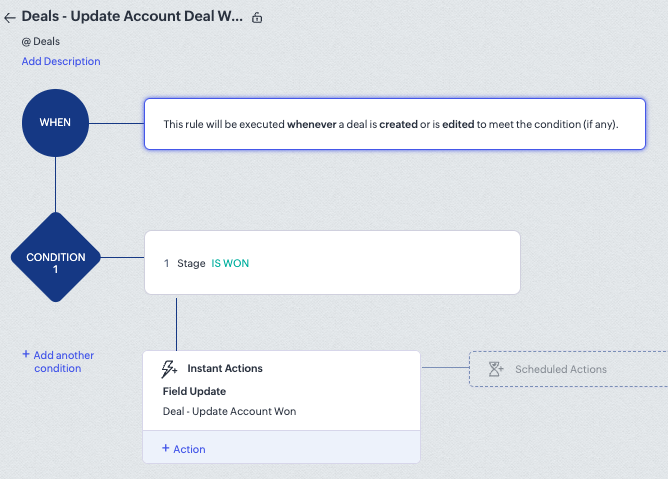
- Record Type (Module) is Deals (aka Opportunities)
- Rule Name, I'm calling mine "Deals - Update Account Won a Deal" > Next
- Execute this workflow rule on Record Action > Create or Edit > Tick "Repeat this workflow whenever a deal is edited" > Done
- Condition 1 has criteria: Deals matching certain conditions
- Click in the dropdown and select "Stage" "is WON" > Done
- Instant Action is a Field Update > Create Field Update
- Give it a name, I'm calling mine "Deal - Update Account Won"
- Module should be "Accounts"
- Field is "Has Won a Deal"
- Value to be updated is ticked
- Click "Save and Associate"
- Click on "Save" to save the workflow.
- Go to Setup > Automation > Workflow Rules > Create Rule
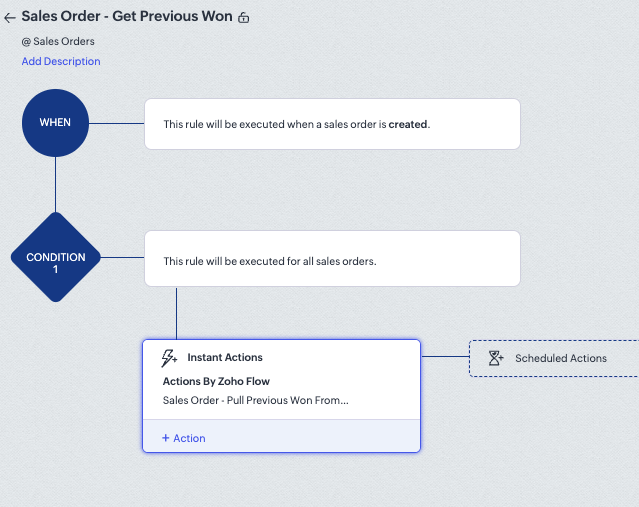
- Record Type (Module) is Sales Orders
- Rule Name, I'm calling mine "Sales Order - Get Previous Won" > Next
- Execute this workflow rule on Record Action > Create > Next
- Condition 1 includes "All Sales Orders > Done
- Under "Instant Actions" click on this and select "Actions by Zoho Flow"
- Click on "New Action"
- Search Apps for Zoho CRM
- Select "Zoho CRM" > "Next"
- Scroll down to "Update Module Entry" > Next
- Choose Connection
- If "New Connection" then give it a name (eg. My Zoho CRM Connection)
- Scroll down under "Action" and ensure that "Update module entry" is ticked
- Click "Authorize"
- You will be advised of what this connection has permission to do > Authorize (If exists, then click on "Re-Use")
- You will return to the connection panel > Next
- Give it an action name, I'm calling mine: "Sales Order - Pull Previous Won From Account"
- Give it a description, I gave it: "On sales order creation, maps value from the account 'Has Won a Deal' to the sales order 'Account Won Before'."
- For Module, specify "Sales Orders" (should be already selected and read-only) > Create
- A popup for "Update Module Entry" will appear:
- Module is "Sales Orders"
- Layout is "Standard"
- Click into the field "Entry Id" and on the right sidebar expand "CRM Sales Orders" by clicking on it
- Scroll down and select "Sales Order Id" (this should insert "${Sales_Orders.id}" into the field)
- Staying within this popup, scroll down on the left (main panel of fields) and find "Account Won Before"
- Click into the field "Account Won Before" and on the right sidebar expand "CRM Accounts" by clicking on it
- Click on "Has Won a Deal" (this should insert "${Sales_Orders.lookup.Account_Name.Has_Won_a_Deal}" into the field)
- Click on "Done"
- Associate the action
- Save the workflow
Step 4: Automation - Set Deal / Opportunity won to Existing Business
- Go to Setup > Automation > Workflow Rules > Create Rule
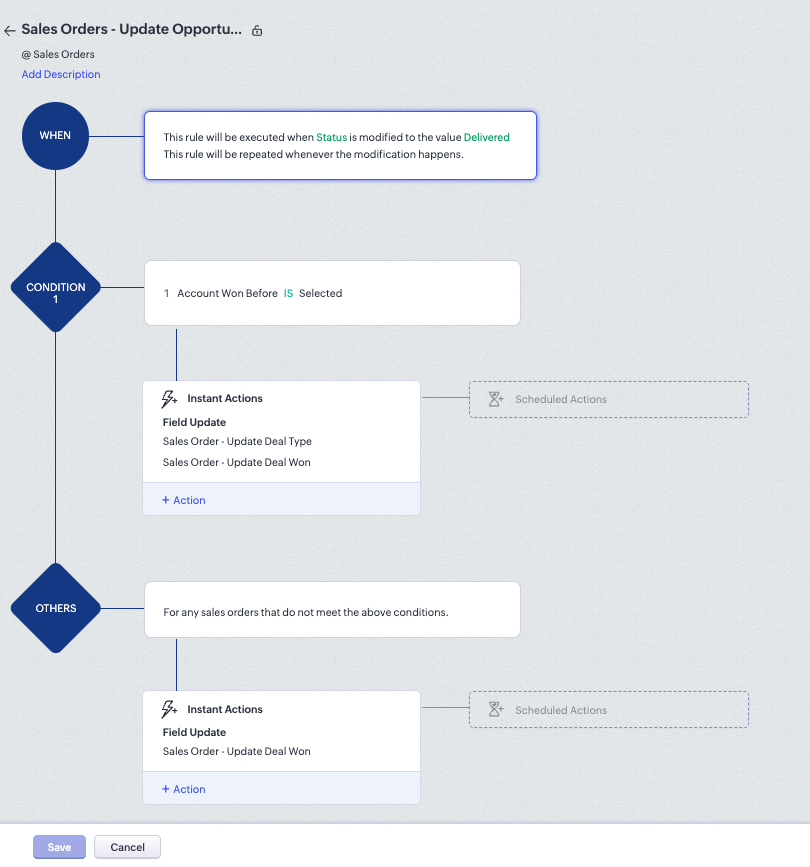
- Record Type (Module) is "Sales Orders"
- Rule Name, I'm calling mine "Sales Order - Update Opportunity Type" > Next
- Execute this workflow rule on Record Action > Edit > Specific field(s) get modified > Tick "Repeat this workflow whenever a deal is edited"
- When Status is modified to the value "Delivered" (or whichever status is considered complete/fulfilled) > Done
- Condition 1 has criteria: Sales Orders matching certain conditions
- Click in the dropdown and select "Account Won Before" is "Selected" > Done
- Instant Action is a Field Update > Create Field Update
- Give it a name, I'm calling mine "Sales Order - Update Deal Type"
- Module should be "Deals"
- Field is "Type"
- Value to be updated is "Existing Business"
- Click "Save and Associate"
- Click on the "+ Action" and select another "Field Update"
- Click on "Create Field Update"
- Give it a name, I'm calling mine "Sales Order - Update Deal Won"
- Module should be "Deals"
- Field is "Stage"
- Value to be updated is "Closed Won"
- Click "Save and Associate"
- Click on "+ Add another condition" (under Condition1)
- Select "Sales Orders that do not meet any of the above conditions" > Next
- Click on "Instant Actions" and select "Field Update"
- Change the Module dropdown to "Deals" (Opportunities)
- Select the "Sales Order - Update Deal Won"
- Click on "Associate"
- Execute this workflow rule on Record Action > Edit > Specific field(s) get modified > Tick "Repeat this workflow whenever a deal is edited"
- Click on "Save" to save the workflow.
Caveat
There is a limit to the number of Zoho Flows per month that CRM professional lets you have. If you need a higher volume, ensure that you are the recipient for the Zoho Flow limit warnings (eg. when reaching 90% you will be emailed by Zoho for some more money).
Discussion
Comments
Questions, corrections and useful additions are reviewed before appearing here.
Discussion Newest first
No comments yet. Start the discussion.