This is an article just repeating a script from the Zoho Kaizen series allowing a confirmation box (something lacking in Zoho Creator - but that every app outside of Zoho has) as well as a popup to email from CRM with a rich-text interface.
Why?
The use-case here is non-existent. It's more of a play around to see what can be achieved and how much this can be customized. The task I've set for myself is as follows:
- Trigger if the contact record has a tickbox called "Extra Confidential" ticked/checked=true
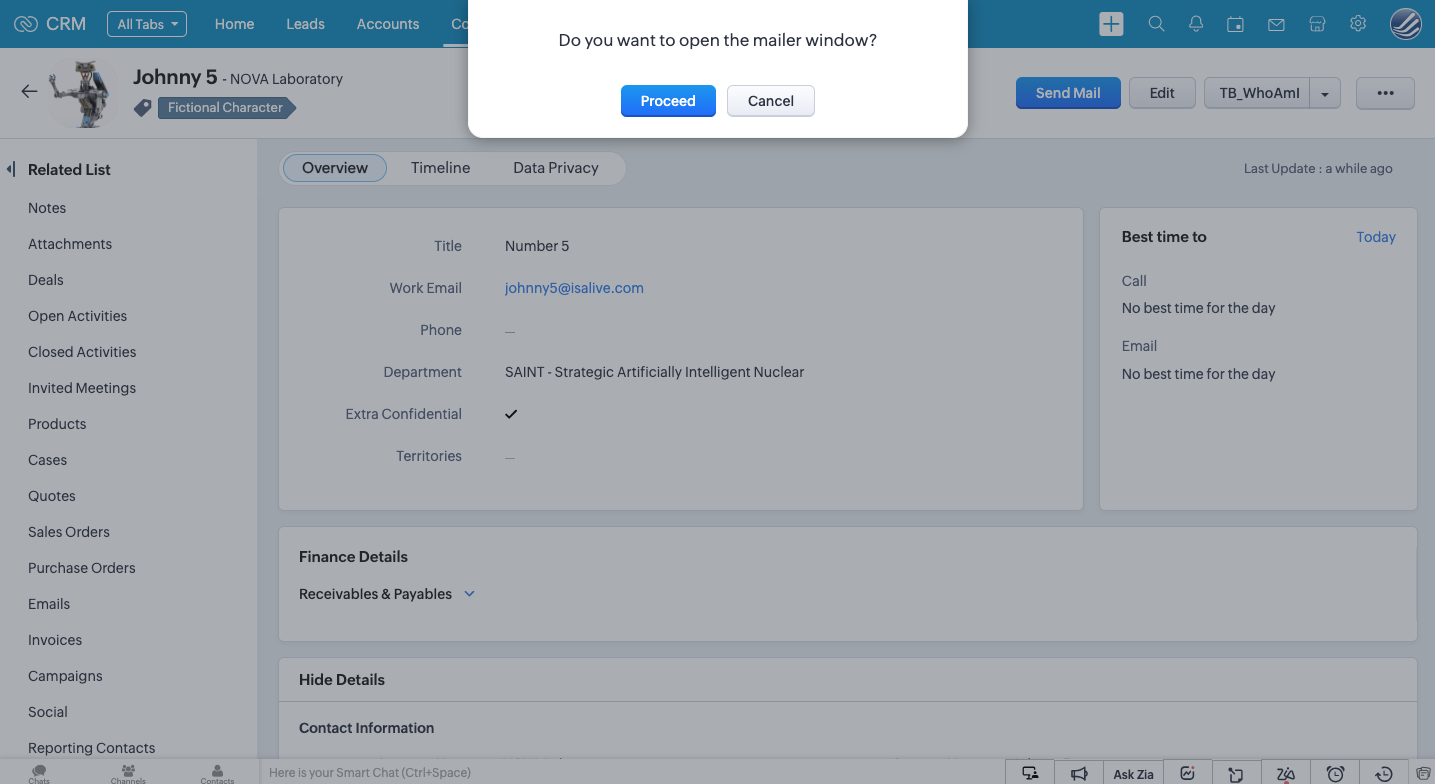
- Popup a confirmation box to proceed or cancel.
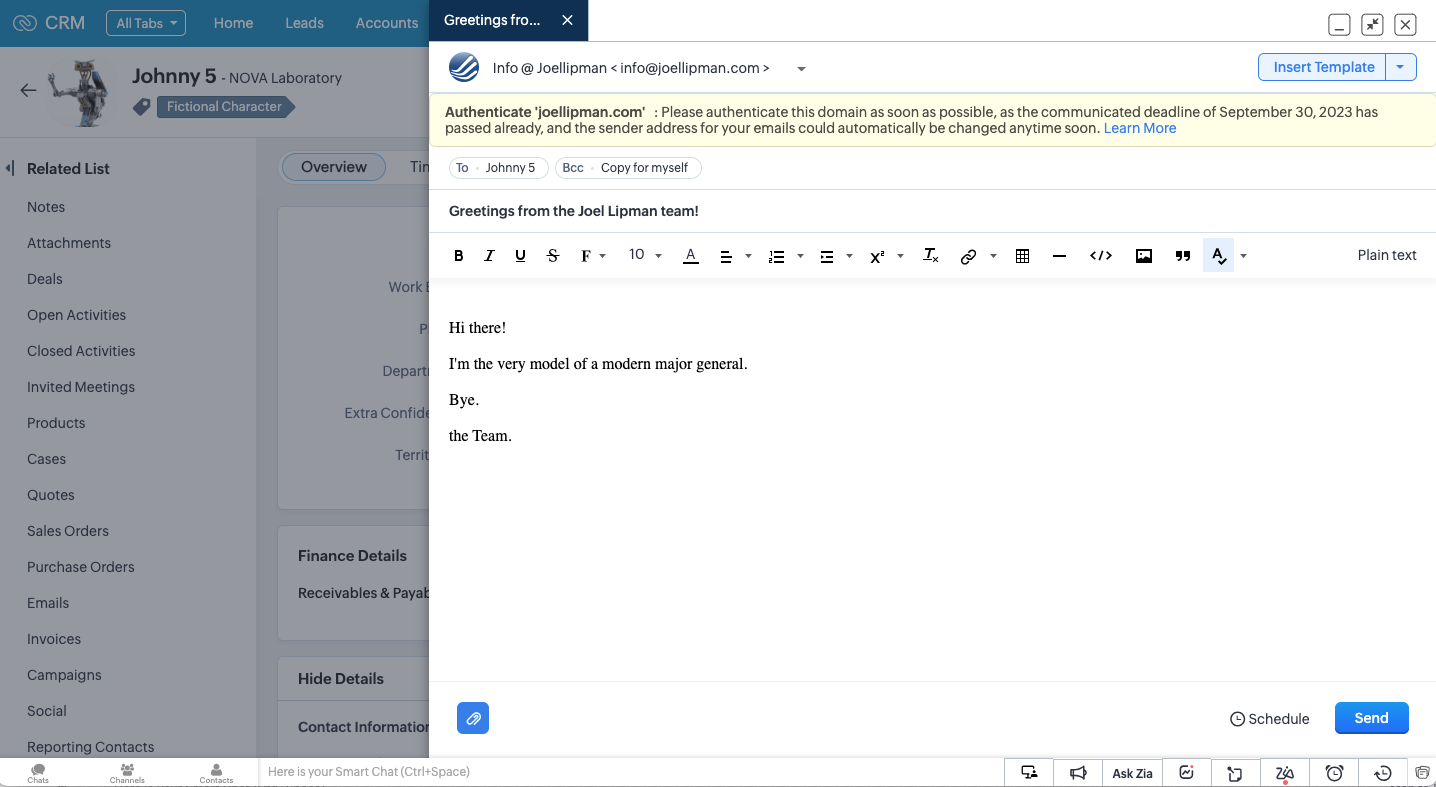
- Popup the email from CRM mailer with the to email address, bcc, subject and message content already populated.
How?
The example from the Kaizen series uses a record with canvas mode applied; but I wanted to try it without a canvas to see if we can have this functionality using the out-of-the-box ZohoCRM.
Client Script Configuration:
- Login to ZohoCRM as a system administrator and go to the Setup page (cog icon in the top right next to the profile image)
- Under "Developer Hub" go to "Client Script"
- Click on "New Script" button (the blue one - not the "Add Script" grey one)
- Give the client script a name, I'm calling mine "Extra Confidential"
- Keep Category=Module, set Page=Detail Page (Standard), set Module=Contacts and set the layout if you want.
- Under Event Details, set Type=Page Event; Event=onLoad
- Click on "Next"
- Give it the following code:
copyraw
// attempt try { // get the ID of this record var v_ThisRecordID = $Page.record_id; // get the full name of this contact (not sure why this returns both first and last) var v_ContactName = ZDK.Page.getField('Last_Name').getValue(); // get the email of this contact var v_ContactEmail = ZDK.Page.getField('Email').getValue(); // get the value of the custom boolean/checkbox field "Extra Confidential" var b_ContactConfidential = ZDK.Page.getField('Extra_Confidential').getValue(); // if this is a sensitive record, ie "Extra Confidential" has been ticked if (b_ContactConfidential) { // prompt with a confirmation box var b_Proceed = ZDK.Client.showConfirmation('Do you want to open the mailer window?', 'Proceed', 'Cancel'); // if both "Extra Confidential" is ticked and confirmation was Yes/true then proceed if (b_Proceed) { ZDK.Client.openMailer({ from: '', to: [{ email: v_ContactEmail, label: v_ContactName }], bcc: [{ email: 'no-reply@joellipman.com', label: 'Copy for myself' }], subject: 'Greetings from the Joel Lipman team!', body: '<span style=\'font-size:12pt;\'>Hi there!<br /><br />I\'m the very model of a modern major general.<br /><br />Bye.<br /><br />the Team.</span>' }); } } } catch (e) { // return error (don't display it, just show it in the logs) console.log(e); //ZDK.Client.showMessage("Client Script error"); }- // attempt
- try {
- // get the ID of this record
- var v_ThisRecordID = $Page.record_id;
- // get the full name of this contact (not sure why this returns both first and last)
- var v_ContactName = ZDK.Page.getField('Last_Name').getValue();
- // get the email of this contact
- var v_ContactEmail = ZDK.Page.getField('Email').getValue();
- // get the value of the custom boolean/checkbox field "Extra Confidential"
- var b_ContactConfidential = ZDK.Page.getField('Extra_Confidential').getValue();
- // if this is a sensitive record, ie "Extra Confidential" has been ticked
- if (b_ContactConfidential) {
- // prompt with a confirmation box
- var b_Proceed = ZDK.Client.showConfirmation('Do you want to open the mailer window?', 'Proceed', 'Cancel');
- // if both "Extra Confidential" is ticked and confirmation was Yes/true then proceed
- if (b_Proceed) {
- ZDK.Client.openMailer({ from: '', to: [{ email: v_ContactEmail, label: v_ContactName }], bcc: [{ email: 'no-reply@joellipman.com', label: 'Copy for myself' }], subject: 'Greetings from the Joel Lipman team!', body: '<span style=\'font-size:12pt;\'>Hi there!<br /><br />I\'m the very model of a modern major general.<br /><br />Bye.<br /><br />the Team.</span>' });
- }
- }
- } catch (e) {
- // return error (don't display it, just show it in the logs)
- console.log(e);
- //ZDK.Client.showMessage("Client Script error");
- }
Output
Source(s):
Category: Zoho CRM :: Article: 396