So this is a pretty cool feature in Zoho CRM that I hadn't used much but definitely worth an article. The ability to block field picklist options from being selected based on the profile of a user.
Why?
There were several alternatives we considered beforehand which still didn't fit the requirement: A client's first-line agents would have a lead record with the status "New Lead". The client wanted that if the status had changed to something else, the first-line agent would not be allowed to set it back to "New Lead". Automations and workflows could however (run as Administrators). Mapping a dependency field didn't fit the bill because we want "Lead Status" to be displayed to the first-line agents. Making this field read-only to first-line agents also wouldn't help as some of the options should be selectable. Two separate fields weren't quite right either: 1 as read-only (permission only to higher level) and 1 picklist as selectable means that the first-line agent would be referring to 2 status fields and not really knowing which one defines the stage the lead is at.
How?
Well this can be done through a validation rule. After working in Zoho CRM for over 3 years, this is the first time I'm using it so I'm documenting it.
For this example, we're going to use my use-case scenario mentioned earlier: first-line agents can't select a specific option in the Lead Status picklist:
- Login to ZohoCRM > Setup > Customization > Modules and Fields > Leads
- Select "Validation Rules" and cick on "New Validation Rule"
- Choose the layout, this has to be the highest level (I think) as a custom lead layout didn't work
- Choose field to validate > Select "Lead Status"
- Choose validation type as "Validate using function" and click on "Next"
- For functions, select "Write your own"
- Give it a function name, eg. "fn_Validation_LeadStatusChange", a display name, eg. "Fn - Validation - Lead Status Change", and a description...
- You will be presented with a deluge IDE editor. I'm putting in the following code:
copyraw
/* ******************************************************************************* Function: fn_Validate_LeadStatusChange Trigger: Function executed when a record is changed Inputs: String crmAPIRequest Outputs: output message to user Date Created: 2022-02-11 (JoelLipman.com - Joel Lipman) - Initial release - Checks the user profile of the logged-in user and allows the change or not ******************************************************************************* */ // // declare m_Output = Map(); v_UserID = 0; v_UserProfile = ""; l_DisallowedProfiles = List({"Agent"}); l_DisallowedOptions = List({"New Lead","Appointment Booked","Lead Confirmed"}); // // capture event m_Webhook = crmAPIRequest.toMap(); // // check if user info is provided if(!isnull(m_Webhook.get("user_info"))) { // // extract user ID v_UserID = m_Webhook.get("user_info").get("id").toLong(); } // // if user ID was extracted sucessfully if(v_UserID != 0) { // // get user details (we need the profile) r_UserDetails = zoho.crm.getRecordById("users",v_UserID); if(!isnull(r_UserDetails.get("users"))) { for each r_User in r_UserDetails.get("users") { if(!isnull(r_User.get("profile"))) { v_UserProfile = r_User.get("profile").get("name"); break; } } } } // // get field value that we want to check for v_LeadStatus = ""; if(!isnull(m_Webhook.get("record"))) { // // extract lead status v_LeadStatus = ifnull(m_Webhook.get("record").get("Lead_Status"),""); } // // if user profile is not allowed to make this change m_Output.put("status","success"); if(v_LeadStatus != "") { if(l_DisallowedProfiles.contains(v_UserProfile) && l_DisallowedOptions.contains(v_LeadStatus)) { m_Output.put("message","Your user profile does not allow you to change the lead status back to \"" + v_LeadStatus + "\""); m_Output.put("status","error"); } } // // return response return m_Output;- /* *******************************************************************************
- Function: fn_Validate_LeadStatusChange
- Trigger: Function executed when a record is changed
- Inputs: String crmAPIRequest
- Outputs: output message to user
- Date Created: 2022-02-11 (JoelLipman.com - Joel Lipman)
- - Initial release
- - Checks the user profile of the logged-in user and allows the change or not
- ******************************************************************************* */
- //
- // declare
- m_Output = Map();
- v_UserID = 0;
- v_UserProfile = "";
- l_DisallowedProfiles = List({"Agent"});
- l_DisallowedOptions = List({"New Lead","Appointment Booked","Lead Confirmed"});
- //
- // capture event
- m_Webhook = crmAPIRequest.toMap();
- //
- // check if user info is provided
- if(!isnull(m_Webhook.get("user_info")))
- {
- //
- // extract user ID
- v_UserID = m_Webhook.get("user_info").get("id").toLong();
- }
- //
- // if user ID was extracted sucessfully
- if(v_UserID != 0)
- {
- //
- // get user details (we need the profile)
- r_UserDetails = zoho.crm.getRecordById("users",v_UserID);
- if(!isnull(r_UserDetails.get("users")))
- {
- for each r_User in r_UserDetails.get("users")
- {
- if(!isnull(r_User.get("profile")))
- {
- v_UserProfile = r_User.get("profile").get("name");
- break;
- }
- }
- }
- }
- //
- // get field value that we want to check for
- v_LeadStatus = "";
- if(!isnull(m_Webhook.get("record")))
- {
- //
- // extract lead status
- v_LeadStatus = ifnull(m_Webhook.get("record").get("Lead_Status"),"");
- }
- //
- // if user profile is not allowed to make this change
- m_Output.put("status","success");
- if(v_LeadStatus != "")
- {
- if(l_DisallowedProfiles.contains(v_UserProfile) && l_DisallowedOptions.contains(v_LeadStatus))
- {
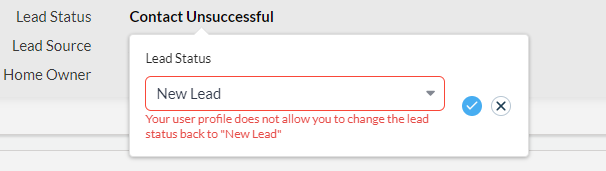
- m_Output.put("message","Your user profile does not allow you to change the lead status back to \"" + v_LeadStatus + "\"");
- m_Output.put("status","error");
- }
- }
- //
- // return response
- return m_Output;
- Click "Save" and Done!
Additional Note(s):
- If the user's profile is blank, the rule will not apply to them.copyraw
l_Disallowed = List(); l_Disallowed.add("Joel"); if(l_Disallowed.contains("")) { info "Yay"; } else { info "Nay"; } // yields "Nay" // v_DisallowedString = "Joel"; if(v_DisallowedString.contains("")) { info "Yay"; } else { info "Nay"; } // yields "Yay" //- l_Disallowed = List();
- l_Disallowed.add("Joel");
- if(l_Disallowed.contains(""))
- {
- info "Yay";
- }
- else
- {
- info "Nay";
- }
- // yields "Nay"
- //
- v_DisallowedString = "Joel";
- if(v_DisallowedString.contains(""))
- {
- info "Yay";
- }
- else
- {
- info "Nay";
- }
- // yields "Yay"
- //
Source(s):
Category: Zoho CRM :: Article: 340