


Zoho CRM & Zoho Inventory: Upload Image to Item Record using Deluge
- Category: Zoho CRM
- Hits: 39196
A quick article on how to upload an image to the product/item listing in Zoho Inventory.
Why?
We're enhancing the out-of-the-box integration from eBay to Zoho Inventory bespoke for a customer. We want the photo on eBay to be downloaded and uploaded to the Zoho Inventory record for the respective record. As Zoho Books and Zoho Subscriptions uses the same database tables as Zoho Inventory, and there's more documentation on the API for Zoho Books, we're going to apply this solution to Zoho Books.
How?
We're not going to go into detail on how to parse an eBay response here (see my other articles on eBay webhooks). Instead, all we want is the URL of an image to be downloaded, then uploaded to the Zoho Inventory or Zoho Books item record.

Zoho CRM & Creator: Download attachment and upload to Creator file field
- Category: Zoho CRM
- Hits: 43064
A super quick article on how to download an attachment from CRM and upload to a "file upload" field in Creator.
Why?
My use case here is that we are creating a Creator app that will show the attachments on a CRM contact record (and be clickable). The complication here is that the user can use the Creator form to add a new attachment that will eventually be uploaded back to CRM.
How?
At time of print, things have moved on and based on the Zoho official forums, this used to be a daunting task. Not anymore at least from what I've seen.

Zoho CRM: Schedule a Meeting using Deluge
- Category: Zoho CRM
- Hits: 31940
Following on my article of creating a task using Zoho Deluge and scheduling a call using Zoho Deluge, here's an article on creating a Meeting or an Event using Zoho Deluge.
Why?
Because at time of print, I couldn't find that much information on how to build up a JSON request to create a meeting (previously known as Event) in Zoho CRM. Here's a quick snippet of code to remind me.
How?
Similar to how to create a call or task, but with some variation:

Zoho CRM: Using a function for validation rules (or restricting specific picklist options by user profile)
- Category: Zoho CRM
- Hits: 52768
So this is a pretty cool feature in Zoho CRM that I hadn't used much but definitely worth an article. The ability to block field picklist options from being selected based on the profile of a user.
Why?
There were several alternatives we considered beforehand which still didn't fit the requirement: A client's first-line agents would have a lead record with the status "New Lead". The client wanted that if the status had changed to something else, the first-line agent would not be allowed to set it back to "New Lead". Automations and workflows could however (run as Administrators). Mapping a dependency field didn't fit the bill because we want "Lead Status" to be displayed to the first-line agents. Making this field read-only to first-line agents also wouldn't help as some of the options should be selectable. Two separate fields weren't quite right either: 1 as read-only (permission only to higher level) and 1 picklist as selectable means that the first-line agent would be referring to 2 status fields and not really knowing which one defines the stage the lead is at.
How?
Well this can be done through a validation rule. After working in Zoho CRM for over 3 years, this is the first time I'm using it so I'm documenting it.

Zoho CRM: searchRecords with sorted results
- Category: Zoho CRM
- Hits: 42443
This is an article to document how to use the searchRecords function in CRM and to sort the results response.
Why?
This is unclear and not always working as coded below since each system (CRM, Creator, Books) seems to interpret this sorting feature differently. This article is an effort to find clear and working solutions. It is working again as of 2022-02-10.
How?
Two methods listed here, the standard searchRecords() and then the getRecords() functions:

Zoho CRM: Template: Empty Space between Header and Line Items
- Category: Zoho CRM
- Hits: 20399
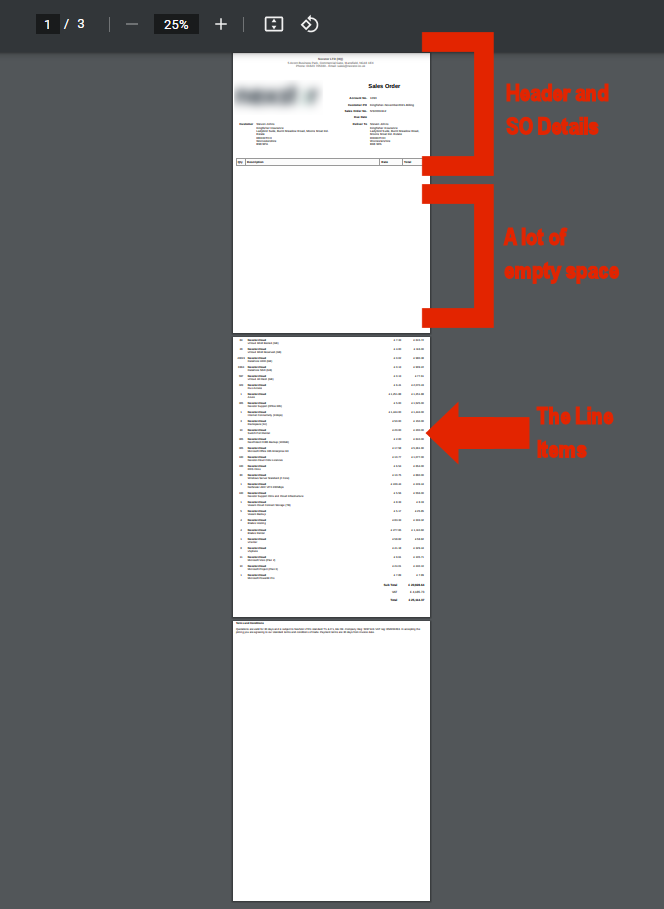
A very quick article on how to deal with an issue where a CRM template has been used and where the table of line items appears on a separate page (and to remind me of the CSS to fix this).
Why?
By default / out-of-the-box / vanilla, in a Zoho CRM Template, the table of line items will behave like this; specifically when there are a lot of line items as per my screenshot here:
How?
This has been raised a few times by multiple clients but the fix is rather quick as long as you can get to the HTML of the template:
ZohoCRM: Template: not being able to edit a text box
- Category: Zoho CRM
- Hits: 40427
This is a bit of an odd article with not 100% certainty on what the cause/outcome would be for your case but worked for us. This documents the steps taken to edit/modify the header on a sales order inventory template.
Why?
A client raised an issue that they had previously hard-coded the address of their organization into the body of a template (just below the header... they weren't using the header section) but then they changed address and couldn't change the template. So they had something like:
${Organization.Organization Name}
${Organization.Street}
${Organization.City}
${Organization.Country}
${Organization.Postal Code}
11 My Street, My City, My State, My Zip, My Country
They wanted to get rid of the "11 My Street, My City, My State, My Zip, My Country" but when editing the template, they couldn't put the cursor in there or even delete the box the address was in.How?
So you're going to say this is a strange issue and an even stranger fix, but I've tested this solution by getting a colleague to refresh the page and check it out as well as the client to go in and confirm the change was successful...:

ZohoCRM & Xero Real-Time Invoices: Receive Webhook
- Category: Zoho CRM
- Hits: 59621
So this is an article expanding on my article Zoho Deluge - Connect to Xero API and explores how instead of a schedule, we can get Xero to tell ZohoCRM whenever an invoice or contact gets updated in Xero.
Why?
I used to use ZohoCRM schedules to pull when an invoice has been paid, but ZohoCRM schedules run only every 2 hours. You can set up 2 schedules: one that runs on even hours and one that runs on odd hours to change this to every hour. It's not enough for some, so the below details on how you can get Xero to tell Zoho when a contact or invoice has been updated immediately.
How?
Here's an overview of how we achieve this:
- Set up a Zoho CRM function to receive the webhook.
- Setup a webhook in Xero.
- [Optional for Method #2] Setup a PHP script on a server that will validate the Xero webhook.