


ZohoCRM: zoho.crm.searchRecords only returns certain records
- Category: Zoho CRM
- Hits: 23008
This is an article to hopefully resolve for you quicker than it took me, why a zoho.crm.searchRecords() returns some of the records but omits others.
Why?
The use-case was that we were creating a custom related list on a Zoho Finance > Sales Orders module but it wasn't finding all the Quotes related to this Sales Order.
How?
The quick answer is buried in Zoho documentation and due to the searchRecords function requiring it's 5th parameter which defaults to "not converted" records:
<variable>=zoho.crm.searchRecords(<module_name>,<criteria>,<page>,<per_page>,<search_value>,<connection>);
Zoho CRM REST API: Stop Workflow from Triggering
- Category: Zoho CRM
- Hits: 27430
This is an article to show you how to use triggers but also how to stop them. We only found this an issue when using REST API v2.1 but also to show you how to configure triggers when using createRecord or updateRecord.
Why?
We had a Creator app updating a CRM record which in turn had a workflow to update the Stage in Creator (so a user can change the stage in CRM and it would reflect this in the equivalent Creator record). There was also a workflow that ran when the Creator record was updated to update its changes to CRM. It was actually causing a loop which used up all the API calls.
How?
You might already be familiar with some of the trigger options below but one that worked was initially guessed as "none" but then later found in the documentation could also be an empty list [].
Zoho CRM: Update a custom field in line items / product details using REST API v2.1
- Category: Zoho CRM
- Hits: 66630
This is a quick article documenting how to update custom fields in a line items or product details section of a transactional module such as Quotes, Sales Orders or Invoices using code: Zoho Deluge.
Why?
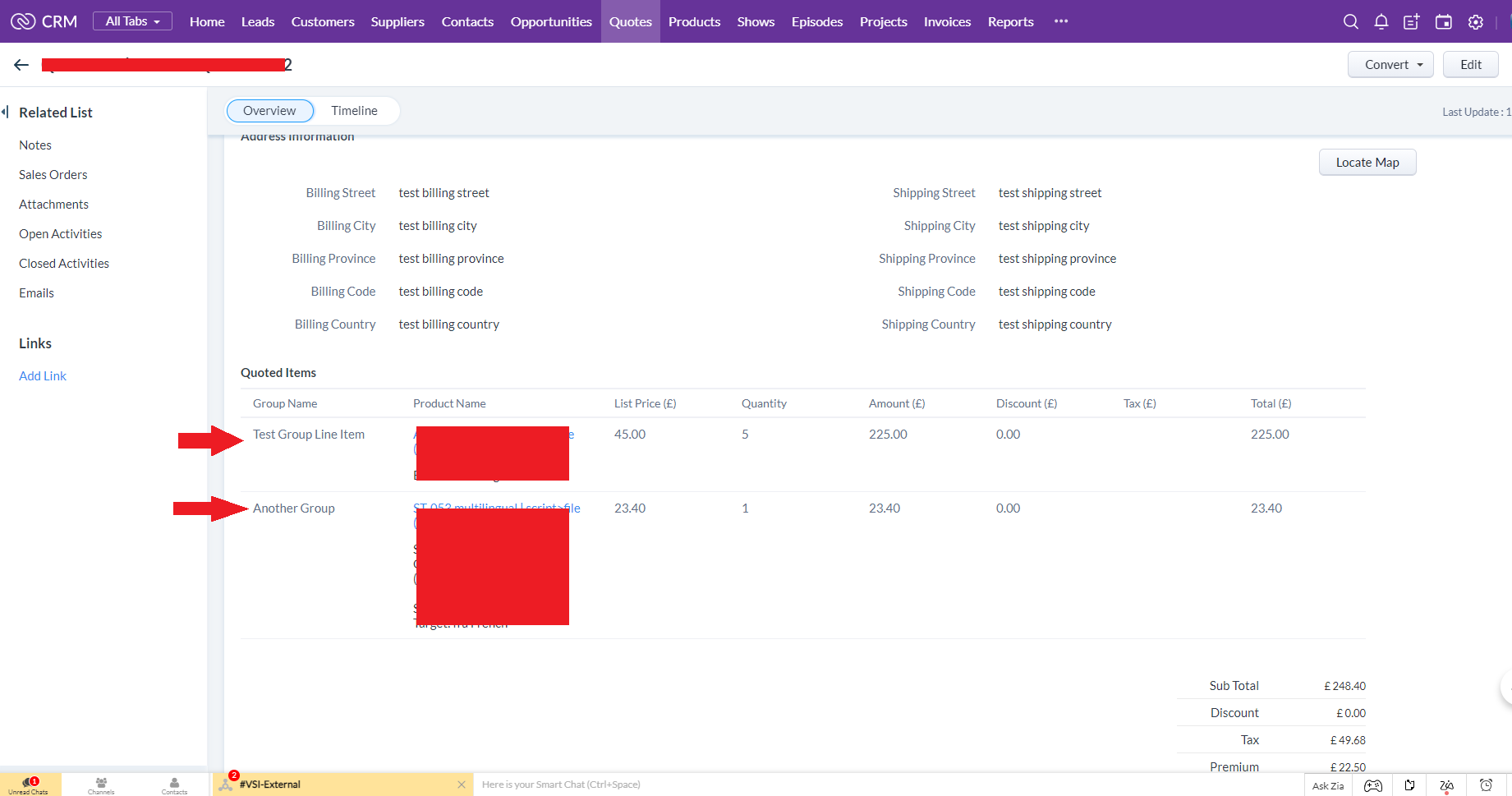
At time of print, Zoho had recently introduced the ability to have custom fields in your line items, alongside the product name, list price, quantity, tax, etc. In the example below, we have added a column called "Group Name" in the CRM Quote module as per the following screenshot:
How?
Again at the time of this article, this is only modifiable when using REST API v2.1. We are going to update the field with label "Group Name" but API name "Grouping" in a list item column.
Zoho CRM: Mapping a Multi-User or Multi-Lookup field using Deluge
- Category: Zoho CRM
- Hits: 52870
This is a very quick article with examples of managing a multi-user or multi-lookup field in CRM using Zoho Deluge.
Why?
Sometimes you might need this when data mapping fields from one module to another, sometimes you need to manage existing multi-lookups/users in a record.
How?
So the key point to remember is that all multi-select lookup and multi-user lookup fields are held in temporary CRM modules called a "LinkingModule" (as opposed to standard modules and custom modules).
Zoho CRM/Creator - Common Errors & Gotchas
- Category: Zoho CRM
- Hits: 54487
A quick article on how to debug some errors in Zoho.
Why?
I wanted a general note to list certain errors that we get when we do certain things in Zoho but didn't want to write a separate page for each minor issue.
How?
So I'm going to try and list solutions to minor errors we run into.
Zoho Templates - Font size is inexplicably tiny
- Category: Zoho CRM
- Hits: 40331
This is an article resolving an issue where a template will shrink all the text when in PDF preview.
Why?
Ok doesn't need a song and dance about it, but I went home yesterday downtrodden by an issue which I'd been working on for most of the day where I would remove all the styling and the text would still appear small. Sure I resized the text to about 46pt and everything was over 3000px in width but this is not good for a final solution. I thought maybe there was a setting for the default font size or where I've accidentally zoomed out in the browser... but these were red herrings as I have other templates that work fine.
How?
The error is one of those that you wouldn't consider relevant in this case, after all, all styling was removed... Here are two screenshots to demonstrate the issue:
Zoho CRM: APIv2 using PHP & cURL
- Category: Zoho CRM
- Hits: 30829
This is an article documenting how to access ZohoCRM with API v2 using PHP and cURL. The first few functions are to manage OAuth v2 and generate the refresh and access tokens. The second snippet of code below is using the functions to read data from Zoho CRM and to write data back to the system.
Why?
I've rewritten this code a few times and want to store the finalized version (following updates) making it as generic as I can in order to apply it to any client.
How?
Firstly, you will need to browse to https://accounts.zoho.eu/developerconsole and register your new app (or the one you will have completed once copying the below scripts).

Zoho Deluge - Multi-line Variable Assignments and Expressions
- Category: Zoho Deluge
- Hits: 10052
A short article explaining how Zoho Deluge allows a variable assignment to be written across multiple lines, as long as the statement ends with a semi-colon. This has a limited number of use cases, but is useful to be aware of if you have not come across it before.
Why?
In many Deluge scripts, assignments are often more than a single value. At times, it can be useful to copy and paste or temporarily format logic across multiple lines to improve readability while writing or reviewing code.
Do bear in mind that once the script is saved and re-opened, the code will be reformatted back onto a single line.
How?
Below are three examples demonstrating multi-line assignments in Zoho Deluge.