

SSRS Querying on either of 2 Parameters
- Category: SQL Server Reporting Services
- Hits: 69265
The end-user must be able to search on EITHER the student's username or the student's ID (2 report parameters: @StudentADAccount [varchar] and @StudentReference [int] respectively). Most of the remaining datasets use the resulting @StudentReference number in their "where" clause. A student always has a "Student Reference" but not necessarily a student AD account (enquired/applied only).
Set default parameter dates to start and end of month
- Category: SQL Server Reporting Services
- Hits: 36488
The requirement in a lot of my reports in SSRS has always been a date range rather than just the one date. The user must be allowed to select all results between two dates instead of just specifying the one day. If the second parameter (ToDate) is the same as the first (FromDate), then the range is for that particular date.
Solution
SSRS Use T-SQL Like with a Parameter
- Category: SQL Server Reporting Services
- Hits: 30391
Situation
I have a report that returns room bookings based on a user and given a date range. The problem is that there are a few thousand users and Microsoft's SQL Server Reporting Services interface isn't the most fun to scroll endlessly down. Advanced users can type the name really fast for it to auto-scroll down to the desired name. Our advanced users are exceptions to the rule.
Problem
SSRS Templates in BIDS 2008
- Category: SQL Server Reporting Services
- Hits: 17753
- Open a Windows Explorer and make a duplicate of the report that you want to use as a template.
- Rename the copy (suffix with template?)
- Remove objects unique to the report and leave elements for all reports.
- File > Save selected item as...
- For SSRS 2008: Save in the folder: "C:\Program Files\Microsoft Visual Studio 9.0\Common7\IDE\PrivateAssemblies\ProjectItems\ReportProject"
- Done!
SSRS Hide results table if empty
- Category: SQL Server Reporting Services
- Hits: 90640
So I don't know how many people were just saying why don't you do the following:
- Bring up the "Tablix Properties" of the dataset
- Look for the section "No Rows"
- Put in a value for "NoRowsMessage".
The long way of doing this
I would have called this article "Iteration within SQL Server Reporting Services Business Intelligence Development Studio (BIDS) version 2008 through combining Transact-SQL and MDX expressions" but boy what a mouthful, and it's not really iterating anymore. So it's "SSRS Hide results table if empty" though I will add that if you wanted to put a message instead of hiding the table then following the below will also let you do this (requirements: common sense or the IQ of a duck).
It's what I've been searching for for the past hour and although you may think I'm just adding to the cyberspace pile of useless info, at least I'm not just copying and pasting from other sites to add content to my own. And I'm not just adding content, the way I'm doing the below is nothing similar to what I googled (probably a bad sign but time is ticking and no one has forever).
SSRS - Lost window with datasets
- Category: SQL Server Reporting Services
- Hits: 34916
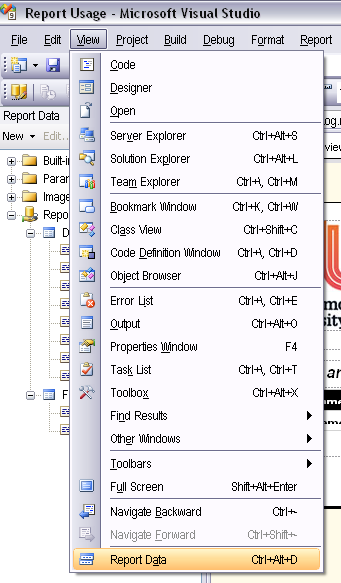
Often happens to me and not sure why. You open the project and the window panel for the Report Data containing the parameters and datasets isn't there. I spent a bit of time enabling/disabling toolbars before I found this.
- Open a Report solution (or have one open already?)
- The menu link is "report data" and it's right at the bottom of the "View" menu.
Border settings not saving in SSRS
- Category: SQL Server Reporting Services
- Hits: 40712
My situation is that I wanted to put an expression to format the border (empty cells have a border and non-empty don't). This was so that a grid would show for empty spaces.
I wasn't getting very far because I'd even ask the border to be grey and save the project but when I come back to the setting, it's still black.
Room Availability Calendar in Business Intelligence Development Studio
- Category: SQL Server Reporting Services
- Hits: 62539
Ok I admit I only googled for about 1 hour before I gave up and just wrote my own. Saying that it's taken me 4 hours just to do the below... hopefully it will be quicker next time now that I noted it all down.