

Excel: convert degrees minutes seconds to decimal
- Category: Excel
- Hits: 22228
A quick article on how to get the value of 40°4′20″N 116°35′51″E into 40.079857, 116.603112.
How?
Let's pretend all the names are in column A, in Column B I have the coordinates that I want to convert:
A                                       B
-------------------------------------   ----------------------
Beijing Capital International Airport   40°4′20″N 116°35′51″E
Beijing Shahezhen Air Base              40°8′57″N 116°19′17″E
Beijing Tongxian Air Base               39°48′40″N 116°42′30″E
Note that I tend to copy the coordinates off a website which has strange apostrophes and double-quotes. You can change this but remember to put two double-quotes if you are searching on it, eg:
FIND(""",B1)   // will NOT work!
FIND("""",B1)  // will work
FIND("″",B1)   // will work
Excel: Extract hyperlink from link
- Category: Excel
- Hits: 11349
A quick article on if you want to extract the link from some text you have copied off the web and into an MS Excel document.
How?
- Open up a new workbook.
- Get into VBA (Press Alt+F11)
- Insert a new module (Insert > Module)
- Copy and Paste the Excel user defined function below
Sub ExtractHL()
Dim HL As Hyperlink
For Each HL In ActiveSheet.Hyperlinks
HL.Range.Offset(0, 1).Value = HL.Address
Next
End Sub
- Press F5 and click “Run”
- Get out of VBA (Press Alt+Q)

Excel: Find values in one column that are not in another
- Category: Excel
- Hits: 35621
A quick note on how to compare two columns for values that are not found in another. I have a column with old values, and now that I have a new list, I want a quick way to see what values are in the old column and which ones are new...
Why?
Consider the 3 following columns in an Excel spreadsheet:
Old       New       Exists in Old?
--------- --------- --------------
123456    234567
234567    345678
345678    456789
567890    597890
I want the third column to say whether this is new or not.
How?
MS Excel: Convert a text to a number
- Category: Excel
- Hits: 24341
This is a quick article on how to convert some cells in Microsoft Excel to number values...
Why?
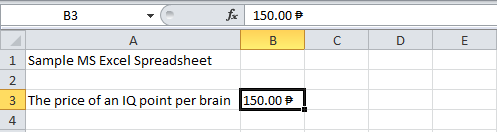
OMG. Seriously Microsoft! I have spent an hour trying to convert a column of currency values to a number using Microsoft Excel 2010. Since when did MS Excel stop understanding what a NUMBER was?
I have a column full of currency values which I want to convert, specifically Philippine pesos to British pounds (sterling). When I multiply the Philippine peso by the conversion rate, it returns #VALUE!
How?
The problem is that I have a column which includes the currency symbol as per the following image:
MS Excel - Sort pivottable column headings by date
- Category: Excel
- Hits: 25644
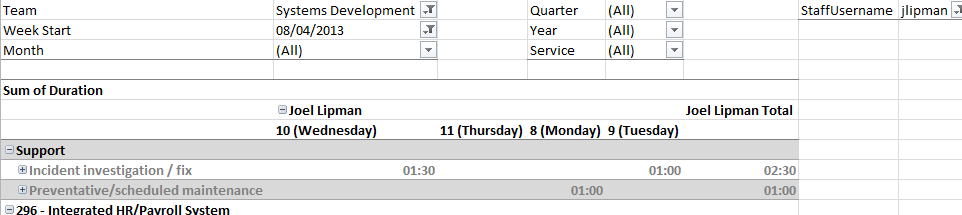
This is a quick note to myself so that I never use parentheses in the column headings again. Basically I have a pivot table in Microsoft Excel 2010 with the projects down the left (in the first column) and the days of the week along the top.
Why?
The excel report would hit a bug where it couldn't work out that 10 (Wednesday) happened after 8 (Monday).
How?
See the following screenshot and note the dates for Monday, Tuesday, Wednesday, and Thursday:
Convert Decimal (Person Days) to Time in Excel
- Category: Excel
- Hits: 26002
We have an excel spreadsheet which reports against a mySQL database and reads time spent on projects by IT Service colleagues. The main report is a pivot table with staff members along the top, tasks down the first column, and time spent in the form of person days in the cross-join.
Why?
Currently the smallest bookable time by low-level tape monkeys and techies is 30 minutes (Managers it would appear can book whatever time, eg. 5mins). 30 minutes for us translates to 0.07 in person days (a person day being 7 hours and 24 minutes or 26640 seconds).
How?
Select unique values in Microsoft Excel column
- Category: Excel
- Hits: 20248
Quick Count
=INT(SUMPRODUCT((A3:A1000<>"")/COUNTIF(A3:A1000,A3:A1000&"")))
This returns the number of unique values in the range A3 to A1000 and excludes the blank/empty cells.
Display all Unique
Found this note on one of Microsoft Help sites:
Stop Excel Row Height Self-Adjust on Refresh
- Category: Excel
- Hits: 51312
I have a Microsoft Excel 2007 file that connects to a SQL Server 2008 R2 database. The Excel file pulls data using lookup tables and displays the data in an Excel Spreadsheet.
The Problem
We can select all cells and set row height to be 30 for example, but everytime we refresh the data in the Excel spreadsheet, all the rows get re-adjusted to fit the data and lose that consistency.
A Workaround: New line inserted before and after
So this is where I am at the moment without VBCode and other suggestions. Instead I add a newline in front of and after the smallest data value (one that I know will never be two lines (or two words)) within the SQL query itself. We have a DEPT column that is an acronym of the departments so for example: