

Run commands for Windows
- Category: Windows OS
- Hits: 44733
This is an article intended for IT Support. It is a list of the system tools available in the Microsoft Windows OS that can be run from the "Start > Run" option.
How?
Running Internet Explorer 6, 7, 8 as standalones
- Category: Windows OS
- Hits: 70414
Intro
I know there are a lot of articles on the WWW detailing this process but none of them really worked for me. I recently changed job and no longer have all my test machines at work. Instead I only have the one workstation :eek Still I've been asked to test some web applications (???) so I had to find a solution to suit me. I'd done this before IE7 (so a long time since).
My office workstation setup for this is:
- HP CMT DC7900
- E5300 @ 2.60Ghz
- 2Gb RAM
- Windows XP Professional SP2
- Internet Explorer 7
As you can tell, not the most up-to-date but unfortunately I need to stay near to my customer base and match their setups as closely as possible.
Windows 7 Aero Features
- Category: Windows OS
- Hits: 48592
Thought I'd put something here as a lot of my clients and friends are all surprised by the Aero features and weren't aware that these existed in Windows Vista (and originally from Linux variants).
Sometimes you may only have partial Aero effects. This can be because Windows may not think your machine is powerful enough to run these effects without affecting performance.
If this is happening to you, and you don’t mind about a possible slight slow down on performance you can force enable them -
- Go to Control Panel -> System and Security -> System
- Click on advanced system settings on the left and then performance settings.
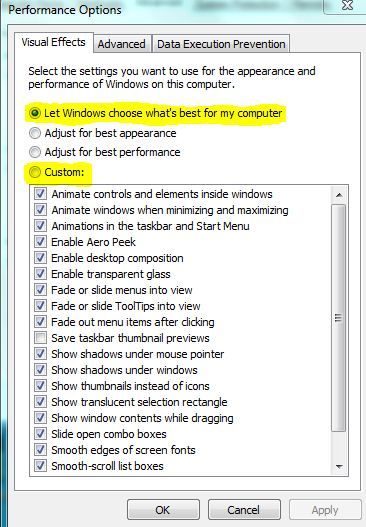
- Under the visual effects tab you should see that the option “ Let windows choose what’s best for my computer “ is by default checked.
- Below it you should see a list of visual effects, some of which will be unchecked if you are not experiencing the full range of Aero features.
- Select the custom option and then select all the effects from the list below it. Hit apply and ok and you should have all the Aero effects enabled.
Now what are these Aero effects?
Another ASCII Extended Character Set for PC
- Category: Windows OS
- Hits: 10004
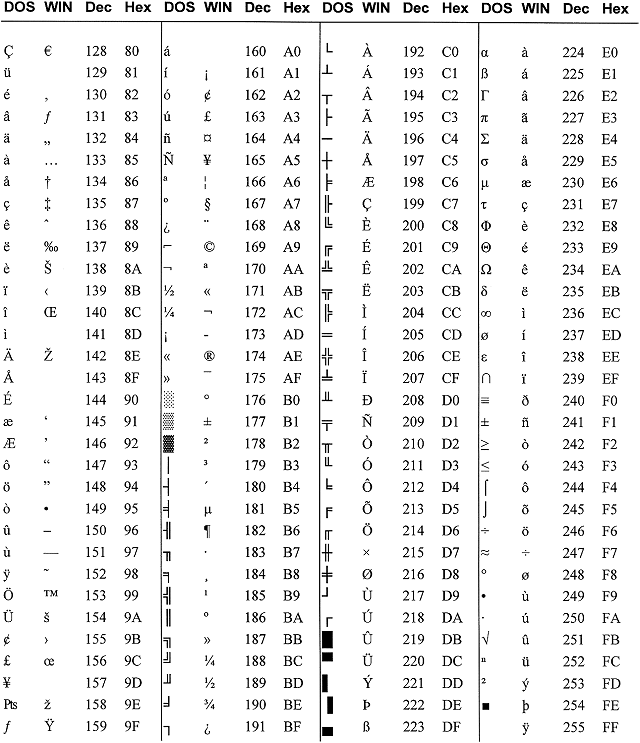
Typing an ASCII character
- In DOS:
- Hold down the <Alt> key while typing the decimal number on the keyboard keypad. (Example: <Alt>178)
- In Windows for a DOS character:
- Hold down <Alt> while typing the decimal on the keyboard keypad. (Example: <Alt>230)
- In Windows for a WIN character:
- Hold down <Alt> while typing "0" then the decimal number on the keyboard keypad. (Example: <Alt>0140)
Remove write-protect from USB pen in Windows
- Category: Windows OS
- Hits: 44943
I just had to put something here as I have been buying and returning failed/corrupt USB pens. In the past few months I have been trying to upgrade my 16Gb USB Integral Pen from Play.Com to a 32Gb equivalent. I use my USB pen as the "My Documents" folder on every computer I use. It was fine with my 16Gb one but my 32Gb ones have all failed at some point.
I went for a cheap one on Play.com (Verbatim 32Gb@£49.99 & Kingston DataTraveler@?) and an even cheaper one on Ebay.com (Leather 64Gb@£29.99). In hindsight, the Ebay one was obviously going to fail (faking the disk size).
I got badgered by my colleagues to splash out and get a worthwhile pen. Aside from some other failures, I decided to get the bulletproof, waterproof, fireproof, shockproof 32Gb USB Pretec Pen (as advertised by Gadget Show on Five.tv). Turns out this is an incredibly fragile pen. If files are being written to it and it gets nudged, this will corrupt the pen. BTW I don't use the "remove device safely" rubbish as my old pen never did and it was fine for over a year. The default setup in windows XP is that it doesn't need it.
Bulletproof, waterproof, fireproof, shockproof BUT NOT joe-proof! ...
Windows Live Messenger: Error 80048820
- Category: Windows OS
- Hits: 23245
This is an issue relating to the Time Server Synchronization error. Basically you start up windows live messenger and get the following error:
{rokbox title=|Messenger Error 80048820|}/images/screenshots/windows_live_error_80048820.png{/rokbox}
Basically you need to check that the time on your windows clock is accurate or close to real Internet time:
Windows 7: System Clock is constantly going out of sync
- Category: Windows OS
- Hits: 246704
The Issue
People have reported that although they have manually set the date/time on their computer, this gets changed by the windows time server (time.windows.com) when connected to the Internet and for some reason it doesn't display the right date/time.
The Quick Fix
First off, check there aren't any Update for Windows 7 releases at Microsoft's Windows Update
Add "Command prompt from here" to right-click context menu
- Category: Windows OS
- Hits: 30713
- Microsoft Windows XP
I keep having to do this every year as I reghost all my machines (=restore to sorta factory settings), so instead of googling it and going through other websites that work and don't; I thought I might as well post the way I do it:
- Open up windows explorer
- Go to Tools -> Folder Options
- Click on the File Types tab
- Scroll down and select (NONE) Folder as file type
- Click on Advanced
- Click on New...
- For the Action type what ever you want the context menu to display, I use Command prompt from here
- For the Application value type c:\windows\system32\cmd.exe (this will be different on winnt, browse if unsure to your cmd.exe program)
- Click on OK > OK > Close
Notes:
- Added by default since Microsoft Windows 7