


ZohoCRM: ZDK Client Script to retrieve Contact Email
- Category: Zoho
- Hits: 30920
An article on one of my first client scripts for ZohoCRM. This retrieves and populates an email field based on when a contact is selected in a lookup field.
Why?
I could do a normal automation/workflow on save of the record, but the client wants the email to be prefilled in the field as soon as a contact is selected.
How?
This needs to behave like a formula field which changes and displays before saving the record. At time of print however, I can't get a formula field to retrieve a field from another CRM record.

ZCRM Client Script: Correct Decimal Fields OnLoad
- Category: Zoho
- Hits: 35452
This is an article detailing the client script to fix any fields which exceed their decimal places limit in ZohoCRM.
Why?
So we have a customer that has some decimal fields on the products module that are calculated and will sometimes return numbers with more than 6 decimal places. As this is more than specified on the ZohoCRM field properties, as soon as the staff user tries to save the record, they will get a validation error on the decimal field even if that's not the field that is being changed:
Decimal places for the Unit Price field should be less than or equal to 6.
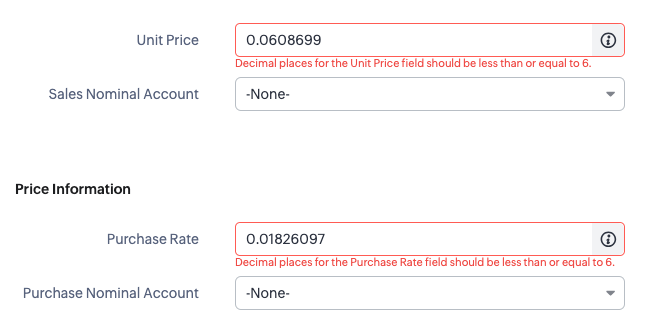
How?
The workaround for staff is to round this up manually and then save the record. But this can be an annoying overhead, especially if it can be auto-corrected with a client script.

Zoho CRM: Client Script Confirmation Box and Popup Mailer
- Category: Zoho
- Hits: 38050
This is an article just repeating a script from the Zoho Kaizen series allowing a confirmation box (something lacking in Zoho Creator - but that every app outside of Zoho has) as well as a popup to email from CRM with a rich-text interface.
Why?
The use-case here is non-existent. It's more of a play around to see what can be achieved and how much this can be customized. The task I've set for myself is as follows:
- Trigger if the contact record has a tickbox called "Extra Confidential" ticked/checked=true
- Popup a confirmation box to proceed or cancel.
- Popup the email from CRM mailer with the to email address, bcc, subject and message content already populated.
How?
The example from the Kaizen series uses a record with canvas mode applied; but I wanted to try it without a canvas to see if we can have this functionality using the out-of-the-box ZohoCRM.

Zoho Creator: isBlank and isNull: Before or After?
- Category: Zoho
- Hits: 26592
A really quick article to test when to use isNull and isBlank.
Why?
So I've noticed that looking at people's Zoho Deluge code, there will often be a check on a null before or after the variable:
if(v_Test.isBlank())
{
    ...
}
VS
if(isBlank(v_Test))
{
    ...
}
isBlank() can be used to check if the string only contains blanks or if a value is null...How?
Consider the following test function:

Zoho Deluge: Nested Catch Statements
- Category: Zoho
- Hits: 23053
What?
A really quick article on demonstrating a nested try...catch()... statement working in Zoho CRM.
Why?
To prove a point to ChatGPT who said this was not possible... and to deal with a scenario which exists for a client of mine.
The use-case for my Cx is that they need documents converted from HTML to PDF — as in we send it a bit of code in HTML and we want a PDF file returned. I have severaly instances of an API which accepts HTML and returns a PDF file. Nothing complex but issues with one of the servers being down, or inaccessible due to certificate expirys, means that the Cx business halts. In order to add a bit of clustering, we have added a bit of code for it to try one server first, if there is any kind of an error with that server, it tries a second server... We now want to add a third server to try if the first 2 fail for whatever reason.
How?
Admittedly, perhaps this maybe wasn't possible but as of February 2024; I have been able to test and implement this.

Zoho CRM: Updating a CRM record Custom Line Items using API v7
- Category: Zoho
- Hits: 41918
What?
This is a quick bit of code for my reference so that I don't have to keep finding a function that gives me the syntax of how to either create or update a record using invokeUrl.
Why?
Because my designers keep including custom fields in their transactional modules line items (quotes, sales orders, invoices, purchase orders). The only way to update these are by using the API and deluge function invokeURL rather than the usual shortcode of zoho.crm.updateRecord() or zoho.crm.createRecord().
How?
This is somewhere in the official documentation but here's the bits that I need:

Zoho CRM: Make Upload File Field Mandatory
- Category: Zoho
- Hits: 13509
What?
A quick article on making an "upload file" field mandatory.
Why?
Because for some reason, it wouldn't appear as selectable when I tried using a layout rule. Probably everyone else has figured this out and I'm just late to the party.
How?
Through the wonders of Zoho CRM Client Script.
So we're going to check on page onload, onchange for the Create Page (Standard), Edit Page (Standard), and Details Page (Standard).

ZohoCRM GetRelatedRecords INVALID_DATA
- Category: Zoho
- Hits: 23748
What?
A ridiculously quick article on resolving a zoho.crm.getRelatedRecords() combined with a zoho.crm.bulkUpdate issue.
Why?
Trying to be clever and reducing the API calls to go through a few thousand records and to update the related records. I was getting the error INVALID_DATA with the details being api_name:'data'... But this is shortcode, not an invokeURL.
{ "code":"INVALID_DATA", "details":{ "api_name":"data" }, "message":"invalid data", "status":"error" }
How?
I recall covering this solution before but it boils simply down to the zoho.crm.getRelatedRecords() not retrieving related records which are clearly visible when using the CRM.
Page 5 of 26
Latest Articles





Accreditation



Donate & Support

 bc1qf6elrdxc968h0k673l2djc9wrpazhqtxw8qqp4
 0xb038962F3809b425D661EF5D22294Cf45E02FebF