


Zoho Deluge: Search Records with Special Characters (COQL)
- Category: Zoho
- Hits: 61014
This is an article to remind me how to search for CRM records by a value that may contain an ampersand or parenthesis.
Why?
I wrote this article because some searches will work for me and sometimes it won't. Escaping the ampersand with a backslash or url encoding to %26 wasn't working for me. I spent several hours trying to write a script that could search for the existing records by company name. The issue is that if you use zoho.crm.searchRecords() this will work fine for company names without special characters such as the ampersand or parentheses. But what if amongst your records you may want to find:
Company Name: Father & Sons (Incorporated)
Contact Name: O'Reilly
How?
Well I've tried various replace methods with regular expressions but the only method reliable enough I have found to work each time is using the CRM Object Query Language or Zoho's COQL. Similar to SQL but subject to similar issues of escaping special characters...

Zoho Desk: Re-enable Desktop Notifications after clicking on "Not Now"
- Category: Zoho
- Hits: 18578
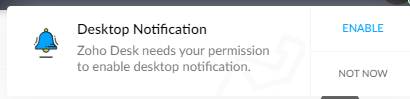
This is a quick article to re-enable desktop notifications after having been prompted initially and having clicked on "Not Now".
Why?
I'm not sure when this prompt is supposed to prompt you again. A client of ours had accidentally clicked on "Not Now" instead of clicking on the "Enable". Documented below is how to get this to prompt you again.
How?
This largely depends on whether you are using the Google Chrome web browser. In this case version 100 and is correct at time of print.

Zoho Workdrive: Getting Team Folder ID
- Category: Zoho
- Hits: 35962
This is an article to document how to get your team folder ID, retrieve information about it, and upload to it via the API.
Why?
The documentation is there but making sense of it, is somewhat difficult, at least for me.
How?
So when I was trying this, I would get either "URL rule not configured" or an unhelpful blank response.

Zoho Books: System Values Maps
- Category: Zoho
- Hits: 26278
A collection of code snippets I seem to be regularly using to generate a dynamic map of system values held in a ZohoBooks instance.
Why?
Rather than hard-coding and having a ton of if..then statements, I can feed these maps a textual value and it returns the ID to use. Some of these can be found elsewhere in my site but I'm putting all of them here just for quick reference.
How?
Note that for the below, I recently updated this article (2024-05-21) due to the API domain name change from https://books.zoho.com to https://www.zohoapis.com/books and changed the Top Level Domain (or Zoho DataCenter) from EU to COM as I was using this for a client on the US datacenter.

Zoho CRM & Zoho Inventory: Upload Image to Item Record using Deluge
- Category: Zoho
- Hits: 31167
A quick article on how to upload an image to the product/item listing in Zoho Inventory.
Why?
We're enhancing the out-of-the-box integration from eBay to Zoho Inventory bespoke for a customer. We want the photo on eBay to be downloaded and uploaded to the Zoho Inventory record for the respective record. As Zoho Books and Zoho Subscriptions uses the same database tables as Zoho Inventory, and there's more documentation on the API for Zoho Books, we're going to apply this solution to Zoho Books.
How?
We're not going to go into detail on how to parse an eBay response here (see my other articles on eBay webhooks). Instead, all we want is the URL of an image to be downloaded, then uploaded to the Zoho Inventory or Zoho Books item record.

ZohoCRM: Integrate ChatGPT to ZohoZIA
- Category: Zoho
- Hits: 69866
Following on from the article: Zoho Cliq: Integrate OpenAI and ChatGPT 3.5 Turbo. This is the next step as we get it to look at data within ZohoCRM.
Why?
Because it is a serious improvement upon ZohoZIA and we get a lot of requests around customizing ZohoZIA...
How?
So taking ideas from my previous article for ZohoCliq; let's use what we know to develop a ZohoZIA for a demo system.
There are several steps, so first we will set up the ZIA action "Ask ChatGPT" using the GUI, then we will capture the question using Deluge code and query the OpenAI ChatGPT API to return a response.

Zoho Books: Estimates/Quotes: Accept & Decline Buttons on Template
- Category: Zoho
- Hits: 46338
An article on adding an accept and decline button on the estimate (aka Quote) notification template within ZohoBooks.
Why?
The use-case is simply that my client wants to make it easier for their customers to accept or decline a quote. Sure there's a portal and you can probably do it from there but this is a one-click accept or decline then done.
One of the biggest hurdles here, which may sound trivial, was the response when an end customer clicks on either the accept or decline button. Using ZohoFlow or other Zoho app for a webhook response, would result in the end customer suddenly downloading a JSON file. Looked a bit suspicious. The code below opens a new tab in their web-browser displaying a plain output message.
How?
So there are 2 caveats to this solution: 1 is that you will need ZohoCRM. I've tried using the "Incoming Webhooks" feature of ZohoBooks but realised the word "Incoming" is the operative word as the response cannot be configured in ZohoBooks like we need to in this solution; namely the webhook response needs to have a header and a body.
The 2nd caveat is a concern around security. It is difficult to guess a customer's Zoho ID; some might say almost impossible. To use other fields that could be sent via the URL as a verification to be checked at the webhook endpoint would be good as well; but I couldn't spend time finding fields that can be 'placeheld', other than what the interface offers, into the template.

Zoho Creator: Input Color Picker
- Category: Zoho
- Hits: 36282
An article on creating a color picker from a specific palette using an input field of a radio type.
Why?
At the time of print, this feature is not provided out-of-the-box and getting our users to learn about hexadecimal color references and Red Green Blue (RGB) values is somewhat difficult. What would be nice-to-have is if they could be presented with a bunch of colors and they click on one to select it.

When are colors used? Well in this use-case, we are using it to color events in a calendar associated with specific staff. Probably not the most essential part of a system but important to some staff...
How?
In an earlier article, I've shown how to change a radio type field in ZohoCreator into a Carousel type of interface. This time, we're going to repurpose and restyle a radio type field into a color picker.
Page 6 of 26
Latest Articles





Accreditation



Donate & Support
If you like my content, and would like to support this sharing site, feel free to donate using a method below:

 bc1qf6elrdxc968h0k673l2djc9wrpazhqtxw8qqp4
 0xb038962F3809b425D661EF5D22294Cf45E02FebF
Paypal:
Bitcoin:
bc1qf6elrdxc968h0k673l2djc9wrpazhqtxw8qqp4
Ethereum:
0xb038962F3809b425D661EF5D22294Cf45E02FebF