


Zoho Creator: Change Radio into Tabs
- Category: Zoho Creator
- Hits: 58667
This is an article to serve as a guide in terms of styling a radio group into a group of Tabs. This is only a guide or reference which was applied for one client but would need adapting to match the colors or style the next client wants.
Why?
The scenario is that my client has quite a long Creator form and instead of scrolling down while entering data, they would prefer if they could have tabs along the top to display each section.
How?
The way we do this is by applying our own stylesheet and overriding certain CSS elements that the vanilla or out-of-the-box Zoho Creator ones provide.
Zoho Creator: Public URL of an Image field / Upload to Shopify API
- Category: Zoho Creator
- Hits: 78581
This is an article to document how I downloaded an image held in a Zoho Creator form, and sent it to an API wanting the publicly accessible link or URL of the image.
Why?
I've got some other articles on handling images in Zoho Creator (see "Sources" below), the most relevant one being my article Zoho Deluge: Get Image Uploaded in Creator Form which has one method of getting a public link.
My use-case scenario here is that while I could upload the link from Creator to eBay's Picture Services successfully, Shopify would not accept any links I gave it. Why not use the links that eBay returns? Well eBay returns URLs to images that have been resized to 400x400 (even with tweak to return 800x800). I wanted a way to upload my image directly to Shopify in 3024x3024 resolution (or the size that the client wants: iPhone res). I then found that Shopify does accept a Base64Encoded version of the image and the below is how I achieved this.
How?
First-off, let me list the various formats that Zoho Creator says that public link exists.

Zoho Creator / eBay: Get all Active Products
- Category: Zoho Creator
- Hits: 35768
This is an article to document a function used in Zoho Creator to retrieve the Product IDs of all the active products in a client's eBay store.
Why?
The use-case was that I wanted to retrieve a list of all the listed active products in a fixed price item listing. The example below is a function which, if given the page number and the number of entries per page, returns these in JSON as a Zoho Map datatype.
How?
I'm not going to go into detail on how I create an access token to query the eBay Trading API as you can read this in my article: Joellipman: Zoho Creator: Push to eBay Listings.
Zoho Creator / Shopify: Get all Active Products
- Category: Zoho Creator
- Hits: 35191
This is an article to document a function used in Zoho Creator to retrieve the Product IDs of all the active products in a client's Shopify.
Why?
The use-case was that I wanted to search Shopify using a Product SKU. Community forums could only suggest looping through all the products.
I then felt that actually I just need the Product IDs. This method could do with some refinement and perhaps if I find a better way to do this, then I'll put it here. But I like this snippet of code albeit a brute force to loop through every active product and list their IDs.
How?
So here's the function I came up with. It loops through a maximum of 2500 products sorted in order of ID ascending (starting with ID=0) retrieving 250 per call and using since_id to not list the same one twice.

Zoho Creator: Receive eBay Order Notifications via Webhook
- Category: Zoho Creator
- Hits: 85644
This is an article to document how I got a client's eBay to notify the seller every time a buyer bought a fixed price item. This uses the Trading API even though I'm aiming for the Platform Notifications API...
Why?
A follow on from my article Zoho Creator: Push to eBay Listings. I have a Creator app that needs to receive the orders from an eBay account as soon as the order or transaction is made on a Fixed Price item.
How?
So first of all, you'll need an access token: please visit my article and read the first part on how to get a valid Access Token for the rest of these steps. Once we have an access token, we will check what notifications already exist (if any), and then we will create a function that subscribes the application so that any order is sent to a URL, specifically a CRM REST API function that will forward the payload data to Zoho Creator (Yes you will need CRM version Enterprise or Zoho One [that supports functions] for this process).

Zoho Creator: Prevent Endless Loops On User Input of a Field
- Category: Zoho Creator
- Hits: 61778
This article serves as a best practice and reminder to myself on how to stop endless loops from happening in Creator and crashing the application. This is more for complex Creator forms which have workflows triggered from many deltas/changes.
Why?
Some clients have referred to this as the "spinning circle of death": they load up a Creator application or change a field and there will be a spinning icon indicating that the field has triggered an automation/workflow but it keeps spinning and doesn't stop. The app page will ultimately timeout and when reloading the form it simply displays a blank page. Their only workaround is wait about 30 seconds or more for the loop to automatically cut out and then they can use the interface again only to find it may crash again.

In the background and from a developers understanding: field1 is told to update field2 when field1 is changed. When field2 is changed, it is told to update field1. This causes a recursive or endless loop where each field triggers an workflow/automation, even if the value has not changed, to modify another field and vice-versa. This can get more complex when there are a lot of fields in the mix.
How?
I'm using this article to go through various methods I tried to prevent this from happening:

Zoho Creator: Push to eBay Listings
- Category: Zoho Creator
- Hits: 6971
This is an article to document how I connect a Zoho Creator app to push a product to your eBay listings. By writing this article, I can refine this method as it took me a while to figure out.
Why?
I have a client who has a Zoho Creator app and wants to push their products to their eBay account. Previously using Zoho Inventory, we realized that this only syncs 1 way not 2 as per the documentation. In that items sold on eBay sync to Zoho Inventory by means of an eBay Sales Order, and only every 4 hours. We needed something that pushes out to eBay and updates the eBay listing. To complicate matters, the client also uses Shopify which means that when an item is sold by eBay, it would take 4 hours until all systems were aware. 1 customer buying the item off eBay and another customer buying the same item off Shopify would be problematic if the client only has 1 of the item in stock. See my Shopify article to get a webhook response within 5 seconds.
How?
At the time of print, the Trading API of eBay is deprecated and reaches end of life at the end of this year (2021). In this demonstration, we're going to use the Listings API, follow the OAuth 2.0 process to get an access token and use it to create an eBay listing.

Zoho Creator: Two submit buttons on a non-stateless form with 2 different redirects
- Category: Zoho Creator
- Hits: 42429
This is an article to document how to have two submit buttons on a non-stateless form which both submit the form but one leaves the current record open while the other redirects to the reports view.
Why?
A client wanted a "Save" button on their form as well as a "Save & Close" button. The "Save" button would submit the form but keep the user on the record form. The "Save & Close" button would submit the form and then redirect the user to the report view of the records.
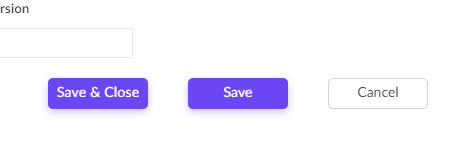
Sounds simple but you can only set a form to redirect to one link and adding a HTML anchor link (<a href>) to the page won't help as you need to submit the form before redirecting the user. A HTML <input type=submit> element to the page won't help either as you need to redirect the user to the specified report after submitting the form.
How?
Well as always, I'm going to cheat. My solution here was to simply repurpose a decision box field in Creator; then re-style it to look like a button; then add a workflow on click of this field.