


Zoho CRM: Using a function for validation rules (or restricting specific picklist options by user profile)
- Category: Zoho
- Hits: 42664
So this is a pretty cool feature in Zoho CRM that I hadn't used much but definitely worth an article. The ability to block field picklist options from being selected based on the profile of a user.
Why?
There were several alternatives we considered beforehand which still didn't fit the requirement: A client's first-line agents would have a lead record with the status "New Lead". The client wanted that if the status had changed to something else, the first-line agent would not be allowed to set it back to "New Lead". Automations and workflows could however (run as Administrators). Mapping a dependency field didn't fit the bill because we want "Lead Status" to be displayed to the first-line agents. Making this field read-only to first-line agents also wouldn't help as some of the options should be selectable. Two separate fields weren't quite right either: 1 as read-only (permission only to higher level) and 1 picklist as selectable means that the first-line agent would be referring to 2 status fields and not really knowing which one defines the stage the lead is at.
How?
Well this can be done through a validation rule. After working in Zoho CRM for over 3 years, this is the first time I'm using it so I'm documenting it.

Zoho CRM: searchRecords with sorted results
- Category: Zoho
- Hits: 34607
This is an article to document how to use the searchRecords function in CRM and to sort the results response.
Why?
This is unclear and not always working as coded below since each system (CRM, Creator, Books) seems to interpret this sorting feature differently. This article is an effort to find clear and working solutions. It is working again as of 2022-02-10.
How?
Two methods listed here, the standard searchRecords() and then the getRecords() functions:

Zoho Deluge: Regex Rounding and/or Removing Trailing Zeros
- Category: Zoho
- Hits: 35381
A very quick article on a cool snippet of code, another regular expression, I've been trying out to round up a number or at least to remove the trailing zeros. I could have added this to my Zoho Deluge - Some Useful Regular Expressions list but I felt this deserved its own article.
Why?
A client wanted the discount displayed on a template and if they gave 10% discount, it would display as 10.00%. And they need the decimal because sometimes they might offer 12.5%. But when it displays in a template, it isn't that pretty to look at: Instead, could they have 10% to display instead of 10.00%, and display 12.5% instead of 12.50%.
Well there might be a longer solution without using a regular expression (regex), as in check for the decimal point, check each digit thereafter to see if there are zeros... But I'm keen on avoiding using loops where possible so we don't breach a statement execution limit in the Zoho app function.
How?
If we're not going to use loops, then the next best thing I'm aware of is a regular expression.

Zoho CRM: Template: Empty Space between Header and Line Items
- Category: Zoho
- Hits: 16365
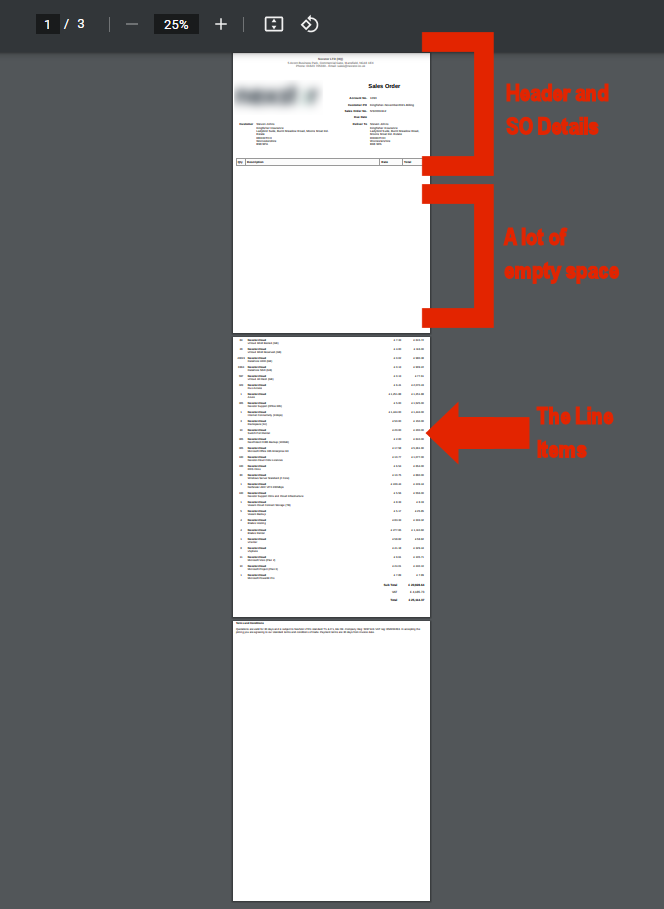
A very quick article on how to deal with an issue where a CRM template has been used and where the table of line items appears on a separate page (and to remind me of the CSS to fix this).
Why?
By default / out-of-the-box / vanilla, in a Zoho CRM Template, the table of line items will behave like this; specifically when there are a lot of line items as per my screenshot here:
How?
This has been raised a few times by multiple clients but the fix is rather quick as long as you can get to the HTML of the template:

Zoho Deluge: a HTML Entity Decoder
- Category: Zoho
- Hits: 24024
A very quick article to document a HTML Entity decoder in Zoho Creator.
Why?
Sometimes when receiving data from a third-party, we may receive some strings containing "&" or " " and obviously want to display these as decoded HTML entities. (Zoho if you're listening) Ideally, Zoho may add this to their zoho.encryption namespace such as zoho.encryption.htmldecode(string). But at time of print, it doesn't exist and in the meantime, I've made a function that does this.
How?
Not sure how else to do this but I simply wrote a function in Zoho Creator for each instance that I knew a HTML entity would be submitted. So it doesn't decode every HTML in existence, only the ones I know will happen.
ZohoCRM: Template: not being able to edit a text box
- Category: Zoho
- Hits: 31437
This is a bit of an odd article with not 100% certainty on what the cause/outcome would be for your case but worked for us. This documents the steps taken to edit/modify the header on a sales order inventory template.
Why?
A client raised an issue that they had previously hard-coded the address of their organization into the body of a template (just below the header... they weren't using the header section) but then they changed address and couldn't change the template. So they had something like:
${Organization.Organization Name}
${Organization.Street}
${Organization.City}
${Organization.Country}
${Organization.Postal Code}
11 My Street, My City, My State, My Zip, My Country
They wanted to get rid of the "11 My Street, My City, My State, My Zip, My Country" but when editing the template, they couldn't put the cursor in there or even delete the box the address was in.How?
So you're going to say this is a strange issue and an even stranger fix, but I've tested this solution by getting a colleague to refresh the page and check it out as well as the client to go in and confirm the change was successful...:

Zoho Creator: eBay: Get Item Transaction
- Category: Zoho
- Hits: 20918
This is the function to get the line item order/transaction from eBay if you give it the eBay Item ID as a parameter.
Why?
Mostly for debugging but here's the code that will quickly get the XML of a GetItemTransactions request to eBay.
How?
You'll need an access token for eBay which I documented on how you can generate one in my article: Zoho Creator: Push to eBay Listings. Then you can use the following code, note that the parameter is the eBay Item ID:

Zoho Creator: Receive eBay Notification and Create Shopify Order
- Category: Zoho
- Hits: 16085
This is an article documenting how to parse the notification from eBay and using it to create an order in Shopify.
Why?
Previously, we would receive an eBay notification and create an order record in Zoho Creator. We did the same for when Shopify would process an order. You can see my following articles for more information on these:
- Zoho Creator: Receive eBay Order Notifications via Webhook
- Zoho Creator: Receive JSON via a Shopify Webhook
How?
I'm going to show you the code first of how to parse the eBay Transaction data and then the code to create a Shopify Order:
Page 13 of 26
Latest Articles





Accreditation



Donate & Support
If you like my content, and would like to support this sharing site, feel free to donate using a method below:

 bc1qf6elrdxc968h0k673l2djc9wrpazhqtxw8qqp4
 0xb038962F3809b425D661EF5D22294Cf45E02FebF
Paypal:
Bitcoin:
bc1qf6elrdxc968h0k673l2djc9wrpazhqtxw8qqp4
Ethereum:
0xb038962F3809b425D661EF5D22294Cf45E02FebF