

Quick Count
copyraw
=INT(SUMPRODUCT((A3:A1000<>"")/COUNTIF(A3:A1000,A3:A1000&"")))
- =INT(SUMPRODUCT((A3:A1000<>"")/COUNTIF(A3:A1000,A3:A1000&"")))
This returns the number of unique values in the range A3 to A1000 and excludes the blank/empty cells.
Display all Unique
Found this note on one of Microsoft Help sites:
- Office 2010:
- Select the data range to do this to.
- Click on the "Data" tab.
- Click on "Advanced" (Advanced Filter).
- Tick the "Unique records only" box.
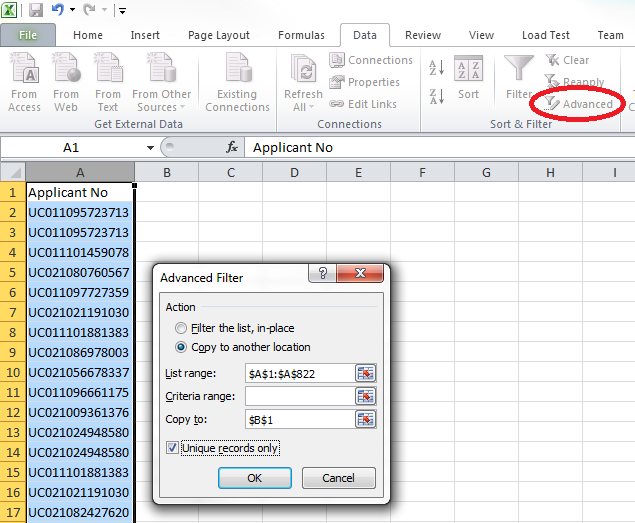
A few more from Microsoft Office Help
copyraw
/* Count the number of unique number values in cells A2:A10, but do not count blank cells or text values (4) */
=SUM(IF(FREQUENCY(A2:A10,A2:A10)>0,1))

/* Count the number of unique text and number values in cells B2:B10 (which must not contain blank cells) (7) */
=SUM(IF(FREQUENCY(MATCH(B2:B10,B2:B10,0),MATCH(B2:B10,B2:B10,0))>0,1))

/* Count the number of unique text and number values in cells A2:A10 , but do not count blank cells or text values (6) */
=SUM(IF(FREQUENCY(IF(LEN(A2:A10)>0,MATCH(A2:A10,A2:A10,0),""), IF(LEN(A2:A10)>0,MATCH(A2:A10,A2:A10,0),""))>0,1))
- /* Count the number of unique number values in cells A2:A10, but do not count blank cells or text values (4) */
- =SUM(IF(FREQUENCY(A2:A10,A2:A10)>0,1))
- /* Count the number of unique text and number values in cells B2:B10 (which must not contain blank cells) (7) */
- =SUM(IF(FREQUENCY(MATCH(B2:B10,B2:B10,0),MATCH(B2:B10,B2:B10,0))>0,1))
- /* Count the number of unique text and number values in cells A2:A10 , but do not count blank cells or text values (6) */
- =SUM(IF(FREQUENCY(IF(LEN(A2:A10)>0,MATCH(A2:A10,A2:A10,0),""), IF(LEN(A2:A10)>0,MATCH(A2:A10,A2:A10,0),""))>0,1))
Category: Excel :: Article: 418











Add comment