Change Regional Settings for your Report

Basically I thought that the regional settings of a report generated using Report Builder 2.0 on a MS SQL Server 2008 instance were dependent on either the server or the client machine.  Realised that this was actually specified in the report. Here's a quick note on how to set Dates and Times used in parameter fields to UK format (dd/MM/yyyy).

You can override this in the report by:

  1. Go to Design
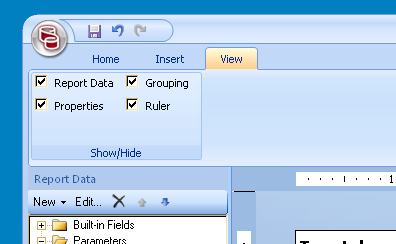
  2. Select the View tabalt
  3. Check that the "Properties" pane is displayed/ticked
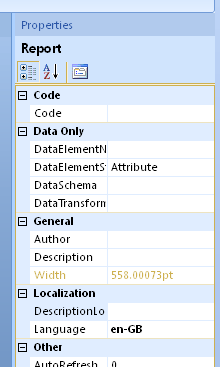
  4. Change Language under Report Properties > Localization to en-GBalt
  5. Save the report and test.
Category: SQL Server Reporting Services :: Article: 264

Comments

Not rated
Trevor
1
Trevor
14 years ago
thanks very much, spot on!
Like Like
Reply | Reply with quote | Quote

Add comment

Your rating:

Submit

Accreditation

Badge - Zoho Creator Certified Developer Associate
Badge - Zoho Deluge Certified Developer
Badge - Certified Zoho CRM Developer

Donate & Support

If you like my content, and would like to support this sharing site, feel free to donate using a method below:

Paypal:
Donate to Joel Lipman via PayPal

Bitcoin:
Donate to Joel Lipman with Bitcoin bc1qf6elrdxc968h0k673l2djc9wrpazhqtxw8qqp4

Ethereum:
Donate to Joel Lipman with Ethereum 0xb038962F3809b425D661EF5D22294Cf45E02FebF

Please publish modules in offcanvas position.