Articles

 By adding the following line to your LocalSettings.php file, you will be able to log everything that WikiMedia does:

$wgDebugLogFile = '/home/username/public_html/wikidir/logfile';

IMPORTANT NOTE: The path above should be the exact full path to the wiki directory under your account.


This took me a whole afternoon and involved a lot of hope as I browsed the Internet and no one seemed to have done this before.  Fortunately, MediaWiki extensions are easier to write than Joomla CMS ones :c)

This article shows you how to get your MediaWiki system to display your Camtasia Studio SWF files in it's articles.

Why Camtasia when there are other free options?

We tried lots of FLV players that were usually branded or not free.  These were awkward to configure a full screen button on the controls and do basic customization.  Our screen recorder was also not displaying the captions of the video unless it was an AVI file that we converted to FLV.  The quality was horrible.  Then we moved to Camtasia Studio where their videos were displaying in good quality but as SWF files.  This extension includes the default settings for "ExpressShow" in Camtasia Studio.

Old Server

mysqldump -u root -p wikidb > wikidb.sql
tar -cvf wiki.tar wiki   ;this is the wiki folder on document root


New Server:

create database wikidb;  this is inside mysql, Note that both mysql versions should be same.
grant create, select, insert, update, delete, lock tables on wikidb.* to wiki@localhost identified by 'YourPassword' ;


MediaWiki Upgrade

copy all the new files to wiki folder and then run php update.php from maintenance folder after updating AdminSettings.php


More Information

http://www.mediawiki.org/wiki/Manual:Moving_a_wiki


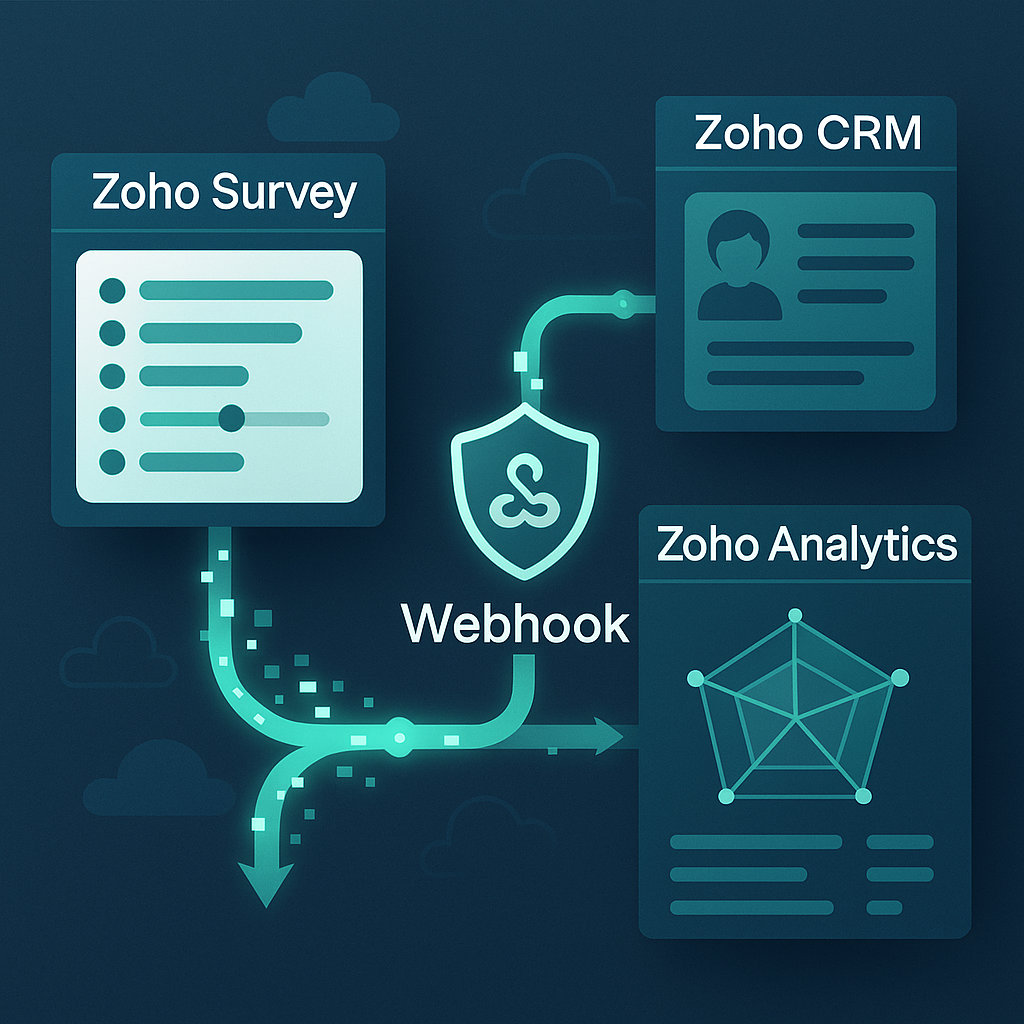
Zoho Survey & Zoho Analytics: Query to generate individual responses and grouped pages

What?
An article on some Zoho ANSI-SQL (in other words, queries that work in Zoho Analytics) as I couldn't find any examples online on how to do this.

Why?
I've been tasked with generating a radar/spider/web chart based on the results from a survey. Apparently this will be done in Zoho Analytics.

The Brief:
We would like the survey data to be generated as a chart and embedded in a PDF brochure we send out to our customers...

How?
Well fulfilling the brief (whether it's the right tool for the job is a different issue), let us synchronize Zoho Surveys into Zoho Analytics. I found I need to edit the setup of the sync every time a new survey is added... but at least it lets me synchronize every hour.

Then I'll write the SQL queries to get the individual responses into a table with labels and columns that can help me group them (and identify which responses belong to which survey attempts).

Then I'll write the SQL to sum up the responses per page per survey attempt.

Finally, I'll see if analytics can be used to generate the radar chart.

Zoho Analytics: Create a Monitoring System with Images

What?
This is an article to remind me how I did this for a customer and images help visualize the health of the system.

Why?
The use-case here is to build a system which monitors a Zoho App for when records were last modified and if a synchronization process starts to fail, there should be images or icons warning or advising of failures.

How?
The key trick to use here the ability for Zoho Analytics to display different images based on a criteria or a value within a data table. As documented in an earlier article, put the URL of the image, then change it's format to show the image and not the URL text. In this example, we are using images uploaded in the Zoho Analytics image library but you would need images either uploaded in Analytics or a publicly accessible image without a user wall.
Zoho Analytics & Zoho People: Monitor DataSource Sync

What?
A quick article on how to setup an automation that checks if a datasource synchronization between Zoho People and Zoho Analytics failed. This can be adapted to any data source for Zoho Analytics.

Why?
We're assisting a client implement Zoho People as their new HR solution. Zoho Analytics is used to generate specific spreadsheets for a feed into their third-party payroll system. If the data is incorrect in Zoho Analytics, and payroll gets run with these discrepancies, then they will have a fair few disgruntled employees who may have been paid incorrectly. As such this system has to be reliable and the system managers need to be notified in advance of any errors with the intention to be able to correct any inconsistencies themselves.

How?
We're going to add a scheduled workflow on a daily basis at 1am in the morning every day. This will be added to the client's Zoho People instance which will check the datasource metadata via the Analytics API.

ZohoAnalytics: Pivot Campaigns vs Contacts

What?
A very quick article of a quick solution but at least a working example of an ANSI-SQL (ZohoSQL) query pivoting campaign results vs contacts.

Why?
Simply the client wanted a report on customers on each row and then the campaigns as columns.

What we want:
Contact Name     Lead Source     Campaign 1     Campaign 2     Campaign 3
---------------- --------------- -------------- -------------- --------------
Joel             Google Ads      Accepted       Invited        Sent
Me               Web             Invited        Accepted       Sent
Myself           Walk-In         Accepted       Sent           Invited          
The catch is that our campaign names are in data rows not individual columns.

How?
There may be ways of doing this using the GUI and a "Pivot View" report but I always resort to a query when I get confused with the GUI:

Zoho Analytics: Determine profits from invoices and purchase orders

What?
An article on the reasoning and steps to generate a dataset using Zoho's ANSI-SQL queries to generate the margins of each invoice in ZohoBooks.

Why?
We need to create a profits/losses dashboard in Zoho Analytics as we can't control the out-of-the-box PNL report that comes with Zoho Books. We needed a dataset that took into account "Delivery" as a separate line item on the purchase order.

I'm writing this article as it had gone through several partners before us and even Zoho themselves without a solution. This took my team the best part of two months to find a solution.

How?
Disclaimer! There may be many ways of doing this, this is just one way that we used that worked for 90% of the invoices. There are invoices that may be associated to sales orders changed after being confirmed or missing associated purchase orders altogether.