

- CSS
- HTML
A quick article on how to get a div layer to increase height based on how a heading fits on a page.
What?
I have a heading like this:

The code of this is:
copyraw
<div id="page-title" class="col-xs-12">
	<h1><a href="/">A long heading that wraps over several lines</a></h1>
</div>
- <div id="page-title" class="col-xs-12">
- <h1><a href="/">A long heading that wraps over several lines</a></h1>
- </div>
When I shrink the browser, I get a heading like this:
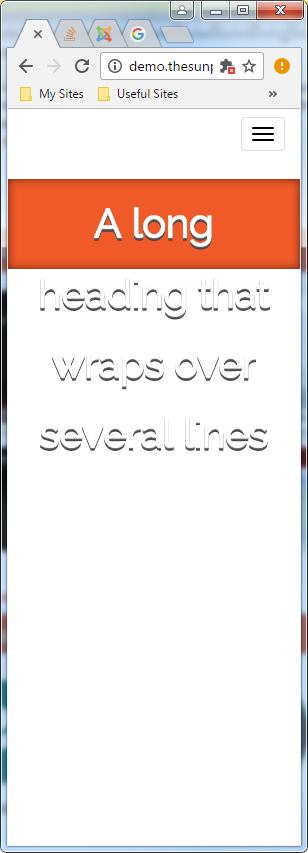
I want this to happen:

The code of this is the addedn overflow:hidden;height:1%;:
copyraw
<div id="page-title" class="col-xs-12" style="overflow:hidden;height:1%;">
	<h1><a href="/">A long heading that wraps over several lines</a></h1>
</div>
- <div id="page-title" class="col-xs-12" style="overflow:hidden;height:1%;">
- <h1><a href="/">A long heading that wraps over several lines</a></h1>
- </div>
Source(s):
Category: Cascading Stylesheets :: Article: 646











Add comment