

Add Image Mouseover effect in AutoHotkey GUI
- Category: AutoHotkey
- Hits: 252867
Couldn't find this anywhere on the net and kinda needed it so am making a note of how to do it here.
The issue is that I wanted to make my autohotkey program change the image that the mouse hovers over (within it's own GUI). No third-party component or dll needed, just a slight modification to the mousemove tooltip in the autohotkey manual.
Uninstalling AEC Central and installing Community Builder
- Category: Joomla
- Hits: 27811
The reason I did this is because AEC is now a commercial package and it is somewhat limited in terms of good customer service. It only really manages the payment side and the complicated tasks of invoicing, but Community Builder provides more options for your website members. If Joomlapolis ever complete the CB Subscription component then there is no need for AEC anymore.
For this we're basically going to follow the AEC installation instructions backwards.
1. Go to your admin panel (back-end)
2. Extensions > Plugin Manager
3. Go to the bottom and change the display # dropdown to ALL
4. Disable Authentication - AEC Access
5. Enable Authentication - Joomla
6. Re-enable any other authentication plugin you used to use.
7. Disable System - AEC Routing
8. Disable System - AEC ErrorHandling
9. Extensions > Install/Uninstall > Plugins
10. Tick Authentication - AEC Access
11. Tick System - AEC ErrorHandling
12. Tick System - AEC Routing
13. Tick User - AEC User
14. Click the Uninstall icon at the top of the page
15. Click on the Modules link (to uninstall modules)
16. Tick mod_acctexp (if you installed this) and Uninstall.
17. Click on the Components link (to uninstall components)
18. Select AcctExp and click on the Uninstall icon.
Now install Community Builder
1. Download the latest version from Joomlapolis.com
2. Unzip to a folder
3. Login to your admin panel
4. Go to Extensions > Install/Uninstall
5. Install com_comprofiler.zip (remember to wait till it confirms it says "Installation finished")
6. Go back to Extensions > Install/Uninstall
7. Install mod_cblogin.zip
8. Install mod_comprofilerModerator.zip
9. Install mod_comprofilerOnline.zip
10. Go to Components > Community Builder
11. Click on the Tools link and click on Synchronize Users
12. Go to Extensions > Module Manager
13. Tick next to CB Login, CB Workflows, CB Online and click Enable
14. Return to Components > Community Builder > Configuration
15. Click on the 'Registration' tab
16. Change Allow User Registration to Yes, ...
17. Make your custom configuration and Save the configuration file.
18. Go to Site > Global Configuration > System
19. Select No next to Allow User Registration and click Save
After installing rokstories, get invalid argument 106
- Category: Joomla
- Hits: 20199
After I installed the rokstories module from www.rockettheme.com, if I clicked on one of the articles (rokstory), I would get a page with the article on it but with the following error (3x) above it:
Warning: Invalid argument supplied for foreach() in /home/.../components/com_content/helpers/route.php on line 106
After googling I found an unlikely solution which is becoming typical of Joomla. I hadn't switched the site to SEF friendly yet but I did this just to follow along with the solution. You need to make a menuitem to just one of the articles. I have a menu called "unused menuitems" (named unusedmenu), which isn't displayed anywhere on my site. I'm guessing the reference in the database is what corrects this.
Change default order of weblinks
- Category: Joomla
- Hits: 47820
It took a few google searches until I could find out how to change the default weblinks order. A lot of websites showed how to do this via the admin back-end panel in the advanced configuration... I can't see this panel, there is no advanced parameters under a weblinks category.
The issue is that suppose a menuitem links to a category of weblinks, the default sort order (as in the first time you view the page) is the order in the admin panel (not even by most recent). I'm going to show you how to do this by title in ascending order without installing any 3rd-party extension as well as by any of the database values used by each link.
Add default to a picture button
- Category: AutoHotkey
- Hits: 19024
Well there's a lot of autohotkey sites saying that you can apply a transparency and then capture special mouse events to emulate the mouseover and mouseout effects of a button with an image as a background. I couldn't get any of these working and they looked more confusing then anything else.
My solution is to set up the default button and the image to respond to the ENTER key after you typed something (this is for a search feature) in addition to having a button if the user would rather click then press the ENTER key. Then create the mouseover and mouseout effects afterwards.
Community Builder in Joomla Vulnerability
- Category: Joomla
- Hits: 36069
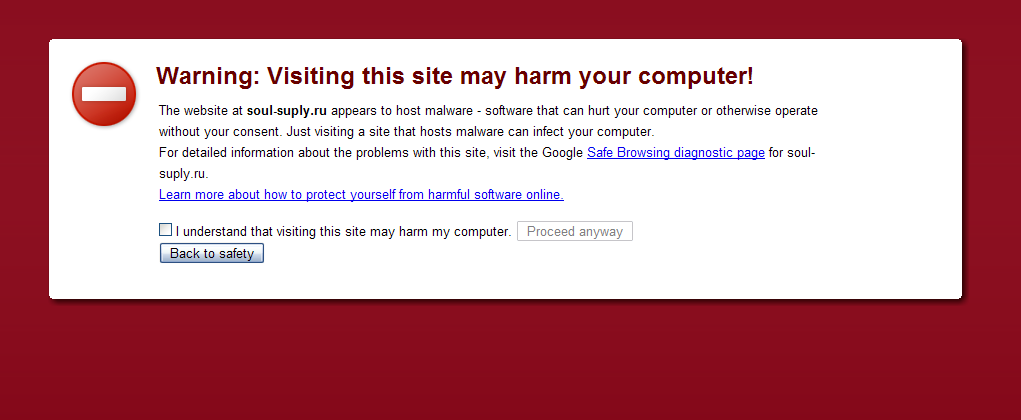
Malware Detected!
Warning: Visiting this site may harm your computer!
The website at .....ru appears to host malware - software that can hurt your computer or otherwise operate without your consent. Just viisting a site that hosts malware can infect your computer.
For detailed information about the problems with this site, visit the Google Safe Browsing diagnostic page for this address
I understand that visiting this site may harm my computer.
Continue?
On Gui Resize Event
- Category: AutoHotkey
- Hits: 17153
Thought I'd put this down as it took me ages to search the Internet for this solution. In the end, I found it hidden away in the Autohotkey help file and not under the gui events...
The issue here is if you want to do something when a user resizes your program.
If you search and search, you'll find that GuiClose responds to when you close the app, and GuiSize will run when you resize the app.
Clicking on a weblink returns a 404 error
- Category: Joomla
- Hits: 12923
If you are in the administration panel and you are editing your weblinks and you come across this error:

"404 - An error has occurred.
Joomla! was unable to locate the stated resource."
Page 69 of 74
Latest Articles





Accreditation



Donate & Support

 bc1qf6elrdxc968h0k673l2djc9wrpazhqtxw8qqp4
 0xb038962F3809b425D661EF5D22294Cf45E02FebF