
What?
A quick way to stop non-admin users changing the owner of existing tasks in Zoho CRM, while administrators retain that ability. The setting is the Change Owner permission for the Tasks module in the users’ profile.
Why?
Our service team needs to work on tasks, but task reassignment should be controlled by administrators. Removing general task edit access would be too broad; this permission targets ownership changes.
How?
- Open Setup → Security Control → Profiles and select the custom profile assigned to your non-admin users. If they still use Zoho’s built-in Standard profile, clone it and assign them to the new profile first; Tools permissions cannot be changed on Standard.
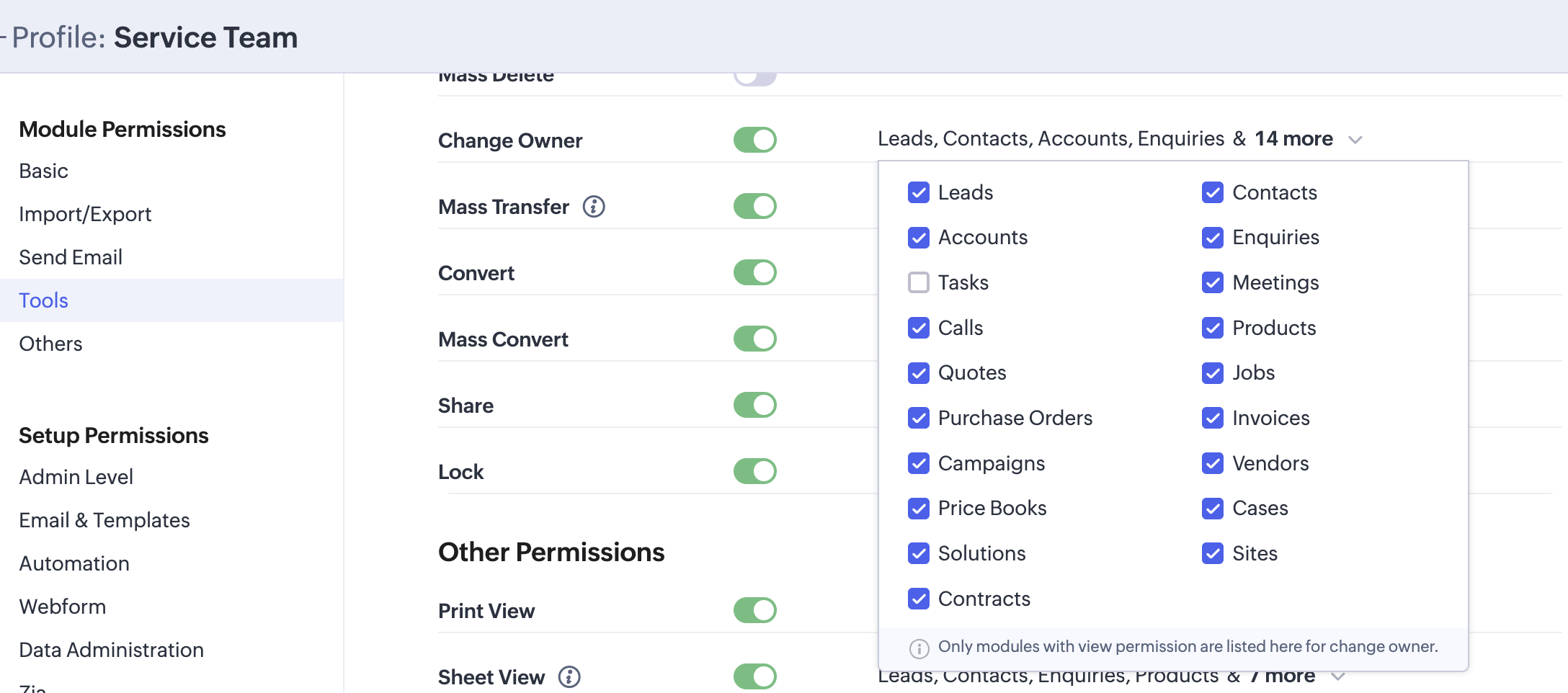
- Under Module Permissions → Tools, find Change Owner and open its module list.
- Untick Tasks. Leave the main Change Owner switch on if users still need this permission for other modules. Zoho saves profile permission changes automatically.
- Check the result with a user on that profile and an administrator: the former should no longer be able to change an existing task’s owner, while the administrator can.
Discussion
Comments
Questions, corrections and useful additions are reviewed before appearing here.
Discussion Newest first
No comments yet. Start the discussion.